
Instant Pot IP-DUO60-220
Instant Pot Duo Smart Cooker 7-in-1, 5.7 Litre Instruction Manual
Model: IP-DUO60-220
Introduction
Welcome to the Instant Pot Duo Smart Cooker user manual. This appliance combines 7 kitchen functions into one: pressure cooker, slow cooker, rice cooker, sauté pan, yogurt maker, steamer, and food warmer. Designed for convenience and efficiency, it helps prepare meals up to 70% faster than traditional cooking methods. Please read this manual thoroughly before first use to ensure safe operation and optimal performance.
Important Safety Information
Always follow basic safety precautions when using electrical appliances.
- Read all instructions before operating the appliance.
- Do not touch hot surfaces. Use handles or knobs.
- To protect against electrical shock, do not immerse cord, plugs, or the appliance base in water or other liquid.
- Close supervision is necessary when any appliance is used by or near children.
- Unplug from outlet when not in use and before cleaning. Allow to cool before putting on or taking off parts.
- Do not operate any appliance with a damaged cord or plug, or after the appliance malfunctions or has been damaged in any manner.
- Do not use outdoors.
- Do not place on or near a hot gas or electric burner, or in a heated oven.
- Extreme caution must be used when moving an appliance containing hot oil or other hot liquids.
- Always attach plug to appliance first, then plug cord into the wall outlet. To disconnect, turn any control to "off", then remove plug from wall outlet.
- Do not use appliance for other than intended use.
- This appliance cooks under pressure. Improper use may result in scalding injury. Ensure unit is properly closed before operating.
- Never force open the lid. Ensure internal pressure is completely released before opening.
- Do not fill the inner pot above the MAX line.
- Do not use this appliance for deep frying with oil.
- Ensure the steam release handle is in the correct position for pressure cooking.
Product Overview and Components
The Instant Pot Duo Smart Cooker consists of several key components designed for safe and efficient cooking.
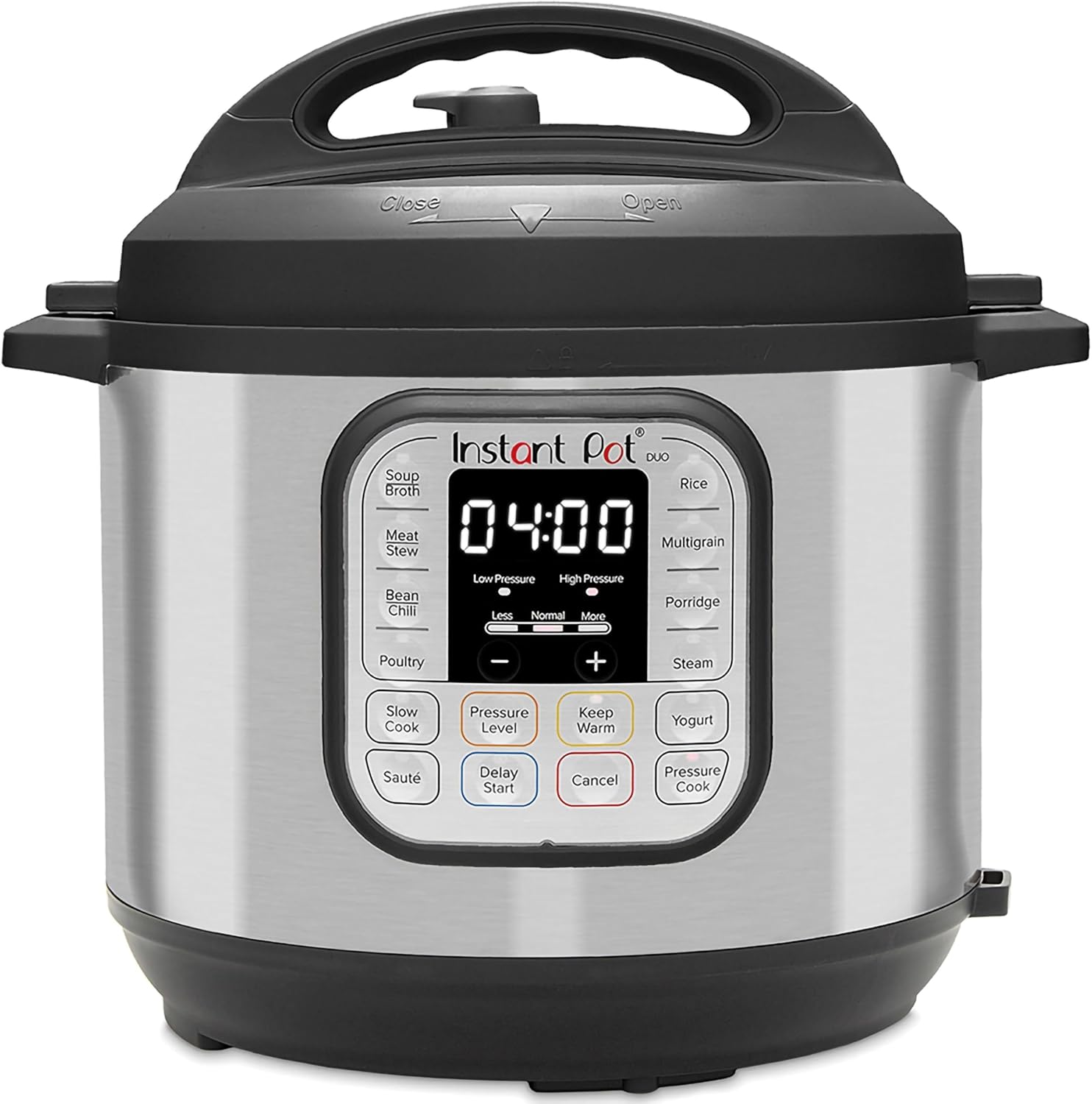
Image 1: Front view of the Instant Pot Duo Smart Cooker, showcasing its stainless steel exterior and control panel.
- Main Cooker Base: The exterior housing containing the heating element and control panel.
- Inner Pot: A removable stainless steel cooking pot where food is placed.
- Lid: Features a steam release handle, float valve, and anti-block shield.
- Sealing Ring: A silicone ring located inside the lid, essential for pressure cooking.
- Condensation Collector: A small cup attached to the back of the cooker to collect condensation.
- Steam Rack: Used for steaming food or elevating items above liquid.
- Power Cord: Detachable power cord.

Image 2: The Instant Pot Duo with its lid open, revealing the stainless steel inner pot and the lid's internal components.
Setup and First Use
Unpacking and Initial Cleaning
- Remove all packaging materials from and around the appliance.
- Wash the inner pot, lid, and sealing ring with warm soapy water. Rinse thoroughly and dry completely.
- Wipe the exterior of the cooker base with a damp cloth. Never immerse the cooker base in water.
- Ensure the condensation collector is properly installed at the back of the cooker.
Water Test (Initial Run)
Performing a water test helps you familiarize yourself with the Instant Pot's operation and ensures it is working correctly.
- Place the inner pot into the cooker base.
- Add 3 cups (750ml) of water to the inner pot.
- Place the lid on the cooker, aligning the ▼ mark on the lid with the ▲ mark on the cooker base. Rotate the lid clockwise until the ▼ mark on the lid aligns with the ▼ mark on the cooker base.
- Ensure the steam release handle is set to the Sealing position.
- Plug in the power cord. The display will show "OFF".
- Press the Pressure Cook button (or Manual).
- Use the + or - buttons to set the cooking time to 5 minutes.
- The cooker will display "On" and begin preheating. Once pressure is reached, the float valve will rise, and the timer will begin counting down.
- When cooking is complete, the cooker will beep and switch to "Keep Warm" mode.
- Carefully turn the steam release handle to the Venting position to quick release the pressure. Once the float valve drops, it is safe to open the lid.
- Unplug the cooker and discard the water.
Operating Instructions
Control Panel Overview

Image 3: Close-up of the Instant Pot Duo's control panel, showing various smart program buttons and the digital display.
The control panel features a central display and various smart program buttons for different cooking functions.
- Display: Shows cooking time, status, and error codes.
- Smart Program Buttons: Dedicated buttons for Soup/Broth, Meat/Stew, Bean/Chili, Poultry, Sauté, Rice, Multigrain, Porridge, Steam, Slow Cook, Keep Warm, Yogurt, and Pressure Cook.
- Adjust: Modifies cooking time or pressure level for certain programs.
- Pressure Level: Toggles between High and Low pressure.
- Delay Start: Sets a delayed start time for cooking.
- Cancel: Stops any active program and returns to standby mode.
- +/- Buttons: Adjust cooking time or delay start time.
Basic Cooking Steps (Pressure Cooking)
- Prepare Ingredients: Place food and liquid into the inner pot. Ensure the total volume does not exceed the MAX fill line.
- Secure the Lid: Place the lid on the cooker and rotate it clockwise until it locks.
- Set Steam Release: Ensure the steam release handle is in the Sealing position.
- Select Program: Press the desired Smart Program button (e.g., Meat/Stew).
- Adjust Time/Pressure (Optional): Use the + or - buttons to adjust the cooking time. Press Pressure Level to toggle between High and Low pressure if available for the program.
- Start Cooking: The cooker will automatically begin preheating after a few seconds. The display will show "On".
- Pressure Building: The float valve will rise when full pressure is reached. The timer will then begin counting down.
- Cooking Complete: Once the timer reaches zero, the cooker will beep and automatically switch to Keep Warm mode (display shows "L0:00" and counts up).
- Release Pressure:
- Natural Release (NPR): Allow the pressure to dissipate naturally. The float valve will drop on its own. This is recommended for foamy foods or large cuts of meat.
- Quick Release (QPR): Carefully turn the steam release handle to the Venting position. Steam will rapidly escape. Keep hands and face away from the steam. Only open the lid once the float valve has dropped completely.
- Open Lid: Rotate the lid counter-clockwise and lift it off.
Other Functions
- Sauté: Press Sauté, then Adjust to cycle through Less, Normal, or More heat settings. Use without the lid.
- Slow Cook: Place ingredients in the inner pot, secure the lid (steam release handle can be in Venting or Sealing position). Press Slow Cook, then Adjust to cycle through Less, Normal, or More heat settings. Use + or - to set time.
- Yogurt: Follow specific recipes for yogurt making. This function has multiple stages (boil, cool, ferment).
- Steam: Add water to the inner pot, place food on the steam rack. Secure lid, set steam release to Sealing. Press Steam and adjust time.
- Keep Warm: Automatically activates after most cooking programs. Can also be selected manually.

Image 4: The Instant Pot Duo positioned on a kitchen counter, surrounded by various dishes, illustrating its versatility in meal preparation.
Care and Maintenance
Cleaning
- Inner Pot: The stainless steel inner pot is dishwasher safe. For stubborn food residue, soak with warm soapy water before scrubbing.
- Lid: Hand wash the lid with warm soapy water. Remove the sealing ring and anti-block shield for thorough cleaning. Ensure all components are dry before reassembling.
- Sealing Ring: Wash with warm soapy water. It is normal for the sealing ring to absorb odors from food; soaking in vinegar or baking soda solution can help. Replace the sealing ring every 12-18 months, or sooner if it shows signs of damage or stretching.
- Cooker Base: Wipe the exterior with a damp cloth. Never immerse the cooker base in water.
- Condensation Collector: Remove and empty after each use. Wash with warm soapy water and dry.
Storage
Store the Instant Pot in a dry place. For best results, place the lid upside down on the cooker base to allow air circulation and prevent odors from being trapped in the sealing ring.
Troubleshooting
| Problem | Possible Cause | Solution |
|---|---|---|
| Steam Leaks from Lid | Sealing ring improperly installed or damaged; food debris on sealing ring; steam release handle in Venting position. | Check and properly install sealing ring; clean sealing ring and lid rim; ensure steam release handle is in Sealing position. |
| Float Valve Does Not Rise | Insufficient liquid; steam release handle in Venting position; sealing ring not properly installed. | Add more liquid; ensure steam release handle is in Sealing position; check and properly install sealing ring. |
| Lid Cannot Be Opened After Cooking | Pressure still inside the cooker. | Ensure float valve has dropped completely. If not, release remaining pressure using Quick Release method. |
| Food Not Cooked Properly | Incorrect cooking time/pressure; insufficient liquid; power interruption. | Adjust cooking time/pressure; ensure minimum liquid requirements are met; check power connection. |
| Burn Message on Display | Food stuck to the bottom of the inner pot; insufficient liquid. | Cancel program, allow to cool, remove inner pot, check for stuck food and add more liquid if necessary. |
Specifications
- Model: IP-DUO60-220
- Capacity: 5.7 Litres (6 Quarts)
- Power: 1000 Watts
- Voltage: 220-240V ~ 50/60Hz
- Material: Stainless Steel (Inner Pot), Brushed Stainless Steel (Exterior)
- Dimensions: Approximately 32P x 33L x 31H cm
- Weight: Approximately 5 kg (11.02 lbs)
- Functions: Pressure Cooker, Slow Cooker, Rice Cooker, Sauté, Yogurt Maker, Steamer, Food Warmer
- Safety Features: 10 proven safety mechanisms
Warranty and Support
For warranty information, please refer to the warranty card included with your product or visit the official Instant Pot website. If you encounter any issues not covered in this manual or require further assistance, please contact Instant Pot customer support. You can often find support contact details on the manufacturer's website or through your retailer.
Online Resources: For additional recipes, tips, and community support, visit the official Instant Pot website or join online communities.
Related documentsIP-DUO60-220


Ask a question about this manual
Ask about setup, troubleshooting, compatibility, parts, safety, or missing instructions. Manuals+ will review the question and use this page’s manual context to help answer it.