
Introduction
The TFA-Dostmann Big Digit Talking Watch 60.7003.54 is a digital talking watch designed for individuals with visual impairments. It features a clear digital display and voice announcements for time, date, and settings, making it easy to use and configure. This manual provides detailed instructions for setting up, operating, and maintaining your watch.
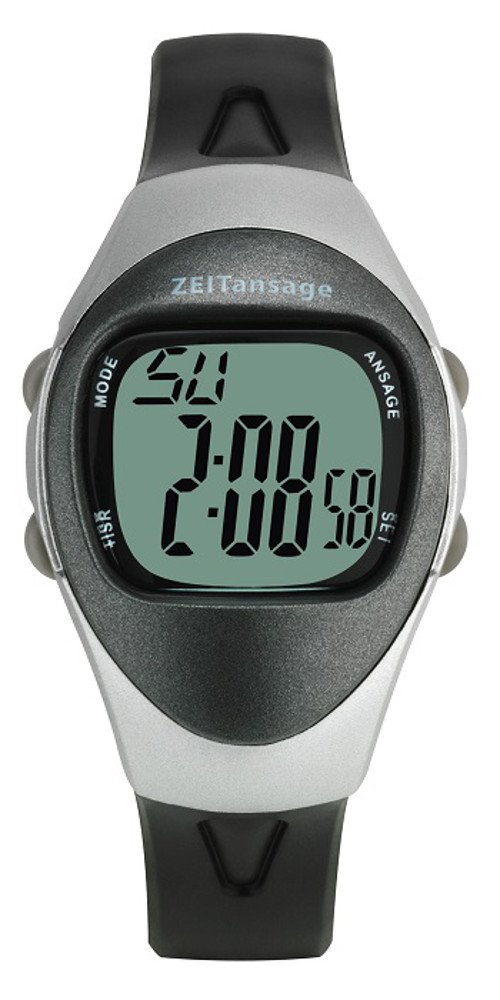
Image: TFA-Dostmann Big Digit Talking Watch 60.7003.54. This image shows the watch face with a large digital time display and a black wrist strap.
Setup
The setting process for the TFA-Dostmann Talking Watch is simplified by its voice announcement feature. Follow these general steps:
- Initial Power-On: Upon inserting the battery (or first use), the watch may prompt you to set the time and date.
- Accessing Settings: Locate the designated setting button(s) on the watch. Pressing and holding this button typically activates the setting mode.
- Voice Guidance: The watch will verbally guide you through each setting option (e.g., "Set hour," "Set minute," "Set year," "Set month," "Set day").
- Adjusting Values: Use the adjustment buttons (often marked for increasing or decreasing values) to set the correct time and date. The watch will announce the current value as you adjust it.
- Confirming Settings: After setting each parameter, press the setting button again to confirm and move to the next setting, or to exit the setting mode.
Refer to the specific button functions detailed in the included quick start guide for precise button identification and sequence.
Operating Instructions
The watch offers several functions for daily use:
- Time Announcement: Press the designated button (usually a large, easily accessible button) to hear the current time announced verbally.
- Date and Day of the Week: A separate button press or a sequence of presses may announce the current date and day of the week.
- Alarm Function: The watch supports setting up to four alarms.
- Setting Alarms: Access the alarm setting mode via the setting button. The watch will guide you verbally to set the hour and minute for each alarm.
- Alarm Purpose: These alarms can serve as reminders, for example, for medication intake.
- Activating/Deactivating Alarms: Ensure alarms are activated after setting them, usually indicated by a voice prompt or a symbol on the display.
- Stopwatch Function: The watch includes a stopwatch feature.
- Starting/Stopping: Use the designated stopwatch button to start and stop the timer.
- Resetting: A separate action or button press will reset the stopwatch.
All voice announcements are in German. Familiarize yourself with the button layout for optimal use.
Maintenance
Proper maintenance ensures the longevity of your talking watch.
- Battery Replacement: The watch uses 1 x CR 2016 battery (included). When the display dims or voice announcements become unclear, it's time to replace the battery.
- Battery Life:
- Approximately 12 months in pure clock mode (without voice function use).
- Approximately 86 days with additional voice function use (calculated at 10 times per day).
- Procedure: Carefully open the battery compartment on the back of the watch using a small screwdriver. Replace the old battery with a new CR 2016 battery, ensuring correct polarity. Close the compartment securely.
- Battery Life:
- Cleaning: Wipe the watch with a soft, dry cloth. Avoid using harsh chemicals or abrasive materials. The watch is not waterproof; avoid submersion.
- Strap Care: The watch features a 16 mm wide strap. Inspect the strap periodically for wear and tear.
Troubleshooting
If you encounter issues with your watch, consider the following:
- No Display/No Voice: Check the battery. A depleted battery is the most common cause. Replace the CR 2016 battery if necessary.
- Incorrect Time/Date: Re-enter the setting mode and follow the voice prompts to reset the time and date. Ensure you confirm each setting.
- Alarms Not Sounding: Verify that the alarms are correctly set and activated. Check the volume setting if applicable (though not explicitly mentioned, it's a common watch feature).
- Voice Unclear/Too Quiet: This often indicates a low battery. Replace the battery.
If problems persist after attempting these solutions, contact customer support.
Specifications
| Model | 60.7003.54 |
| Dimensions (L x W x H) | 10 x 5 x 8 cm (Product Package); Ø 37 x 15 mm (Watch) |
| Weight | Approximately 31 g (Watch); 60 grams (Product Package) |
| Battery Type | 1 x CR 2016 (included) |
| Strap Width | 16 mm |
| Voice Language | German |
| ASIN | B00OFU6YW4 |
Warranty and Support
For warranty information and customer support, please refer to the documentation provided with your purchase or contact the retailer where the product was acquired. Keep your proof of purchase for any warranty claims.
Manufacturer: TFA-Dostmann


