
ADC 6021N
Advantage 6021N Series Blood Pressure Monitor User Manual
Model: 6021N
1. Introduction
The ADC Advantage 6021N Series Home Automatic Digital Blood Pressure Monitor is designed for accurate and convenient blood pressure measurement at home. It measures systolic pressure, diastolic pressure, and pulse, utilizing Smart Logic Technology for optimal inflation. The monitor also features an Irregular Heartbeat Detector and memory storage for up to 99 readings for two users with date/time stamps.
What's in the Box:
- Advantage 6021N Blood Pressure Monitor Unit
- Wide-Range Adult D-Bar Cuff (8.7 inches to 16.5 inches / 22 cm to 42 cm)
- 4 AA Alkaline batteries
- Deluxe Storage Case
- Instruction Manual

Image: The ADC Advantage 6021N Blood Pressure Monitor unit shown alongside its wide-range arm cuff.
2. Safety Information
Please read all instructions carefully before using this device. Keep this manual for future reference. Consult your physician for interpretation of blood pressure measurements. Self-diagnosis and treatment based on measurements can be dangerous. This device is intended for adult use only. Keep out of reach of children. Do not use this device on infants or individuals who cannot express their consent. If you have any medical conditions, consult your doctor before use.
Proposition 65 Warning: This product may contain chemicals known to the State of California to cause cancer and birth defects or other reproductive harm.
3. Setup
3.1. Battery Installation
- Open the battery compartment cover located on the back of the monitor.
- Insert four (4) AA alkaline batteries, ensuring the correct polarity (+/-) as indicated inside the compartment.
- Close the battery compartment cover securely.
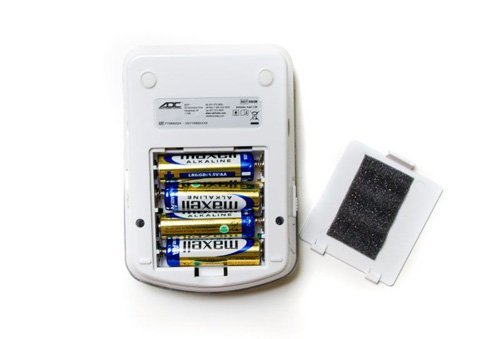
Image: The rear view of the blood pressure monitor with the battery compartment open, showing the placement of four AA batteries.
3.2. Cuff Connection
- Locate the air tube connector on the cuff.
- Firmly insert the air tube connector into the air jack located on the side of the main monitor unit. Ensure a snug fit to prevent air leakage during measurement.
4. Operating Instructions
4.1. Applying the Cuff
- Sit in a comfortable position with your back supported and feet flat on the floor.
- Place the cuff on your bare upper arm, approximately 1-2 cm above the elbow joint. The air tube should run down the inside of your arm.
- Ensure the cuff is snug but not too tight. You should be able to insert two fingers between the cuff and your arm.
- Rest your arm on a table or flat surface so that the cuff is at heart level.

Image: A blood pressure cuff correctly positioned on an upper arm, ready for a measurement.
4.2. Taking a Measurement
- Press the 'START/STOP' button to begin the measurement.
- The cuff will automatically inflate using Smart Logic Technology to determine the ideal inflation level. Remain still and silent during inflation and deflation.
- Once the measurement is complete, the monitor will display your systolic pressure, diastolic pressure, and pulse rate.
- The monitor will automatically deflate and turn off after a period of inactivity.
4.3. Irregular Heartbeat Detector
This monitor is equipped with an Irregular Heartbeat Detector. If an irregular heartbeat is detected during the measurement, a specific symbol will appear on the display. If this symbol appears frequently, consult your physician.
4.4. Memory Recall
The unit can recall the last 99 readings for two different users with a convenient date/time stamp. To access stored readings, press the 'M' (Memory) button. Press 'M' repeatedly to scroll through previous measurements. To switch between User 1 and User 2 memory, use the designated user selection button (refer to the monitor's specific button layout).
5. Maintenance and Care
5.1. Cleaning
Wipe the monitor and cuff with a soft, dry cloth. If necessary, use a slightly damp cloth with mild soap, then wipe dry. Do not use abrasive cleaners or immerse the unit or cuff in water.
5.2. Storage
Store the device in its deluxe storage case in a cool, dry place, away from direct sunlight, extreme temperatures, and humidity. Remove batteries if the unit will not be used for an extended period.
5.3. Cuff Inspection
Periodically inspect the cuff for any signs of wear or damage. The cuff is a consumable item and may require replacement over time to ensure accurate readings. Incorrect cuff size can result in measurement errors; please choose carefully.
6. Troubleshooting
- Error Message / Inaccurate Readings: Ensure the cuff is correctly applied and the air tube is securely connected. Verify that the cuff size is appropriate for your arm circumference. Remain still and silent during measurement. Check battery levels.
- No Power: Check if batteries are inserted correctly and are not depleted. Replace with new batteries if necessary.
- Cuff Not Inflating: Ensure the air tube is not kinked or blocked. Check for any leaks in the cuff or connections.
- Irregular Heartbeat Symbol Appears Frequently: This indicates consistent detection of an irregular heartbeat. Consult your physician for advice.
7. Specifications
| Feature | Detail |
|---|---|
| Model Number | 6021N |
| Product Dimensions | 4.92 x 7.17 x 3.54 inches |
| Item Weight | 1.07 Pounds |
| Cuff Size (Band Size) | 8.7-16.5 inches (22 cm to 42 cm) |
| Power Source | 4 AA Alkaline batteries (included) |
| Display Type | Digital |
| Memory | 99 readings for two users with date/time stamp |
| Special Features | Smart Logic Technology, Irregular Heartbeat Detector, Automatic Inflation/Deflation |
| Compliance | Meets or exceeds EN 1060-1 and EN 1060-3 |
| Material Feature | Made without natural rubber latex or phthalates |
Cuff Sizing Chart: 6021N and 6022N

Image: A chart detailing the applicable limb range in centimeters and inches for Small Adult, Adult, and Large Adult cuffs for models 6021N and 6022N. Note: Incorrect cuff size can result in measurement errors. Please choose carefully.
8. Warranty and Support
8.1. Warranty Information
The ADC Advantage 6021N Series Blood Pressure Monitor is backed by a five-year warranty, ensuring quality and reliability.
8.2. Manufacturer Contact Information
For support or inquiries, please contact the manufacturer at: 1-800-232-2670.
Related documents6021N


Ask a question about this manual
Ask about setup, troubleshooting, compatibility, parts, safety, or missing instructions. Manuals+ will review the question and use this page’s manual context to help answer it.