
Introduction
The Shure P3RA is a premium wireless stereo bodypack receiver designed for use with the PSM300 Personal Monitor System. It provides professional personal monitoring with detailed 24-bit digital audio and reliable wireless performance, suitable for various stage environments. This manual provides essential information for the setup, operation, maintenance, and troubleshooting of your P3RA bodypack receiver.
Product Overview

Figure 1: Front view of the P3RA receiver, displaying the LCD screen with channel and signal strength indicators. The antenna is visible at the top left, and the volume knob is at the top right.

Figure 2: Rear view of the P3RA receiver with the battery compartment open, revealing two AA batteries. Control buttons for 'exit', 'enter', 'sync', and 'scan' are visible above the battery compartment.

Figure 3: Side profile of the P3RA receiver, showing its compact design and the durable metal belt clip for secure attachment.

Figure 4: Top view of the P3RA receiver, featuring the 3.5mm headphone output jack, the main volume control knob, and LED indicators for battery status and wireless signal.
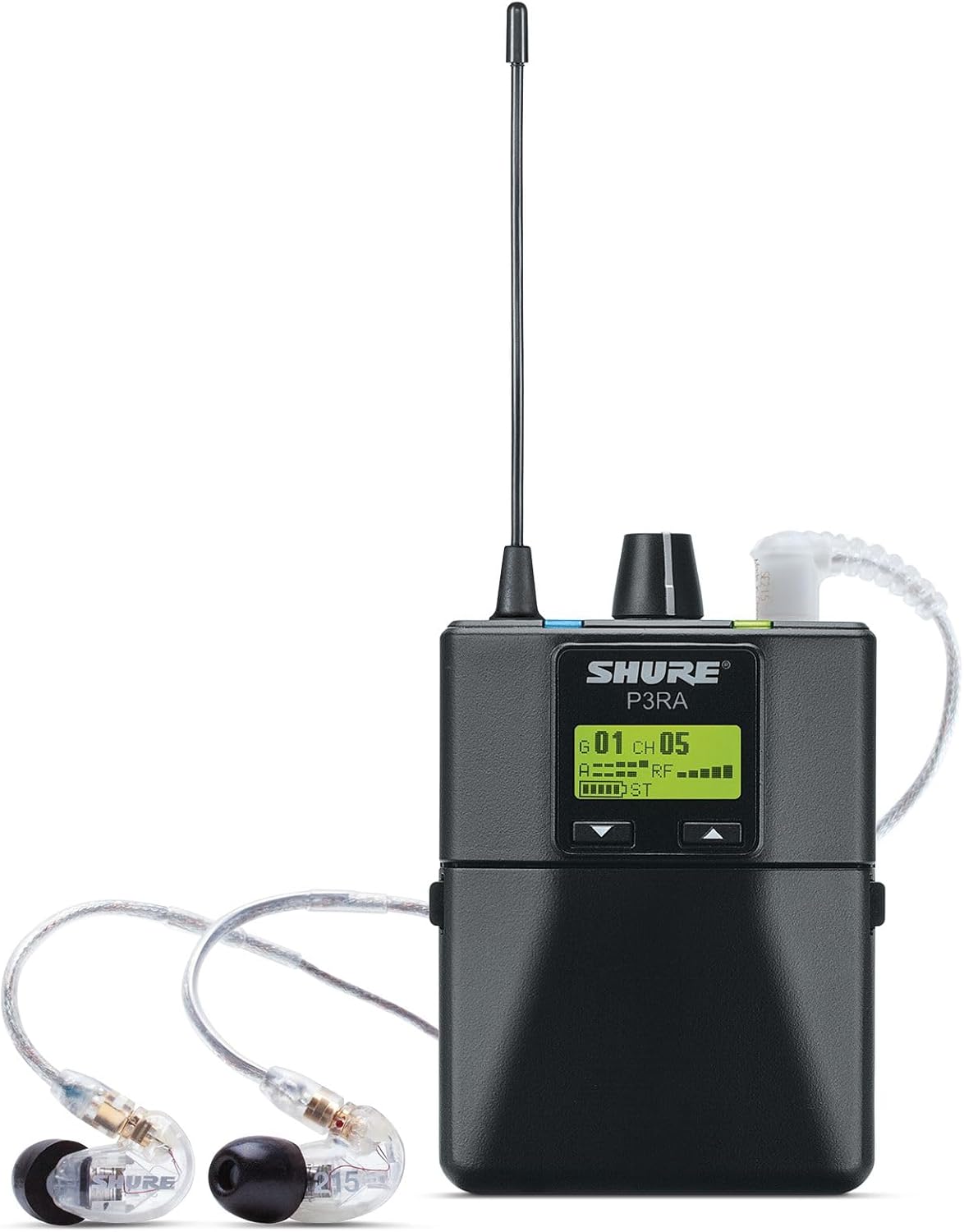
Figure 5: The P3RA receiver connected to a pair of in-ear monitors, demonstrating a typical usage scenario for personal monitoring.
Setup
1. Battery Installation
The P3RA operates on two standard AA batteries, providing up to 6 hours of continuous use. For extended runtime and in-unit charging, the optional Shure SB900 lithium-ion rechargeable battery (sold separately) can be used.
- Open the battery compartment cover on the rear of the P3RA unit (refer to Figure 2).
- Insert two AA batteries, ensuring correct polarity (+/-) as indicated inside the compartment.
- Close the battery compartment cover securely.
2. Connecting In-Ear Monitors
Connect your in-ear monitors (IEMs) or headphones to the 3.5mm (1/8-inch) headphone output jack located on the top of the P3RA unit (refer to Figure 4).
3. Powering On
To power on the P3RA, rotate the volume knob clockwise until the display illuminates. To power off, rotate the volume knob counter-clockwise until the display turns off.
Operating Instructions
1. Scanning for Frequencies
The P3RA features a scan function to automatically find the clearest available frequency within its wide tuning bandwidth (G20 Band: 488-512 MHz).
- Press the Scan button (located below the display, refer to Figure 2).
- The receiver will scan for an open frequency and display it.
- Press Enter to confirm and set the frequency.
2. Syncing with Transmitter
To synchronize the P3RA with your PSM300 transmitter:
- Ensure both the P3RA and the PSM300 transmitter are powered on.
- Align the IR windows of the P3RA and the transmitter.
- Press the Sync button on the P3RA (refer to Figure 2). The units will exchange frequency information.
3. Adjusting Volume and Mix Mode
The P3RA allows for personalized audio mixes:
- Volume Control: Use the large rotary knob on the top of the unit to adjust the overall headphone volume (refer to Figure 4).
- MixMode Technology: This feature allows you to create a personal mix from two channels of audio. Access this through the LCD menu.
- Stereo Mode: Alternatively, operate in standard stereo mode for a traditional left/right audio experience.
4. EQ and Volume Limiting
Further customize your sound via the high-contrast LCD menu:
- Equalization (EQ): Adjust audio frequencies to suit your preference or the acoustic environment.
- Volume Limiting: Set a maximum volume level to protect your hearing.
Maintenance
- Cleaning: Use a soft, dry cloth to clean the exterior of the unit. Avoid using harsh chemicals or abrasive materials.
- Battery Care: Remove AA batteries if the unit will not be used for an extended period to prevent leakage. If using the SB900 rechargeable battery, follow its specific charging and storage guidelines.
- Storage: Store the P3RA in a cool, dry place away from direct sunlight and extreme temperatures. The included zipper bag can be used for protection during transport and storage.
- Physical Protection: The P3RA features a compact and rugged aluminum body. While durable, avoid dropping the unit or subjecting it to severe impacts.
Troubleshooting
| Problem | Possible Cause | Solution |
|---|---|---|
| No audio from receiver |
|
|
| Intermittent audio or static |
|
|
| Receiver won't turn back on immediately after turning off |
|
|
Specifications
| Feature | Detail |
|---|---|
| Model Number | P3RA=-G20 |
| Frequency Band | G20 Band (488-512 MHz) |
| Audio Quality | 24-bit digital audio |
| Power Source | 2 AA batteries (included) or optional Shure SB900 rechargeable battery (sold separately) |
| Battery Life (AA) | Up to 6 hours continuous use |
| Housing Material | Aluminum |
| Color | Black |
| Item Weight | 6.7 ounces |
| Product Dimensions | 11 x 5.3 x 3.3 inches |
| Display | High contrast LCD |
Warranty and Support
For detailed warranty information, please refer to the official Shure Warranty document. A digital copy of the user manual and warranty can be found via the links below:
For technical support, product inquiries, or service, please visit the official Shure website or contact their customer service department. Always provide your product model number (P3RA=-G20) and serial number when seeking support.


