
Important Safety Information
Before using the Fitness Reality 690XL Inversion Table, please read and understand all instructions and warnings. Failure to follow these instructions may result in serious injury or property damage. Consult your physician before beginning any new exercise program, especially if you have pre-existing medical conditions.
- Ensure all parts are correctly assembled and secured before each use.
- Do not use if you have high blood pressure, heart conditions, glaucoma, retinal detachment, or are pregnant.
- Always ensure the ankle holders are securely fastened.
- Do not exceed the maximum weight capacity of 300 lbs.
- Adjust the height setting accurately for your body to ensure proper balance and control during inversion.
- Use the tether strap to control the maximum inversion angle, especially when first starting.
- Keep children and pets away from the inversion table during use.
Product Overview and Features
The Fitness Reality 690XL Inversion Table is designed to provide a comfortable and secure inversion experience. It features a robust steel frame and user-friendly adjustments.
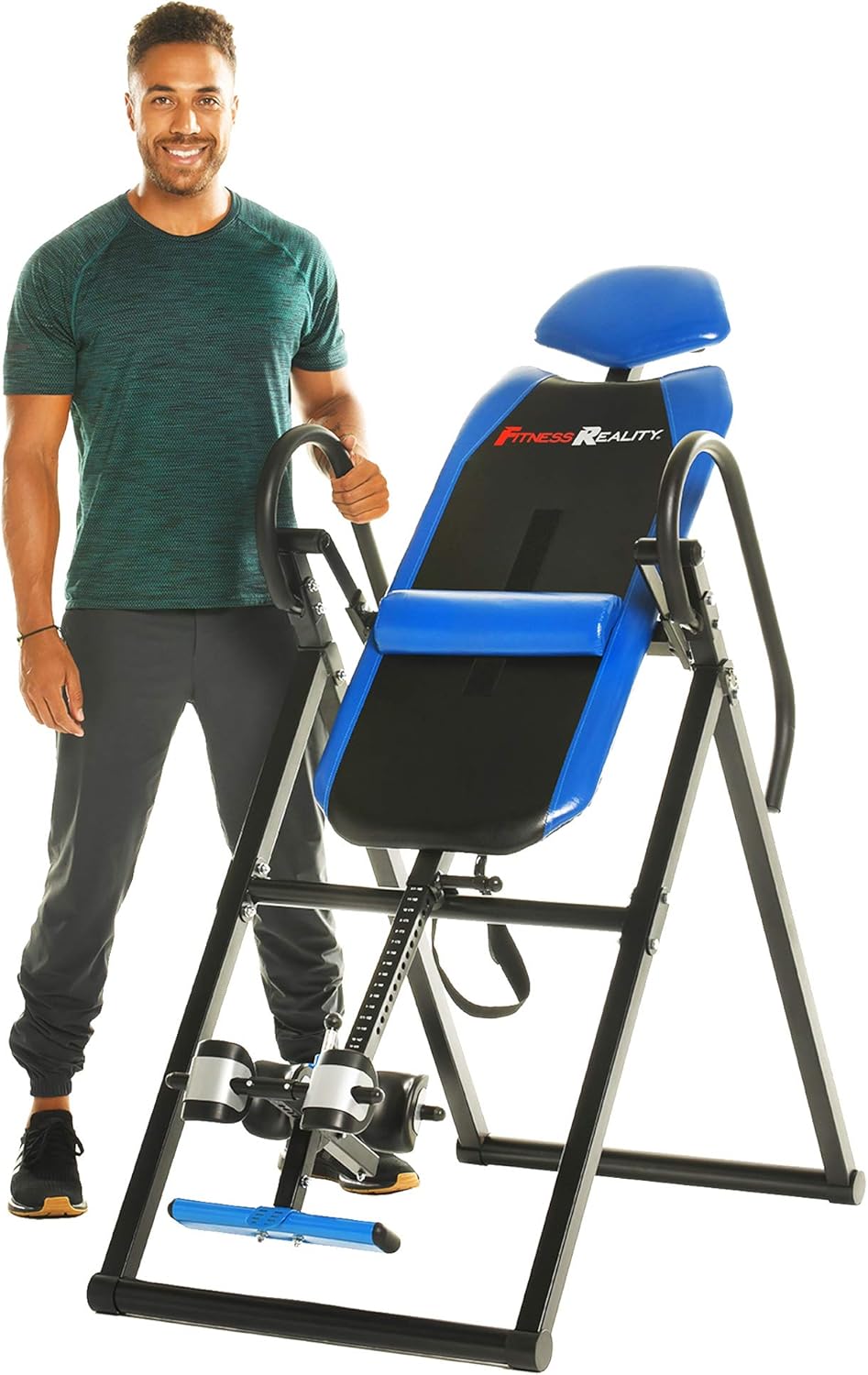
The Fitness Reality 690XL Inversion Table, designed for stability and comfort.
- Heavy-Duty Steel Frame: Constructed with 1.5-inch square steel for enhanced stability and durability.
- Scratch-Resistant Finish: Powder-coated finish protects against wear and tear.
- Comfortable Backrest: Features a 3/4-inch soft foam backrest for comfort during inversion.
- Removable Lumbar Pillow: Provides additional support for the lower back.
- Dual U-Shaped Ankle Holders: Combination foam roller and ankle cushions securely hold ankles.
- Easy Pull Pin Release System: Simplifies securing and releasing ankles.
- Adjustable Tether Strap: Allows control over the maximum inversion angle.
- Extra-Long Safety Handles: Foam-covered handlebars assist in returning to the upright position.

The removable lumbar pillow offers targeted lower back support.
Assembly Instructions
The Fitness Reality 690XL Inversion Table requires assembly. Please refer to the detailed assembly manual included in the product packaging for step-by-step instructions. All necessary tools, such as small wrenches and an Allen key, are typically provided. Using your own ratchet set may expedite the assembly process.
Operating Instructions
Follow these steps for safe and effective use of your inversion table:
- Adjust Height: Before use, adjust the height setting on the main shaft to match your body height. This ensures proper balance and rotation.
- Secure Ankles: Step onto the foot platform and place your ankles into the dual U-shaped ankle holders. Use the easy pull pin release system to securely lock your ankles in place. Ensure they are snug but comfortable.

Secure your ankles firmly using the pull pin release system.
- Initiate Inversion: Lie back slowly on the backrest. As you lean back, the table will begin to invert. Use the extra-long safety handles for support and control.

Gently lean back to initiate the inversion process.
- Control Inversion Angle: The adjustable tether strap allows you to set the maximum inversion angle. For beginners, start with a shallow angle and gradually increase as you become more comfortable. The table can invert up to a full vertical 180 degrees.

The tether strap allows for controlled inversion at various angles.
- Return Upright: To return to the upright position, slowly reach for the extra-long safety handles and pull yourself up. The table will pivot back to the starting position.

Use the handles to safely return to the upright position.
For a visual guide on operating the inversion table, please watch the official product video:
Official demonstration video for the Fitness Reality 690XL Inversion Table, showing setup and usage.
Adjustments
The inversion table is adjustable to accommodate users of various heights, from 4'10" to 6'6".
- Height Adjustment: Locate the height adjustment pin on the main frame. Pull the pin out, slide the backrest assembly up or down to your desired height, and re-insert the pin, ensuring it locks securely into one of the pre-drilled holes.

The height adjustment mechanism allows customization for different user heights.
Maintenance
Regular maintenance ensures the longevity and safe operation of your inversion table:
- Cleaning: Wipe down the frame and backrest with a damp cloth after each use. Avoid abrasive cleaners.
- Inspection: Periodically check all bolts, nuts, and moving parts to ensure they are tight and functioning correctly. Inspect the foam padding for any signs of wear or damage.
- Lubrication: Apply a small amount of silicone-based lubricant to pivot points if any squeaking occurs.
Storage
The Fitness Reality 690XL Inversion Table is designed to fold for convenient storage.
- Folding: To fold, ensure the table is in the upright position. Follow the instructions in your assembly manual to collapse the frame.
- Dimensions (Folded): 75" H x 28" W x 18" D.
- Location: Store in a dry, safe place, such as a closet or against a wall.

The inversion table folds for compact storage.
Troubleshooting
If you encounter any issues with your Fitness Reality 690XL Inversion Table, please refer to the following common solutions:
- Difficulty Inverting: Ensure the height adjustment is correctly set for your body. If it's too high, you may not invert easily. If too low, you might invert too quickly.
- Unstable Feeling: Verify that all bolts and nuts are tightened. Ensure the table is on a flat, stable surface.
- Ankle Discomfort: Check that the ankle holders are properly adjusted and secured. Ensure you are wearing appropriate footwear.
- Noise During Use: Inspect pivot points for debris and apply lubricant if necessary.
If problems persist, contact customer support for assistance.
Specifications
| Specification | Detail |
|---|---|
| Model Number | 2510 |
| Item Weight | 55 Pounds |
| Maximum Weight Recommendation | 300 Pounds |
| User Height Adjustment | 4'10" to 6'6" |
| Material | Alloy Steel, Plastic |
| Color | Blue |
| Assembled Dimensions | 46" L x 27" W x 57" H |
| Folded Dimensions | 75" H x 28" W x 18" D |
| UPC | 888115025107 |
| Manufacturer | Paradigm Health & Wellness Inc. |
Warranty and Support
The Fitness Reality 690XL Inversion Table comes with a 1-year limited warranty. For warranty claims, technical support, or any product-related inquiries, please contact Fitness Reality customer service. Refer to the contact information provided in your product packaging or visit the official Fitness Reality website.