1. Introduction
This manual provides comprehensive instructions for the installation, operation, and maintenance of your Pioneer AVH-X5700BHS In-Dash Multimedia Receiver. This unit is designed to enhance your in-car entertainment and connectivity experience with advanced features.
Key features include:
- 7" WVGA Touchscreen with LED Backlight Display
- Bluetooth hands-free calling & audio streaming
- 13-Band Graphic Equalizer
- AppRadio One, HD Radio, Sirius-XM Ready, DVD/CD playback
2. Setup and Installation
Proper installation is crucial for optimal performance. It is highly recommended to have this unit professionally installed by a qualified technician, especially given the complexity of modern vehicle electronics and the various connections required.
2.1. What's in the Box
Your package should contain the following items:
- Pioneer AVH-X5700BHS Car Stereo Unit
- Wiring Harness
- Microphone
- USB Cable
- Remote Controller (Model: CXE5116)
- Mounting Screws

Figure 2.1: Included wiring harness and external microphone for hands-free calling.
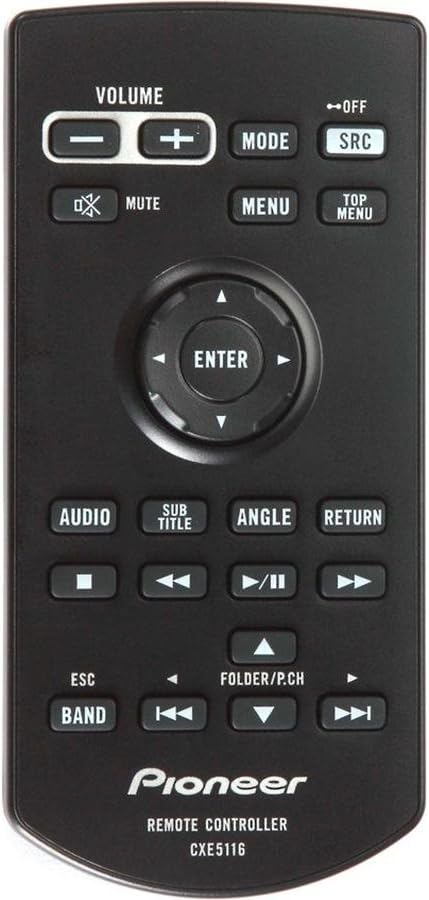
Figure 2.2: Remote control (CXE5116) and USB extension cable.
2.2. Wiring Connections
The rear panel of the AVH-X5700BHS features various input and output connections for power, speakers, external amplifiers, video, and auxiliary devices. Ensure all connections are secure and correctly matched to your vehicle's wiring system.

Figure 2.3: Rear view of the unit displaying various audio/video inputs, outputs, and power connections.
2.3. Firmware Updates
Pioneer periodically releases firmware updates to improve performance and add new features. It is recommended to keep your unit's firmware up to date. Firmware files are typically downloaded from the official Pioneer website and transferred via a USB flash drive. Ensure the USB drive is formatted correctly (e.g., FAT32) and contains only the firmware file to avoid update issues.
3. Operating Instructions
3.1. Touchscreen Interface
The AVH-X5700BHS features a responsive 7-inch WVGA resistive touchscreen. Navigate through menus, select sources, and control playback directly from the display.

Figure 3.1: Main display showing media playback interface, including iPod source, track information, and playback controls.

Figure 3.2: App selection screen, providing access to various integrated applications like AppRadio.
3.2. Bluetooth Connectivity
Pair your smartphone via Bluetooth for hands-free calling and audio streaming. Once paired, the unit can automatically connect to your device upon entering the vehicle. You can initiate calls from the head unit's contact list (after syncing) or use voice commands (e.g., Siri integration for iPhone users).
3.3. Audio and Media Playback
The unit supports a wide range of media sources and formats:
- Radio: Built-in HD Radio tuner.
- Disc Playback: DVD/CD player for audio and video discs.
- USB: Connect USB devices for audio and video playback.
- Streaming Services: Integrated support for Pandora and Spotify.
- SiriusXM: Sirius-XM Ready (requires separate tuner and subscription).
- Audio Formats: Supports MP1, MP2, MP3, MP4, WMA, AAC, WAV, AVI.
Utilize the 13-Band Graphic Equalizer to fine-tune your audio output for optimal sound quality.
3.4. Remote Control
The included remote controller (CXE5116) provides convenient access to common functions such as volume control, source selection, menu navigation, and media playback controls.
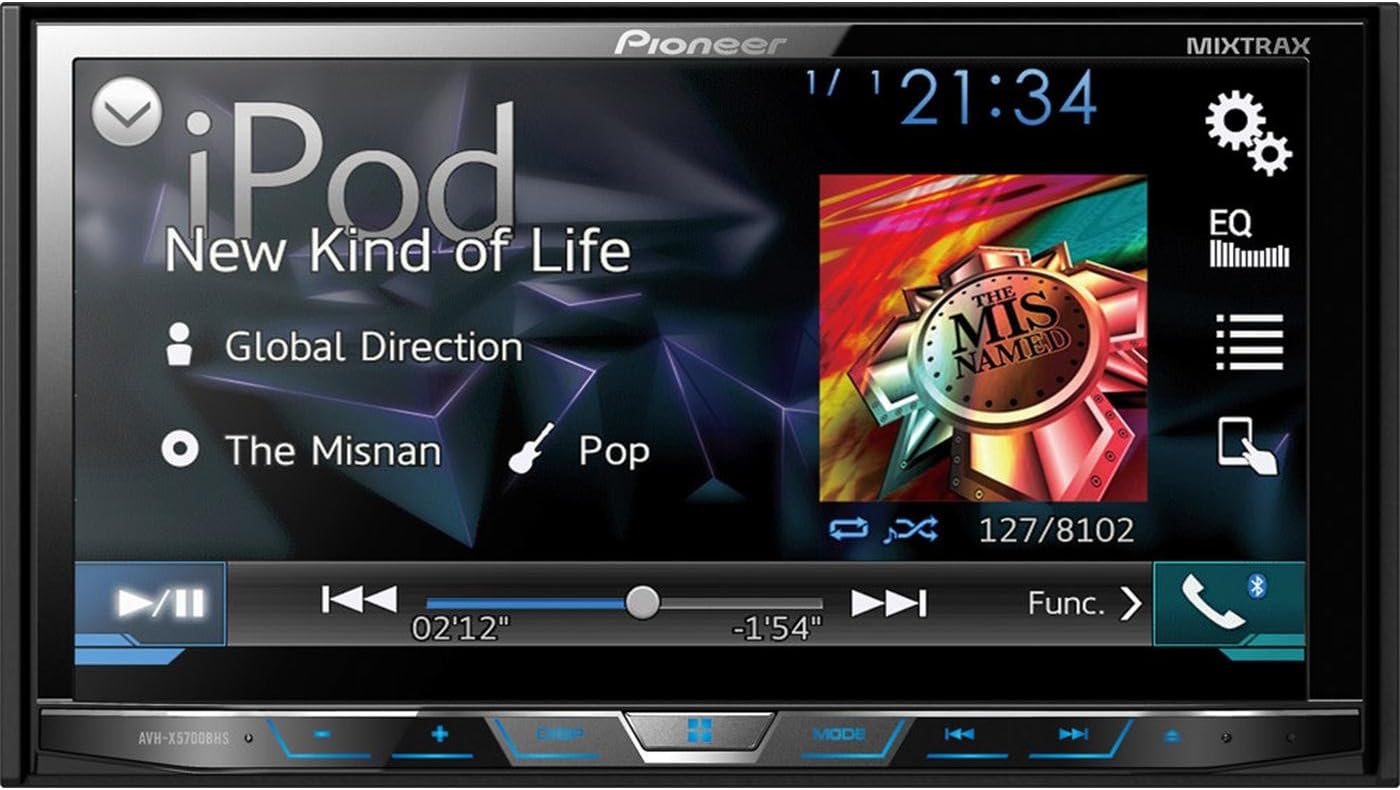
Figure 3.3: Close-up view of the CXE5116 remote control, showing button layout for various functions.
4. Maintenance
To ensure the longevity and optimal performance of your Pioneer AVH-X5700BHS, follow these general maintenance guidelines:
- Cleaning: Use a soft, dry cloth to clean the display and unit exterior. For stubborn smudges on the touchscreen, a slightly damp, lint-free cloth can be used. Avoid abrasive cleaners or solvents.
- Temperature: Avoid exposing the unit to extreme temperatures, direct sunlight for prolonged periods, or high humidity.
- Disc Care: Handle CDs and DVDs by their edges. Keep discs clean and free of scratches to prevent playback issues.
- Ventilation: Ensure the unit's ventilation openings are not blocked to prevent overheating.
5. Troubleshooting
This section addresses common issues you might encounter with your AVH-X5700BHS. If the problem persists after attempting these solutions, please contact Pioneer customer support.
| Problem | Possible Cause | Solution |
|---|---|---|
| No power/Unit does not turn on. | Loose power connection, blown fuse. | Check all power wiring connections. Inspect and replace any blown fuses (e.g., 10A fuse on the unit's rear). |
| Bluetooth audio stutters or skips. | Interference, phone power saving mode, outdated phone OS. | Ensure no other Bluetooth devices are interfering. Disable power saving modes on your phone. Keep your phone's operating system updated. Some Android devices may require the phone's screen to remain active to prevent stuttering. |
| Firmware update fails. | Incorrect USB format, incorrect file placement. | Ensure the USB flash drive is formatted to FAT32 and contains ONLY the firmware file in the root directory. Try a different USB drive if necessary. |
| No sound from speakers. | Mute activated, incorrect source selected, speaker wiring issue, external amplifier issue. | Check if the unit is muted. Verify the correct audio source is selected. Inspect speaker wiring connections. If an external amplifier is used, ensure it is powered on and functioning correctly. |
6. Specifications
Below are the technical specifications for the Pioneer AVH-X5700BHS In-Dash Multimedia Receiver:
- Item Weight: 3.7 pounds
- Product Dimensions: 6.5 x 7 x 3.88 inches
- Item Model Number: AVH-X5700BHS
- Batteries: 1 Lithium Metal battery required (included)
- Chassis Size: Double-DIN
- Preamp Voltage: 4 Volts
- Display Type: Resistive Touchscreen
- Display Resolution: 800x480
- Wireless Remote: Yes
- Expansion: Built-in Bluetooth, Optional MP3 Cable
- Memory Card Slot: SD
- Media Playback Supported: MP1, MP2, MP3, MP4, WMA, AAC, WAV, AVI
- Screen Size: 7 Inches
- Manufacturer: Pioneer Electronics USA Inc
- Date First Available: October 20, 2014
7. Warranty and Support
7.1. Warranty Information
The Pioneer AVH-X5700BHS comes with a 1-YEAR manufacturer's warranty. Please retain your proof of purchase for warranty claims. The warranty covers defects in materials and workmanship under normal use.
7.2. Customer Support
For technical assistance, troubleshooting beyond this manual, or warranty inquiries, please contact Pioneer customer support. You can also visit the official Pioneer store for more information and resources:


