
Dogtra ARC
Dogtra ARC Slim Ergonomic E-Collar User Manual
Model: ARC | Brand: Dogtra

Image: The Dogtra ARC Slim Ergonomic E-Collar system, including the remote transmitter, receiver collar, and product packaging.
Product Overview
The Dogtra ARC Slim Ergonomic E-Collar is a remote dog training system designed for precise control and effective communication with your dog. It features a sleek, ergonomic design for comfortable fit, a 3/4-mile range, and 127 levels of stimulation for fine-tuning correction levels. The system is fully waterproof and expandable for training up to two dogs.
Key Features
- Ergonomic Design: Sleek and slim receiver for a comfortable, hardly noticeable fit on your dog's neck.
- IPX9K Waterproof Certified: Withstands high-pressure liquid sprays, ensuring durability in various training environments.
- 3/4-Mile Range: Ideal for obedience, hunting, and K-9 training, expandable to a two-dog system.
- 127 Precise Correction Levels: Fine-tune stimulation with a Rheostat Dial and clear LCD screen.
- Correction Types: Includes Nick (quick 1/2-second pulse), Constant (up to 12 seconds), and Pager (vibration) functions.
What's Included
The Dogtra ARC Slim Ergonomic E-Collar package typically includes the following components:
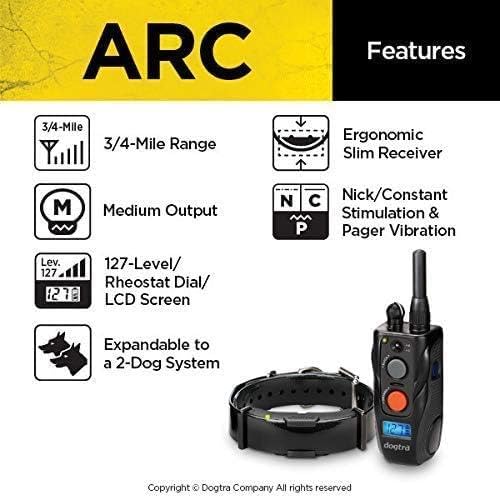
Image: Dogtra ARC E-Collar components including transmitter, receiver, charger, and manual.
- Transmitter
- Receiver (E-Collar)
- Battery Charger
- Splitter Cable
- Test Light
- Belt Clip & Screws
- Owner's Manual
Setup and Operation
Charging the Battery
Before initial use, fully charge both the transmitter and receiver. The battery is fully charged within 2 hours. The LED indicator on the receiver will turn green when fully charged. The LCD screen on the transmitter will show a full battery icon.
Video: Demonstrates how to charge the Dogtra ARC E-Collar transmitter and receiver, showing the charging indicators. (Relevant segment: 2:52-3:15)
Turning On/Off
To turn on the transmitter, press the on/off button. To turn on the receiver, touch the magnetic red dots on both units together. The LED indicator on the receiver will flash green when on.
Video: Illustrates the process of turning the Dogtra ARC E-Collar transmitter and receiver on and off using the designated buttons and magnetic dots. (Relevant segment: 1:05-1:35)
Button Functions
The transmitter features a Rheostat Dial for 0-127 correction levels, a Nick/Constant toggle switch, and dedicated buttons for each dog's Nick, Constant, and Pager functions. The LCD screen displays the current correction level.

Image: Detailed view of the Dogtra ARC remote and collar, highlighting key features like the Rheostat Dial, Nick/Constant switch, and LCD screen.
Video: Demonstrates the various button functions on the Dogtra ARC transmitter, including Nick, Constant, and Pager, and how they interact with the receiver. (Relevant segment: 1:36-2:51)
Training Guidelines
The Dogtra ARC E-Collar is a powerful tool for dog training when used correctly and humanely. It is crucial to understand your dog's temperament and the specific training needs to select the appropriate stimulation level and correction type.
Video: Expert discussion on selecting appropriate stimulation levels for dog training using Dogtra E-Collars, emphasizing precise control.
Consider the following factors when choosing a Dogtra E-Collar and setting its levels:
- Occasion/Activity: Determine if the collar is for companion use (leash walking), hunting (great distances), or professional/K9 work.
- Temperament: Adjust levels based on your dog's enthusiasm or laid-back nature.
- Size of Dog: Different receiver sizes and output levels are available for small, medium, and large dogs.
Video: Dogtra's e-collar buying guide, explaining how to choose the right collar based on dog's activity, temperament, and size.
Maintenance and Care
Proper maintenance ensures the longevity and effectiveness of your Dogtra ARC E-Collar. Always keep the units clean and dry when not in use.
- Cleaning: Wipe down the transmitter and receiver with a damp cloth after each use, especially if exposed to dirt or water.
- Contact Points: Regularly check the contact points on the receiver for any debris or corrosion. Ensure they are clean for proper skin contact.
- Collar Strap: Inspect the collar strap for wear and tear. Replace if damaged to ensure secure fit.
- Battery Care: Avoid overcharging or completely draining the batteries. Store in a cool, dry place.
Troubleshooting
If you encounter issues with your Dogtra ARC E-Collar, refer to the following common troubleshooting steps:
| Problem | Possible Cause | Solution |
|---|---|---|
| No stimulation/vibration | Low battery, incorrect contact point fit, unit not paired. | Charge batteries, adjust collar fit, re-pair transmitter and receiver. |
| Short range | Obstructions, low battery, antenna damage. | Move to open area, charge batteries, inspect antenna. |
| Receiver not turning on | Low battery, magnetic dots not aligned. | Charge battery, ensure proper alignment of magnetic dots. |
For more detailed troubleshooting, please consult the full Owner's Manual (PDF) available via the provided link.
Specifications
- Model: ARC
- Range: 3/4-Mile
- Correction Levels: 127 (Rheostat Dial)
- Correction Types: Nick, Constant, Pager Vibration
- Waterproof Rating: IPX9K Certified
- Expandability: Up to 2 dogs
- Battery Type: Lithium Polymer (rechargeable)
- Item Weight: 6.6 ounces
- Dimensions: 12.13 x 8.5 x 3.25 inches (package)
- Material: Biothane Collar Strap
- Country of Origin: USA / Republic of Korea
Warranty and Support
The Dogtra ARC E-Collar comes with a 1-Year Manufacturer's Warranty. For warranty claims or technical support, please contact Dogtra customer service.
Additional resources:
Related documentsARC


Ask a question about this manual
Ask about setup, troubleshooting, compatibility, parts, safety, or missing instructions. Manuals+ will review the question and use this page’s manual context to help answer it.