
1. Introduction
This manual provides instructions for the installation, operation, and maintenance of the Conexant RD01-D270 Half Height Low Profile 56K PCI Modem. This device is designed to provide dial-up internet connectivity and fax capabilities for compatible personal computers.
Key Features:
- Dell Dimension 2400 Desktop Modem Card compatibility
- DP/N: 5W416
- Conexant Model: RD01-D270
- Speed: 56K (V.90/V.92)
- Interface: PCI
2. Package Contents
Verify that your package contains the following items:
- Conexant RD01-D270 PCI Modem Card
- (Optional) Driver CD (if included with purchase)
- (Optional) Telephone cable (RJ-11)
If any items are missing or damaged, please contact your vendor.
3. Setup and Installation
Before proceeding with installation, ensure your computer is powered off and unplugged from the wall outlet. It is recommended to wear an anti-static wrist strap to prevent electrostatic discharge (ESD) damage to components.
3.1 Hardware Installation
- Prepare your computer: Power off your computer and disconnect all cables. Open the computer case according to your computer's manufacturer instructions.
- Locate an available PCI slot: Identify an empty PCI expansion slot on your motherboard. The Conexant RD01-D270 is a half-height, low-profile card, so ensure the slot is compatible with this form factor.
- Remove the slot cover: Carefully remove the metal slot cover corresponding to the chosen PCI slot from the back of your computer case.
- Insert the modem card: Align the modem card with the PCI slot. Apply even, firm pressure to both ends of the card until it is fully seated in the slot. Ensure the metal bracket of the modem card is flush with the back of the computer case.
- Secure the card: Use a screw to secure the modem card's bracket to the computer case.
- Close the computer case: Replace the computer case cover and reconnect all cables.
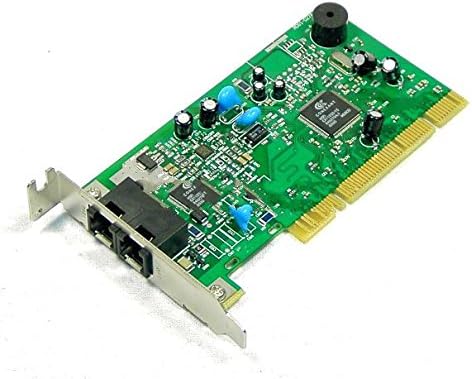
Figure 1: Conexant RD01-D270 PCI Modem Card. This image shows the green circuit board with various electronic components, including capacitors, resistors, and the Conexant chipset. The card features two RJ-11 telephone jacks on its metal bracket for line and phone connections, and a PCI connector at the bottom for motherboard integration.
3.2 Driver Installation
After hardware installation, you will need to install the appropriate drivers for the modem to function correctly.
- Power on your computer: Start your computer. The operating system may detect new hardware and attempt to install drivers automatically.
- Install drivers from CD (if applicable): If a driver CD was included, insert it into your CD/DVD drive and follow the on-screen instructions.
- Download drivers online: If no CD is available or if you need updated drivers, visit the Conexant support website or the support website for your computer manufacturer (e.g., Dell for Dimension 2400 models) to download the latest drivers for the RD01-D270 modem.
- Follow driver installation prompts: Execute the downloaded driver installer and follow the instructions to complete the installation. You may need to restart your computer after installation.
4. Operating Instructions
Once the modem is installed and drivers are configured, you can set up your dial-up connection.
4.1 Connecting to a Telephone Line
- Locate the two RJ-11 ports on the modem card's bracket. One is typically labeled "LINE" and the other "PHONE".
- Connect a standard telephone cable (RJ-11) from your wall telephone jack to the "LINE" port on the modem.
- If you wish to connect a telephone handset to the same line, connect it to the "PHONE" port on the modem.
4.2 Setting Up a Dial-Up Connection (Windows Example)
Steps may vary slightly depending on your operating system version.
- Open Network and Sharing Center (Windows 7/8/10) or Network Connections (Windows XP).
- Select Set up a new connection or network.
- Choose Set up a dial-up connection and click Next.
- Enter the dial-up phone number, username, and password provided by your Internet Service Provider (ISP).
- Give the connection a name (e.g., "ISP Dial-up").
- Click Connect to test the connection.
5. Maintenance
The Conexant RD01-D270 modem card requires minimal maintenance.
- Keep it clean: Ensure the inside of your computer case is free from excessive dust, which can impede airflow and component cooling. Use compressed air to gently clean dust from the modem card and surrounding components periodically.
- Driver updates: Periodically check the manufacturer's website for updated drivers. Newer drivers can improve performance, stability, or add compatibility.
- Environmental conditions: Operate the computer in a well-ventilated area, away from direct sunlight, excessive heat, or moisture.
6. Troubleshooting
If you encounter issues with your Conexant RD01-D270 modem, refer to the following common troubleshooting steps:
- Modem not detected:
- Ensure the modem card is fully seated in the PCI slot.
- Check Device Manager in Windows to see if the modem is listed (it might appear with a yellow exclamation mark if drivers are missing).
- Reinstall drivers.
- Try a different PCI slot if available.
- Cannot connect to the internet:
- Verify the telephone cable is securely connected to the "LINE" port on the modem and the wall jack.
- Confirm that your telephone line is active and working (e.g., by plugging in a phone and checking for a dial tone).
- Double-check the dial-up phone number, username, and password in your connection settings.
- Contact your ISP to confirm service status and connection details.
- Slow connection speed:
- Dial-up connections are inherently slower than broadband. 56K is the maximum theoretical speed.
- Ensure there are no other devices on the same telephone line causing interference.
- Check for updated modem drivers.
7. Specifications
| Feature | Detail |
|---|---|
| Brand | Conexant |
| Model | RD01-D270 |
| Part Number (DP/N) | 5W416 |
| Item Model Number | MDCONRD01D27056 |
| Speed | 56K (V.90/V.92) |
| Interface | PCI |
| Form Factor | Half Height, Low Profile |
| Compatible Devices | Personal Computer (e.g., Dell Dimension 2400 Desktop) |
| UPC | 700736791479 |
| Date First Available | August 26, 2015 |
8. Warranty and Support
Information regarding specific warranty terms or direct technical support for the Conexant RD01-D270 modem is not provided within this manual. For warranty details, technical assistance, or driver downloads, please refer to the original vendor or the official Conexant support website. If this product was purchased as part of a larger system (e.g., a Dell computer), please consult the documentation provided by the system manufacturer for support information.

