
1. Overview
The Canary Pro is an all-in-one indoor home security system designed to provide comprehensive monitoring and peace of mind. It integrates a 1080p HD camera with advanced sensors to keep you informed about your home's environment and security status.
Key functionalities include 24/7 live video streaming, a 90 dB siren, climate monitoring (temperature, humidity, air quality), motion alerts, two-way talk, night vision, and 10x zoom. The device is designed for easy setup and can be controlled via a compatible mobile application, offering seamless integration with smart home ecosystems like Amazon Alexa and Google Assistant.
Video: Meet Canary Pro. This video provides a brief introduction to the Canary Pro device and its core capabilities as a complete home security system.
2. What's Included
Your Canary Pro package contains the following items:
- Canary All-In-One Device
- Power Adapter (USB charger brick)
- Micro USB Cable
- Audio Cable
- Quick Start Guide
- Security Window Decals

Image: The Canary Pro device along with its power adapter, USB cable, audio cable, quick start guide, and security decals.
3. Setup Guide
Setting up your Canary Pro is a simple, three-step process:
- Download the App: Download the Canary app from the App Store (iOS) or Google Play Store (Android) on your smartphone.
- Plug in the Camera: Connect the Canary Pro device to a power outlet using the provided USB cable and power adapter.
- Connect to Wi-Fi: Follow the in-app instructions to connect your Canary Pro to your home's 2.4GHz Wi-Fi network. The device also supports wired Ethernet connection.
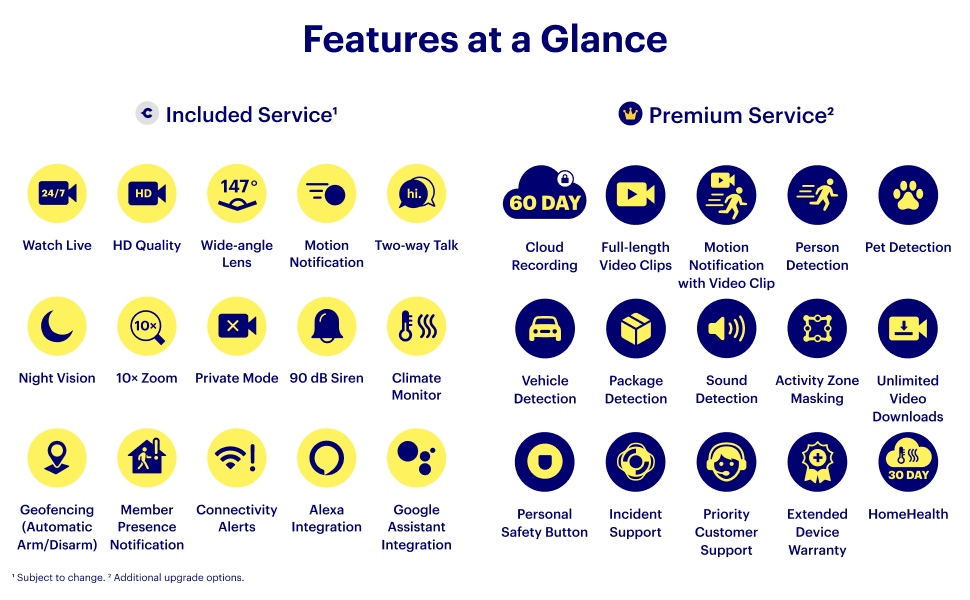
Image: Visual representation of the three easy setup steps: download the app, plug in the camera, and connect to Wi-Fi.
4. Key Features
The Canary Pro offers a robust set of features to enhance your home security:
- 1080p HD Video & Night Vision: Records crystal-clear video day and night with a 147-degree wide-angle lens and 10x zoom.
- Motion Alerts: Receive instant notifications on your smartphone when motion is detected.
- 90 dB Siren: Activate a loud siren remotely via the app to deter intruders.
- Two-Way Talk: Communicate with people or pets in your home directly through the Canary app.
- Climate Monitor: Track temperature, humidity, and air quality to ensure a healthy home environment.
- Auto Arm/Disarm: Utilizes geofencing to automatically arm and disarm the system as family members come and go.
- Private Mode: Ensures privacy by disabling the camera and microphone when you are home.
- Smart Home Integration: Works with Amazon Alexa and Google Assistant for voice control and integration into your smart home ecosystem.

Image: A visual summary of Canary Pro's included and premium features, highlighting live view, HD quality, motion alerts, two-way talk, night vision, and climate monitoring.
5. Operating Your Canary Pro
Once set up, manage your Canary Pro through the dedicated mobile app:
- Live View: Open the app and select 'Watch Live' to view real-time HD video and audio from your camera.
- Receive Alerts: Motion detection triggers push notifications to your phone. Tap on the notification to view the recorded event.
- Two-Way Communication: Use the microphone icon in the live view to speak through the device's speaker.
- Activate Siren: In case of an emergency, tap the siren icon in the app to sound the 90 dB alarm.
- Arm/Disarm Modes: Configure Home, Away, and Night modes. Utilize geofencing for automatic mode switching based on your location.
Video: Canary Pro - Product Features. This video demonstrates the setup process, live view, and various features of the Canary Pro.
6. Environmental Monitoring
The Canary Pro continuously monitors your home's environment, providing data on:
- Temperature: Track indoor temperature to ensure comfort and safety.
- Humidity: Monitor humidity levels to prevent issues like mold or excessive dryness.
- Air Quality: Detects abnormal levels of airborne pollutants, alerting you to potential issues.
Access historical data and real-time readings through the HomeHealth section of the Canary app.

Image: A smartphone screen showing detailed graphs for temperature, humidity, and air quality monitored by the Canary Pro.
7. Data Security and Privacy
Canary prioritizes your data security and privacy:
- Secure Data Storage: All data is stored in certified high-security data centers.
- Encryption: Utilizes AES 256-bit, TLS, and SSL encryptions for secure data transfer.
- Access Control: Multi-factor access control systems are in place to ensure complete privacy.

Image: Visuals illustrating Canary's commitment to secure data protection through encryption and certified data centers.
8. Versatile Applications
The Canary Pro can be used for various monitoring needs:
- Indoor Home Security: Monitor your property for unauthorized activity.
- Baby Monitor: Keep an eye on your infant with HD video and audio.
- Pet Camera: Check in on your pets while you're away and even talk to them.
- Elderly Care: Provide remote oversight for elderly family members.

Image: Examples of how the Canary Pro can be used as a pet camera, baby monitor, or for elderly care.
9. Technical Specifications
| Feature | Specification |
|---|---|
| Indoor/Outdoor Usage | Indoor |
| Power Source | Corded Electric |
| Connectivity Protocol | 2.4GHz Wi-Fi (802.11 b/g/n), Wired Ethernet, Bluetooth Low Energy (BLE) |
| Controller Type | Amazon Alexa, Google Assistant |
| Mounting Type | Free Standing |
| Video Capture Resolution | 1080p |
| Color | Black |
| Viewing Angle | 147 Degrees |
| Item Dimensions (L x W x H) | 3 x 3 x 6 inches |
| Item Weight | 13.9 ounces (0.87 Pounds) |
| Special Features | 90+ decibel Siren, Climate Monitor, Two-way Talk |
10. Troubleshooting Common Issues
- No Connection: Ensure your device is plugged in and within range of your 2.4GHz Wi-Fi network. Check your router settings.
- False Motion Alerts: Adjust motion sensitivity settings within the Canary app. Consider activity zone masking to ignore specific areas.
- Poor Video Quality: Verify your internet connection speed. Ensure the camera lens is clean and free from obstructions.
- Siren Not Activating: Confirm the device is powered and connected. Check app permissions and ensure the siren feature is enabled.
- App Issues: Ensure your Canary app is updated to the latest version. Restart the app or your smartphone if problems persist.
11. Warranty and Support
Canary offers an extended warranty with its Premium Service plan. For detailed warranty information and to access customer support, please refer to the Canary app or visit the official Canary website. The app also provides direct access to emergency services (police, ambulance, fire department) when needed.
Video: Canary - Trusted by First Responders. This video highlights the reliability of Canary's system, trusted by emergency personnel.


