1. Introduction
The Lionel LCS Block Power Controller 2 (BPC2) is a module designed to enhance control over your model railroad layout. It manages up to eight independent track power blocks, organized into two distinct power districts. This device allows for precise control of track sections, enabling advanced operational scenarios and improved safety on your layout.
2. Product Overview
The BPC2 integrates into your Lionel Layout Control System (LCS) to provide robust block control capabilities. Key features include:
- Eight Normally Open Relays: The unit features eight normally open relays, divided into two banks of four, for flexible track power management.
- Addressable Control: Each block can be addressed using TR (Track) or ACC (Accessory) TMCC IDs ranging from 1 to 99.
- LCS Compatibility: Operate the BPC2 using Lionel remotes or other LCS-compatible smart devices.
- High Current Capacity: Supports latching relay operation with a maximum capacity of 20 amps.
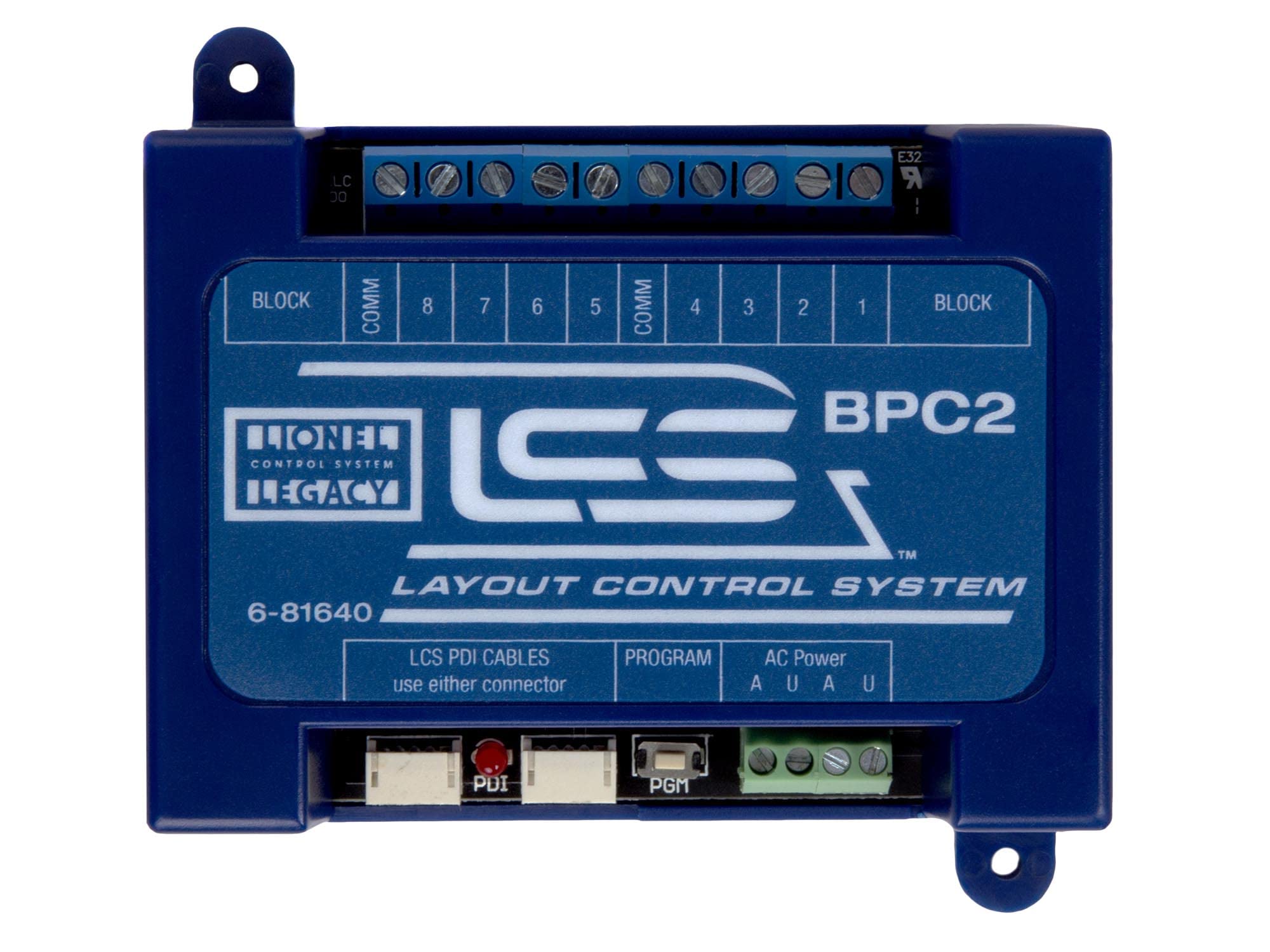
Figure 2.1: Front view of the Lionel LCS Block Power Controller 2 (BPC2). This image shows the overall design and labeling of the unit.
2.1 What's in the Box
Your package should contain the following item:
- One (1) LCS Block Power Controller 2 (BPC2) unit.
3. Setup and Installation
Proper installation is crucial for the safe and effective operation of your BPC2. Please follow these steps carefully.
3.1 Power Requirements
The BPC2 requires an external accessory transformer for operation. This transformer is not included with the BPC2 unit and must be purchased separately. Ensure the transformer provides appropriate voltage for your LCS system.
3.2 Cable Connections
Cables for connecting the BPC2 to your LCS system are not included and must be acquired separately. The type and quantity of cables depend on your existing LCS setup:
- First LCS Device: If this is your first LCS device, you will need one 6-81499 LCS DB-9 Cable with Power Supply.
- Additional LCS Devices: For each additional LCS device, including the BPC2, you will need one of the following LCS PDI Cables:
- 6-81500 - 1' LCS PDI Cable
- 6-81501 - 3' LCS PDI Cable
- 6-81502 - 10' LCS PDI Cable
- 6-81503 - 20' LCS PDI Cable

Figure 3.1: Packaging details highlighting cable requirements and key features for the BPC2.
3.3 Connecting the BPC2
Refer to the diagrams below for connection points on the BPC2 unit.

Figure 3.2: Front view of the BPC2, showing the PDI, Program, and AC Power connections.
- AC Power: Connect your accessory transformer to the AC Power terminals (A, O, A, U). Ensure correct polarity as indicated on the unit.
- PDI (Power Distribution Interface): Connect the appropriate LCS PDI cable here to integrate the BPC2 into your LCS network.
- Program: This port is used for programming and configuration of the BPC2.

Figure 3.3: Rear view of the BPC2, showing the Block and Comm terminal connections.
- Block Terminals: Connect your track power blocks to these terminals. There are eight block terminals, corresponding to the eight relays.
- Comm Terminals: These are common return terminals for the block power districts.
Always ensure all power is disconnected before making or changing any connections to prevent damage to the unit or your layout components.
4. Operating Instructions
Once the BPC2 is correctly installed and connected to your LCS system, you can begin controlling your track blocks.
4.1 Addressing the BPC2
The BPC2 must be assigned a unique address within your LCS system. This is typically done through the Program port using an LCS-compatible device or software. Refer to your LCS system's main manual for detailed instructions on assigning TR or ACC TMCC IDs (1-99) to the BPC2.
4.2 Controlling Track Blocks
After addressing, you can control the individual track blocks connected to the BPC2 using your Lionel remote control or LCS-compatible smart device. Each of the eight relays can be independently switched to control power to its corresponding track block.
- Power On/Off: Use your control device to toggle power to specific blocks.
- Latching Relays: The BPC2 utilizes latching relays, meaning they maintain their state (on or off) even if control power is temporarily interrupted.
Consult your Lionel remote or LCS app manual for specific commands and interface details for controlling accessory devices or track power blocks.
5. Maintenance
The LCS BPC2 is designed for reliable operation with minimal maintenance. Follow these general guidelines:
- Cleaning: Keep the unit clean and free from dust. Use a soft, dry cloth for cleaning. Do not use liquid cleaners or solvents.
- Environment: Operate the BPC2 in a dry, indoor environment. Avoid exposure to extreme temperatures, humidity, or direct sunlight.
- Connections: Periodically check all cable connections to ensure they are secure. Loose connections can lead to intermittent operation.
6. Troubleshooting
If you encounter issues with your BPC2, review the following common troubleshooting steps:
- No Power to Blocks:
- Verify that the accessory transformer connected to the BPC2's AC Power terminals is functioning and supplying power.
- Check all AC Power connections for secure contact.
- Ensure the BPC2 is properly addressed and receiving commands from your LCS controller.
- Confirm that the track block connections to the BPC2 are secure.
- Unit Not Responding to Commands:
- Check the PDI cable connection between the BPC2 and your LCS network.
- Ensure the BPC2 has a unique and correct TMCC ID assigned.
- Verify that your Lionel remote or LCS-compatible device is functioning correctly and within range.
- Intermittent Operation:
- Inspect all wiring for loose connections or damage.
- Ensure the operating environment is stable and free from excessive electrical interference.
If problems persist after following these steps, consult the Lionel customer support or your LCS system's comprehensive manual for further assistance.
7. Specifications
| Model Number | 6-81640 |
| Product Dimensions | 3.5 x 1.4 x 1 inches (8.9 x 3.6 x 2.5 cm) |
| Item Weight | 1.8 pounds (0.82 kg) |
| Manufacturer | Lionel |
| Recommended Age | 14 years and up |
| Country of Origin | China |
| Relay Capacity | Up to 20 amps max. |
| ASIN | B00NU9RY34 |
| UPC | 0023922816405 |
8. Customer Support
For further assistance, technical support, or warranty information, please visit the official Lionel website or contact their customer service department. Keep your purchase receipt and model number (6-81640) handy when contacting support.
You can also visit the Lionel Store on Amazon for more products and information.


