
1. Introduction
This manual provides detailed instructions for the safe and efficient use of your Marantz PM7005 Integrated Amplifier. Please read this manual thoroughly before operating the unit to ensure proper setup and optimal performance. Keep this manual for future reference.
The Marantz PM7005 is a high-performance integrated amplifier designed to deliver exceptional audio quality. It features a powerful 2x 60W output into 8 ohms, symmetrical circuits for balanced sound, high-grade audio components, current feedback HDAMs, and a high-speed instantaneous current supply. It also includes versatile digital inputs such as USB-B, optical, and coaxial for connecting various digital audio sources.
2. Important Safety Instructions
Always follow basic safety precautions when using this product to reduce the risk of fire, electric shock, and injury to persons.
- Read these instructions.
- Keep these instructions.
- Heed all warnings.
- Follow all instructions.
- Do not use this apparatus near water.
- Clean only with a dry cloth.
- Do not block any ventilation openings. Install in accordance with the manufacturer’s instructions.
- Do not install near any heat sources such as radiators, heat registers, stoves, or other apparatus (including amplifiers) that produce heat.
- Do not defeat the safety purpose of the polarized or grounding-type plug. A polarized plug has two blades with one wider than the other. A grounding-type plug has two blades and a third grounding prong. The wide blade or the third prong are provided for your safety. If the provided plug does not fit into your outlet, consult an electrician for replacement of the obsolete outlet.
- Protect the power cord from being walked on or pinched particularly at plugs, convenience receptacles, and the point where they exit from the apparatus.
- Only use attachments/accessories specified by the manufacturer.
- Unplug this apparatus during lightning storms or when unused for long periods of time.
- Refer all servicing to qualified service personnel. Servicing is required when the apparatus has been damaged in any way, such as power-supply cord or plug is damaged, liquid has been spilled or objects have fallen into the apparatus, the apparatus has been exposed to rain or moisture, does not operate normally, or has been dropped.
3. Setup
3.1 Unpacking
Carefully remove the PM7005 from its packaging. Ensure all accessories are present:
- Marantz PM7005 Integrated Amplifier
- Remote Control Unit
- Power Cord
- AAA Batteries (x2) for remote control
- Quick Start Guide
3.2 Placement
Place the amplifier on a flat, stable surface with adequate ventilation. Avoid direct sunlight, heat sources, and areas with high humidity or dust.
3.3 Connecting Speakers
The PM7005 supports one pair of speakers. Use high-quality speaker cables for optimal sound performance.
- Ensure the amplifier is powered off and unplugged from the AC outlet.
- Connect the positive (+) terminal (red) of your speaker to the positive (+) terminal (red) of the amplifier's speaker output.
- Connect the negative (-) terminal (black) of your speaker to the negative (-) terminal (black) of the amplifier's speaker output.
- Repeat for the other speaker, ensuring correct polarity (left speaker to L terminals, right speaker to R terminals).
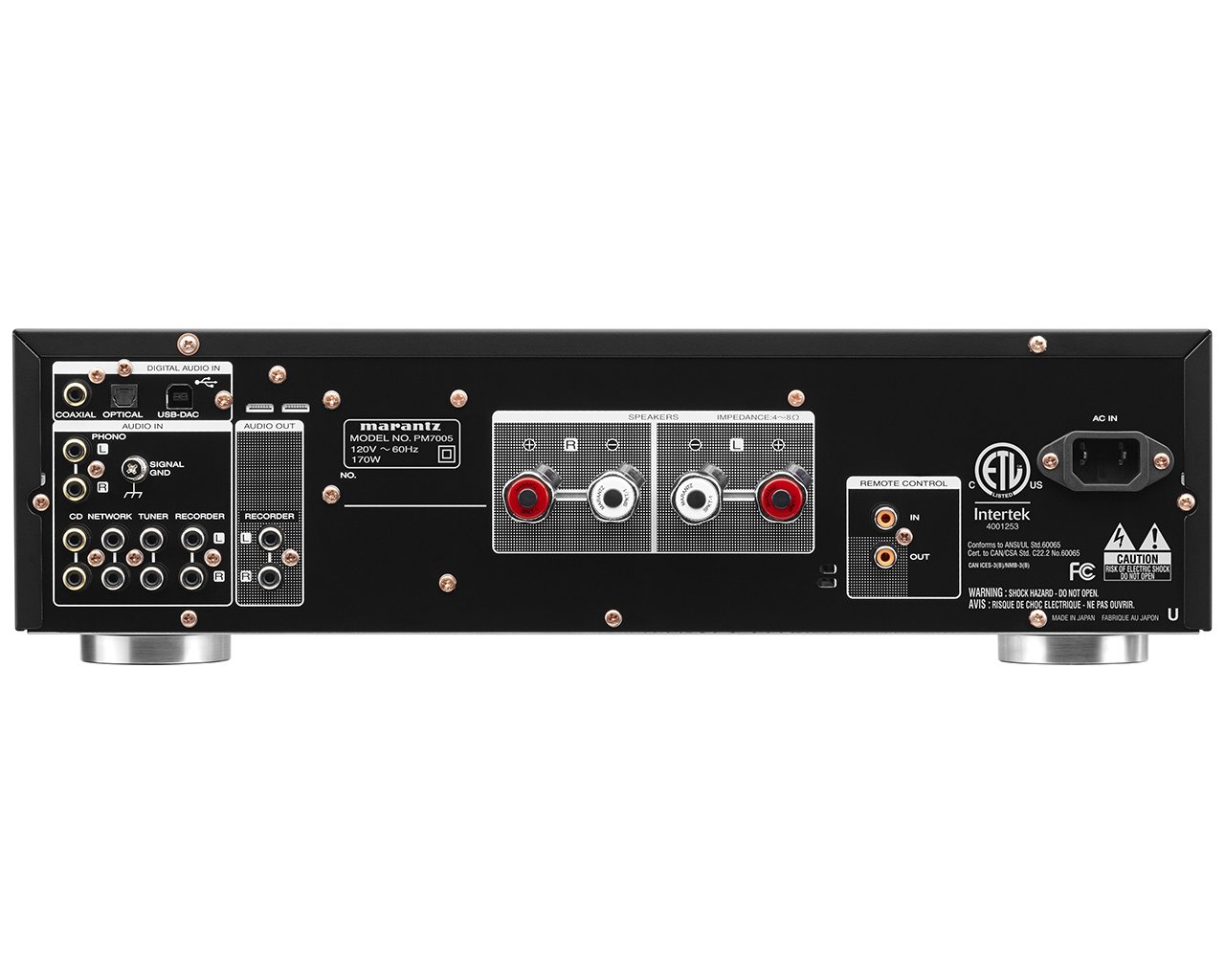
Figure 1: Rear Panel Connections. This image displays the rear panel of the Marantz PM7005 amplifier, highlighting the speaker output terminals (red and black binding posts for left and right channels) and various input connections including analog RCA, coaxial, optical, and USB-B. The AC inlet is also visible on the right.
3.4 Connecting Audio Sources
The PM7005 offers a variety of input options:
- Analog Inputs (CD, NETWORK, TUNER, RECORDER, PHONO): Use RCA cables to connect your analog audio components (e.g., CD player, network player, tuner, tape deck, turntable). The PHONO input is specifically for turntables with a moving magnet (MM) cartridge.
- Digital Inputs (OPTICAL, COAXIAL): Use optical or coaxial digital cables to connect digital audio sources such as a TV, Blu-ray player, or game console.
- USB-DAC Input: Connect your computer via a USB-B cable to use the PM7005's internal DAC for high-resolution audio playback.
Ensure all connections are secure and correctly matched (e.g., Left to Left, Right to Right).
3.5 Power Connection
- After all audio connections are made, connect the supplied power cord to the AC inlet on the rear panel of the PM7005.
- Plug the other end of the power cord into a suitable AC wall outlet.
3.6 Remote Control Setup
Insert the two supplied AAA batteries into the remote control unit, ensuring correct polarity (+/-) as indicated inside the battery compartment.

Figure 2: Remote Control Unit. This image shows the full layout of the Marantz RC003PM remote control, detailing buttons for power, input selection (CD, Network, Tuner, Phono, Coaxial, Optical, USB-DAC, Analog), volume control, mute, tone controls, and navigation for connected Marantz components.
4. Operating Instructions
4.1 Power On/Off
Press the POWER button on the front panel or the remote control to turn the unit on or off. The power indicator will illuminate when the unit is on.

Figure 3: Front Panel Overview. This image displays the front panel of the Marantz PM7005 integrated amplifier, featuring the large input selector knob on the left, the volume knob on the right, and various buttons and smaller knobs for headphones, speakers, mute, analog mode, source direct, bass, treble, and balance controls.
4.2 Input Selection
Rotate the INPUT SELECTOR knob on the front panel or use the dedicated input buttons on the remote control (e.g., CD, NETWORK, OPTICAL, USB-DAC) to choose your desired audio source.
4.3 Volume Control
Adjust the listening level using the large VOLUME knob on the front panel or the VOLUME +/- buttons on the remote control.
Press the MUTE button on the front panel or remote to temporarily silence the audio. Press it again to restore the volume.
4.4 Tone Controls (Bass, Treble, Balance)
Use the BASS, TREBLE, and BALANCE knobs on the front panel to fine-tune the sound to your preference. These controls can also be adjusted via the remote control.
4.5 Analog Mode / Source Direct
The ANALOG MODE button on the front panel (or SOURCE DIRECT on the remote) bypasses the tone control circuits and digital processing, providing the purest possible analog signal path. This is ideal for high-fidelity listening from analog sources.
4.6 Headphone Use
Connect headphones to the PHONES jack on the front panel. Connecting headphones will automatically mute the main speaker outputs.
5. Maintenance
5.1 Cleaning
To clean the unit, wipe the exterior surfaces with a soft, dry cloth. Do not use abrasive cleaners, waxes, or solvents as they may damage the finish. Ensure the unit is unplugged before cleaning.
5.2 Storage
If storing the unit for an extended period, unplug it from the power outlet and cover it to protect against dust. Store in a cool, dry place.
6. Troubleshooting
If you experience problems with your PM7005, refer to the following table for common issues and solutions. If the problem persists, contact Marantz customer support.
| Problem | Possible Cause | Solution |
|---|---|---|
| No power | Power cord not connected; Power outlet faulty; Unit in standby mode. | Check power cord connection; Try a different outlet; Press the POWER button. |
| No sound | Incorrect input selected; Volume too low; Mute function active; Speaker cables disconnected; Source component not playing. | Select correct input; Increase volume; Deactivate Mute; Check speaker connections; Ensure source component is playing. |
| Sound distorted or noisy | Poor cable connections; Source component issue; Speaker impedance mismatch. | Check all cable connections; Test with a different source; Ensure speakers are within supported impedance range (4-16 ohms). |
| Remote control not working | Batteries depleted or incorrectly inserted; Obstruction between remote and unit; Remote sensor blocked. | Replace batteries, check polarity; Remove obstructions; Ensure remote sensor on unit is clear. |
| Humming noise | Ground loop; Nearby electrical interference. | Ensure all components are properly grounded; Try moving the unit away from other electrical devices. |
7. Specifications
The following are key specifications for the Marantz PM7005 Integrated Amplifier:
- Model Number: PM7005
- Output Power: 2 x 60W (8 ohms)
- Digital Inputs: USB-B, Optical, Coaxial
- DAC: 192 kHz / 24-bit (CS4398)
- DSD Playback: 2.8 MHz / 5.6 MHz
- Dimensions (W x D x H): 17.3 x 14.9 x 4.9 inches (440 x 378 x 125 mm)
- Weight: 22 Pounds (10 kg)
- Speaker Impedance: 4 - 16 ohms
8. Warranty and Support
Marantz products are designed and manufactured to high-quality standards. This product is covered by a limited warranty. Please refer to the warranty card included with your product or visit the official Marantz website for detailed warranty terms and conditions specific to your region.
For technical support, service inquiries, or further assistance, please contact your authorized Marantz dealer or visit the Marantz support website. Have your model number (PM7005) and serial number ready when contacting support.
Marantz Official Website: www.marantz.com


