
Introduction
The Marantz HD-DAC1 is a high-quality audio device designed to function as a dedicated headphone amplifier, a digital-to-analog converter (DAC), and a stereo preamplifier. It incorporates Current Feedback amplification technologies and HDAM-SA2 circuits to deliver high-resolution audio playback. This unit is capable of driving high-impedance headphones up to 600 ohms and offers versatile connectivity options for various audio sources.

Front view of the Marantz HD-DAC1, showcasing its elegant design and control knobs.
Marantz Brand Overview
This video provides an overview of the Marantz brand, highlighting its history and commitment to high-quality audio reproduction.
Setup
Unboxing and Placement
- Carefully remove the HD-DAC1 from its packaging.
- Place the unit on a stable, level surface away from direct sunlight, heat sources, and excessive moisture. Ensure adequate ventilation around the unit.
- The unit features rigid feet designed to minimize vibrations for optimal audio performance.
Connecting Audio Sources and Outputs
Refer to the diagram below for an overview of the rear panel connections.
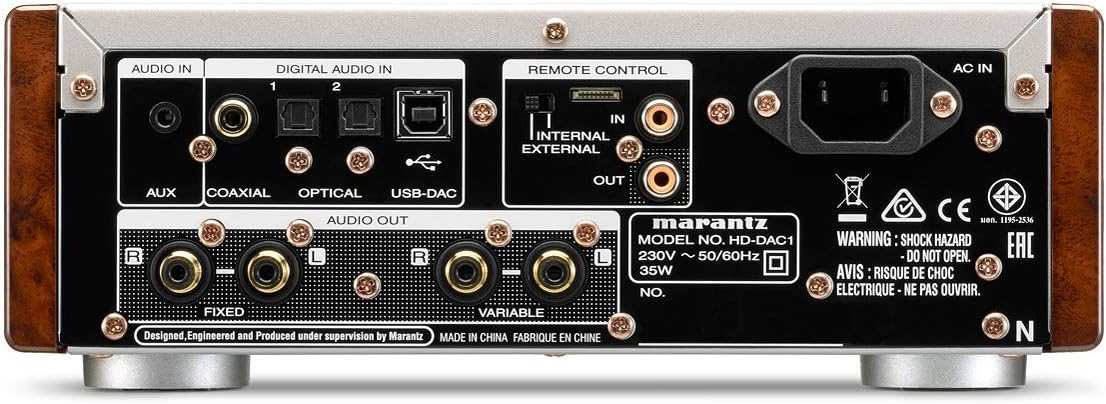
Rear panel of the Marantz HD-DAC1, showing various audio input and output ports, remote control connections, and the AC power inlet.
- AC IN: Connect the supplied power cord to this inlet and then to a wall outlet.
- AUDIO IN (AUX): Connect analog audio sources (e.g., smartphone, portable music player with analog output) using RCA cables.
- DIGITAL AUDIO IN (COAXIAL): Connect digital audio sources (e.g., CD player, gaming console) using a coaxial digital cable.
- DIGITAL AUDIO IN (OPTICAL 1 & 2): Connect digital audio sources using optical digital cables. The unit has two optical inputs.
- DIGITAL AUDIO IN (USB-DAC): Connect your PC or MAC using a USB-B cable for high-resolution audio streaming.
- REMOTE CONTROL (IN/OUT): These ports allow for integration with other Marantz components for synchronized remote control operation.
- AUDIO OUT (FIXED): Use these RCA outputs to connect to a Hi-Fi integrated amplifier or other audio equipment requiring a fixed-level output.
- AUDIO OUT (VARIABLE): Use these RCA outputs to connect directly to a power amplifier or active speakers, allowing the HD-DAC1 to function as a preamplifier with volume control.
Driver Installation (for PC/MAC USB-DAC)
For optimal performance when connecting to a PC or MAC via the USB-DAC input, it may be necessary to install dedicated drivers. These drivers are typically available on the official Marantz support website for the HD-DAC1 model. Follow the instructions provided with the driver download for installation.
Front USB Port (iPod/iPhone Compatible)
The front panel features a USB port specifically designed for connecting iDevices (iPod/iPhone) to play music directly through the HD-DAC1.
Operating Instructions
Power On/Off
- Press the power button on the front panel or the remote control to turn the unit on or off.
- Allow a few seconds for the unit to initialize after powering on.
Input Selection
- Use the "Input Selector" knob or buttons on the remote control to choose your desired audio source (e.g., AUX, Coaxial, Optical 1, Optical 2, USB-DAC, Front USB).
- The selected input will be displayed on the front panel.
Headphone Connection and Gain Control
- Connect your headphones to the headphone output jack on the front panel.
- The HD-DAC1 features a three-level gain control (Low/Mid/High) to match the impedance of your headphones. Adjust this setting to achieve optimal volume and sound quality without distortion.
- Low Gain: Suitable for highly sensitive headphones or in-ear monitors.
- Mid Gain: General purpose setting for most headphones.
- High Gain: Recommended for high-impedance headphones (up to 600 ohms) to ensure sufficient power and dynamics.
- Adjust the volume using the large volume knob on the front panel or the remote control.
Using as a Stereo Preamplifier
- If connected to a power amplifier or active speakers via the VARIABLE AUDIO OUT, the volume knob on the HD-DAC1 will control the output level to these devices.
- Ensure the volume is set to a low level before playing audio to prevent sudden loud sounds.
Maintenance
Cleaning
- Before cleaning, always disconnect the power cord from the wall outlet.
- Wipe the exterior surfaces with a soft, dry cloth.
- Do not use abrasive cloths, thinners, alcohol, or other chemical cleaning agents, as these may damage the finish.
Storage
- If storing the unit for an extended period, disconnect it from the power supply and store it in a cool, dry place.
Safety Precautions
- WARNING: SHOCK HAZARD - DO NOT OPEN. There are no user-serviceable parts inside. Refer all servicing to qualified service personnel.
- Do not expose the unit to rain or moisture.
- Do not block ventilation openings.
- Ensure the power cord is securely connected and not damaged.
Troubleshooting
If you experience issues with your Marantz HD-DAC1, consult the following common problems and solutions before seeking professional service.
| Problem | Possible Cause | Solution |
|---|---|---|
| No power | Power cord not connected or power outlet issue. | Ensure the power cord is securely plugged into the unit and a working wall outlet. Check the power switch. |
| No sound from headphones | Incorrect input selected, volume too low, headphones not properly connected, or incorrect gain setting. | Verify the correct input source is selected. Increase the volume. Ensure headphones are fully plugged in. Adjust the gain setting (Low/Mid/High) to match your headphones. |
| No sound from connected amplifier/speakers (Variable Audio Out) | Incorrect input selected, volume too low, or amplifier/speakers not powered on/configured correctly. | Confirm the correct input source is selected on the HD-DAC1. Increase the volume. Check the power and input selection on your connected amplifier or active speakers. |
| Distorted or poor sound quality | Incorrect gain setting, poor quality cables, or source audio issues. | Adjust the gain setting to prevent clipping or insufficient power. Use high-quality audio cables. Ensure the source audio file or stream is of good quality. For USB-DAC connections, ensure the correct drivers are installed and consider using a high-quality USB cable. |
| USB-DAC not recognized by computer | Missing or incorrect drivers, or USB cable issue. | Install the latest drivers from the Marantz website. Try a different USB port or cable. Restart your computer and the HD-DAC1. |
Specifications
| Feature | Detail |
|---|---|
| Model Number | HDDAC1/N1B |
| Product Dimensions (L x W x H) | 10 x 4 x 10 inches (25.4 x 10.16 x 25.4 cm) |
| Item Weight | 13 pounds (5.9 kg) |
| Power Consumption | 35W (230V ~ 50/60Hz) |
| Compatible Devices | Cellular Phones, Headphones, MP3 Player, PC, Speaker |
| Connector Type | Coaxial, Optical, USB-B, RCA (Analog In/Out) |
| Headphone Impedance Support | Up to 600 ohms (with three-level gain control) |
| DAC Features | High-current, audiophile DAC with audio clock generators and jitter reduction for high-resolution audio playback. |
Warranty & Support
For detailed warranty information, please refer to the warranty card included with your product or visit the official Marantz website. Warranty terms and conditions may vary by region.
For technical support, product registration, or to find authorized service centers, please visit the Marantz support page or contact their customer service directly. Keep your purchase receipt and product serial number handy when contacting support.
Online Support: Marantz Official Support


