
Edifier e3360BT
Edifier Prisma Encore 2.1 Bluetooth Audio System User Manual
Model: e3360BT
1. Introduction
Thank you for purchasing the Edifier Prisma Encore 2.1 Bluetooth Audio System. This manual provides detailed instructions for setting up, operating, and maintaining your new audio system. Designed to complement modern PC monitors and notebooks, the Prisma Encore offers versatile connectivity options including auxiliary input and Bluetooth for seamless audio streaming.
Please read this manual thoroughly before use to ensure proper operation and to maximize your listening experience.
2. Package Contents
Please check the contents of your package. If any items are missing or damaged, contact your local dealer or Edifier customer service.
- Prisma Encore Subwoofer Unit
- Left Satellite Speaker
- Right Satellite Speaker
- Wireless Remote Control
- Power Adapter
- 3.5mm to 3.5mm Audio Cable
- User Manual (this document)
3. Product Overview
Familiarize yourself with the components of your Edifier Prisma Encore system.

Figure 3.1: The complete Edifier Prisma Encore 2.1 Bluetooth Audio System, showcasing the central subwoofer, two satellite speakers, and the wireless remote control. The system features a sleek, modern design in black.

Figure 3.2: Top view of the Prisma Encore subwoofer, highlighting the elegant lighted power control and touch-sensitive controls for volume adjustment and playback. A green LED indicator is visible at the top.
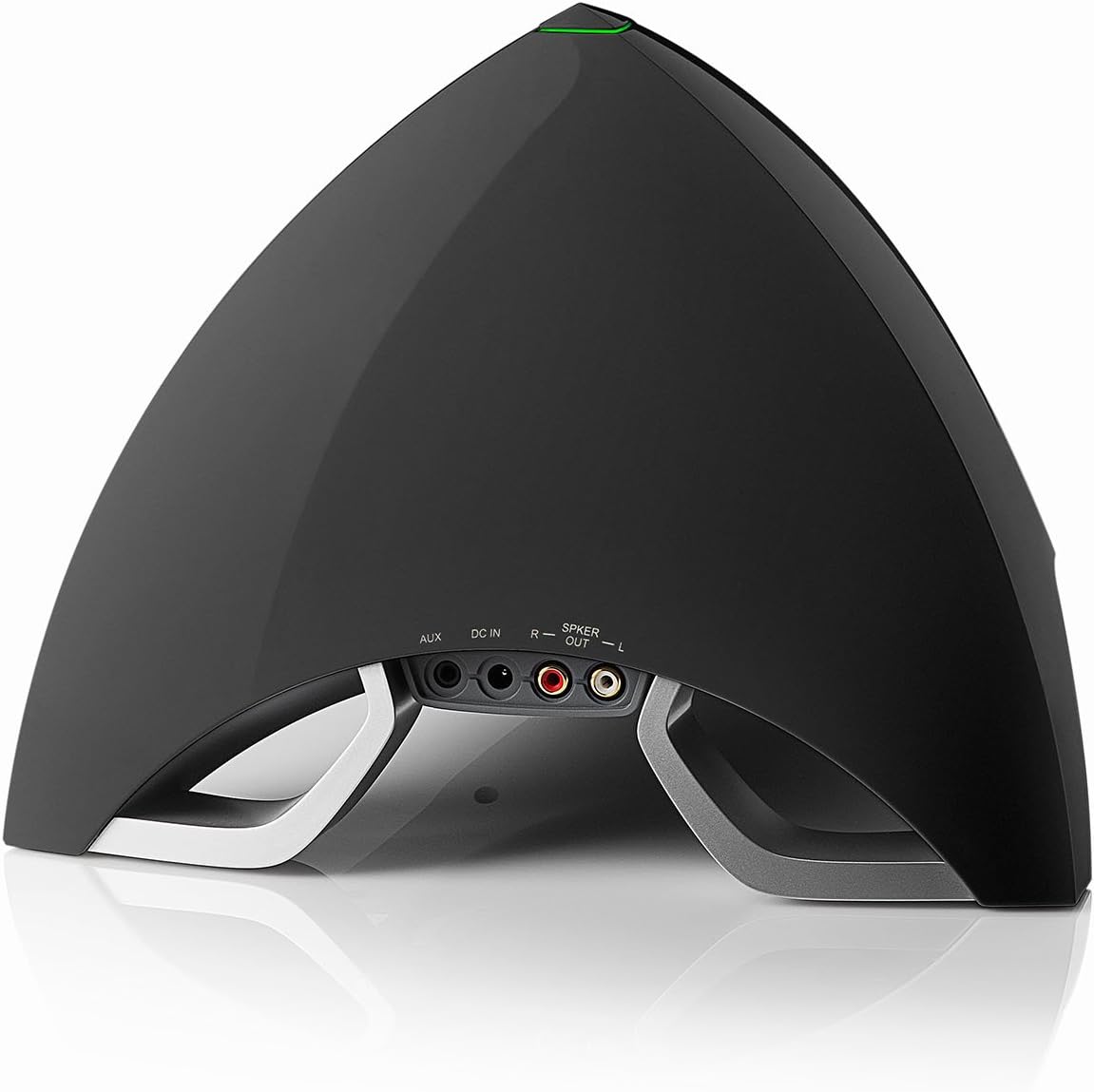
Figure 3.3: Rear view of the Prisma Encore subwoofer, displaying the various connection ports including AUX input, DC IN for power, and speaker output terminals (R and L) for the satellite speakers.

Figure 3.4: Close-up of the compact wireless remote control for the Edifier Prisma Encore system, featuring buttons for power, volume adjustment, and input selection.
4. Setup
Follow these steps to set up your Edifier Prisma Encore audio system.
4.1 Placement
- Place the subwoofer on a stable, flat surface, preferably on the floor or a sturdy desk.
- Position the satellite speakers on either side of your listening area, facing towards you for optimal stereo imaging. Ensure they are placed on a stable surface.
4.2 Connecting the Speakers
- Connect the right satellite speaker cable to the "R" speaker output port on the rear of the subwoofer.
- Connect the left satellite speaker cable to the "L" speaker output port on the rear of the subwoofer.
4.3 Connecting to an Audio Source
The Prisma Encore offers two main ways to connect to an audio source: Bluetooth and Auxiliary (AUX) input.
4.3.1 Bluetooth Connection
- Ensure the Prisma Encore is powered on.
- Press the Bluetooth button on the remote control or the touch control on the subwoofer to select Bluetooth input. The LED indicator on the subwoofer will flash blue, indicating it is in pairing mode.
- On your audio device (smartphone, tablet, computer), enable Bluetooth and search for new devices.
- Select "EDIFIER PRISMA ENCORE" from the list of available devices.
- Once paired, the LED indicator on the subwoofer will turn solid blue. You can now play audio through the system.
4.3.2 Auxiliary (AUX) Input Connection
- Using the provided 3.5mm to 3.5mm audio cable, connect one end to the AUX input port on the rear of the subwoofer.
- Connect the other end of the cable to the headphone jack or audio output port of your audio device (e.g., computer, TV, MP3 player).
- Press the AUX button on the remote control or the touch control on the subwoofer to select AUX input. The LED indicator will turn green.

Figure 4.1: Connection diagram illustrating how to connect the satellite speakers, power adapter, and audio source (via AUX or Bluetooth) to the Edifier Prisma Encore subwoofer.
4.4 Connecting Power
- Connect the power adapter to the "DC IN" port on the rear of the subwoofer.
- Plug the power adapter into a wall outlet.
- The system is now ready for operation.
5. Operating Instructions
5.1 Power On/Off
- To power on the system, press the power button on the wireless remote control or the touch-sensitive power control on top of the subwoofer.
- To power off the system, press the power button again.
5.2 Volume Control
- Using the Remote Control: Press the "+" button to increase volume and the "-" button to decrease volume.
- Using Subwoofer Touch Controls: Swipe your finger along the touch-sensitive strip on top of the subwoofer to adjust volume.
5.3 Input Selection
- Press the input selection button (often labeled with a source icon or "M" for Mode) on the remote control or the touch control on the subwoofer to switch between Bluetooth and AUX input modes.
- The LED indicator on the subwoofer will change color to indicate the selected input:
- Blue: Bluetooth Input
- Green: AUX Input
5.4 Bluetooth Playback Controls (when in Bluetooth mode)
- Play/Pause: Press the play/pause button on the remote control or the touch control on the subwoofer.
- Next Track: Press the next track button on the remote control.
- Previous Track: Press the previous track button on the remote control.
6. Maintenance
Proper care will ensure the longevity and optimal performance of your Edifier Prisma Encore system.
- Cleaning: Use a soft, dry cloth to clean the surfaces of the speakers and subwoofer. Do not use liquid cleaners or aerosol sprays directly on the unit.
- Placement: Avoid placing the system in direct sunlight, near heat sources, or in areas with high humidity or dust.
- Ventilation: Ensure adequate ventilation around the subwoofer to prevent overheating. Do not block any ventilation openings.
- Power Off: If the system will not be used for an extended period, unplug it from the power outlet.
7. Troubleshooting
If you encounter any issues with your Edifier Prisma Encore system, please refer to the following common problems and solutions.
| Problem | Possible Cause | Solution |
|---|---|---|
| No sound |
|
|
| Bluetooth connection fails |
|
|
| Distorted sound |
|
|
| Remote control not working |
|
|
8. Specifications
Detailed technical specifications for the Edifier Prisma Encore 2.1 Bluetooth Audio System.
- Model Number: e3360BT
- Speaker Type: Subwoofer (2.1 system)
- Connectivity Technology: Wireless (Bluetooth), Wired (AUX)
- Audio Output Mode: Stereo
- Speaker Maximum Output Power: 64 Watts
- Recommended Uses: Music
- Compatible Devices: Smartphone, Computer, Tablet, MP3 Player, TV
- Controller Type: Battery Powered (Remote Control)
- Color: Black
- Included Components: Wireless remote
- Item Weight: Approximately 11 Pounds (4.99 kg)
- Product Dimensions (L x W x H): 46.81 x 25.5 x 35.61 cm (18.43 x 10.04 x 14.02 inches)
- Power Source: Battery Powered (for remote), AC Powered (for main unit via adapter)
- Batteries: 1 Lithium Ion battery required (included for remote)
- Mounting Type: Tabletop
- Manufacturer: Edifier USA
- First Available Date: November 15, 2014
9. Warranty and Support
For warranty information and technical support, please refer to the warranty card included with your product or visit the official Edifier website. You can also contact Edifier customer service directly for assistance with product registration, troubleshooting, or service inquiries.
Edifier Official Website: www.edifier.com
Related documentse3360BT


Ask a question about this manual
Ask about setup, troubleshooting, compatibility, parts, safety, or missing instructions. Manuals+ will review the question and use this page’s manual context to help answer it.