
1. Introduction
The Napoleon F60 Fireplace Remote Control provides convenient and effective control over your Napoleon heating appliance. This battery-operated, hand-held device features a clear digital screen for easy temperature monitoring and adjustment. It is designed to simplify the operation of your fireplace, allowing for precise temperature management and on/off control.
Key features include:
- Convenient on/off and thermostat control.
- Battery-operated, hand-held design with an easy-to-read digital screen.
- A 2-degree temperature swing to reduce short on/off cycling (e.g., if set to 70°F, the fireplace activates at 69°F and deactivates at 71°F).
- Ability to monitor room temperature every 60 seconds and adjust accordingly.
2. What's in the Box
Upon unpacking your Napoleon F60 Fireplace Remote Control, ensure all the following components are present:
- Transmitter (Remote Control Unit)
- Receiver Unit
- Wall Mount Cradle
- Wall Faceplate
- Fireplace Mounting Plate
- Slide Switch
- 2 AAA Batteries (for Transmitter)
- 4 AA Batteries (for Receiver)
- User Manual (this document)
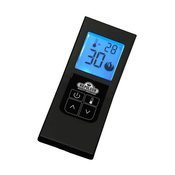
Image: The Napoleon F60 Fireplace Remote Control (transmitter) and its associated receiver unit.
3. Setup and Installation
This section guides you through the physical installation and initial setup of your Napoleon F60 remote control system. Please refer to your fireplace's manual for specific details regarding its millivolt valve connections.
3.1. Connecting the Receiver to the Fireplace
- Identify Fireplace Connections: Locate the existing wall switch wires connected to your fireplace's millivolt gas valve. These are typically labeled TH/TP terminals.
- Disconnect Wall Switch: Carefully unplug the wires from your existing wall switch.
- Connect Receiver Wires: Connect the two wires from the F60 receiver unit to the TH/TP terminals on your fireplace's millivolt gas valve. Ensure a secure connection. The F60 receiver effectively replaces your manual wall switch.
- Install Batteries: Insert the provided 4 AA batteries into the receiver unit and 2 AAA batteries into the transmitter (remote control).
3.2. Initial Pairing
If your remote and receiver are not pre-paired, or if you need to re-pair them:
- Ensure the receiver unit is powered on.
- Locate the reset button on the receiver unit.
- Press and hold the reset button for approximately 5 seconds until an indicator light on the receiver begins to blink.
- Release the button.
- Within a few seconds, press a button on the remote control (transmitter). The indicator light on the receiver should stop blinking and remain solid, indicating successful pairing.
4. Operating Instructions
The Napoleon F60 remote control offers simple and intuitive operation for your fireplace.
4.1. On/Off Control
- Press the Power button (Power icon) once to turn the fireplace ON.
- Press the Power button again to turn the fireplace OFF.
4.2. Thermostat Control
The remote allows you to set a desired room temperature. The fireplace will automatically turn on or off to maintain this temperature.
- Press the Temperature button (Thermometer icon) to activate thermostat mode.
- Use the Up (Up arrow icon) and Down (Down arrow icon) arrow buttons to adjust the desired temperature.
- The digital screen will display the current room temperature and your set temperature.
- The system is designed with a 2-degree temperature swing. For example, if the thermostat is set to 70°F, the fireplace will activate when the room temperature drops to 69°F and turn off when it reaches 71°F.
5. Maintenance
To ensure optimal performance and longevity of your Napoleon F60 Fireplace Remote Control:
- Battery Replacement: Replace the batteries in both the transmitter (2 AAA) and receiver (4 AA) when the display becomes dim or the remote's response is sluggish. Always use fresh, high-quality batteries.
- Cleaning: Wipe the remote control and receiver with a soft, dry cloth. Do not use abrasive cleaners or immerse in water.
- Placement: Ensure the receiver unit is placed in an area that allows for good signal reception and is not directly exposed to excessive heat or moisture. The metal enclosure of the receiver is designed to withstand heat, but extreme conditions should be avoided.
- Antenna: Ensure the external antenna on the receiver is positioned for optimal signal transmission, especially if the receiver is located within a metal fireplace enclosure.
6. Troubleshooting
If you encounter issues with your Napoleon F60 remote control, try the following solutions:
- Remote Not Responding:
- Check and replace batteries in both the transmitter and receiver.
- Ensure the remote and receiver are within operational range and there are no obstructions.
- Re-pair the remote and receiver (refer to Section 3.2).
- Fireplace Not Turning On/Off:
- Verify that the fireplace's pilot light is lit.
- Check the wiring connections between the receiver and the fireplace's millivolt valve.
- Ensure the receiver is powered on and its indicator light is functioning correctly.
- Incorrect Temperature Readings:
- Ensure the remote control is not placed near a direct heat source or in direct sunlight, which can affect its internal thermometer.
- Allow sufficient time for the remote to acclimate to the room temperature.
- Intermittent Signal:
- Adjust the position of the receiver's external antenna for better signal reception.
- Ensure the receiver is not completely enclosed by metal, which can interfere with wireless signals.
If problems persist after attempting these steps, please contact customer support.
7. Specifications
| Feature | Detail |
|---|---|
| Brand | Napoleon |
| Model Name | F60 |
| Model Number | F60 |
| Special Feature | Ergonomic, No Programming Required |
| Color | Black |
| Compatible Devices | Fireplace |
| Connectivity Technology | Infrared |
| Button Quantity | 4 |
| Controller Type | Button Control |
| Battery Type | 2 AAA batteries (Transmitter), 4 AA batteries (Receiver) - included |
| Item Weight | 16 ounces |
| UPC | 767674914827 |
8. Warranty and Support
For warranty information, technical support, or service inquiries, please refer to the official Napoleon product website or contact their customer service department. Keep your purchase receipt as proof of purchase for any warranty claims.

