
1. Introduction
This manual provides essential instructions for the installation, operation, and maintenance of your HGST Ultrastar He8 HUH728080ALE600 8TB SATA 3.5" Hard Disk Drive. Please read this manual thoroughly before using the product to ensure proper functionality and longevity.

Figure 1: HGST Ultrastar He8 8TB Hard Disk Drive. This image displays the front label of the hard drive, indicating its brand (HGST), HelioSeal technology, Ultrastar He8 series, 8TB capacity, and 7200 RPM speed.
2. Safety Information
- Handle the hard drive with care to avoid physical shock, which can cause damage.
- Ensure proper grounding to prevent electrostatic discharge (ESD) when handling the drive.
- Do not expose the drive to extreme temperatures or humidity.
- Always disconnect power before installing or removing the hard drive.
3. Package Contents
Verify that your package contains the following items:
- HGST Ultrastar He8 HUH728080ALE600 8TB Hard Drive
- (Additional accessories, if any, would be listed here by the manufacturer)
4. Setup and Installation
4.1 Physical Installation
- Prepare your system: Power down your computer or server and disconnect the power cable. Open the computer case to access the drive bays.
- Mount the drive: Secure the 3.5-inch hard drive into an available drive bay using appropriate screws or mounting hardware. Ensure the drive is firmly seated to prevent vibration.
- Connect data cable: Connect one end of a SATA data cable to the SATA port on the hard drive and the other end to an available SATA port on your motherboard or host bus adapter (HBA).
- Connect power cable: Connect a SATA power cable from your power supply unit (PSU) to the power connector on the hard drive.
- Close system: Close your computer case and reconnect the power cable.
4.2 Initializing the Drive
After physical installation, the drive needs to be initialized and formatted by your operating system (Windows, Mac OS, Linux) before use. Refer to your operating system's documentation for specific steps on disk management.
4.3 Advanced Format Considerations
This drive supports Advanced Format (AF) with 512e (emulated) and 4Kn (native) models. The HUH728080ALE600 is a 512e model, offering compatibility with current and past operating systems. For optimal performance, ensure your operating system and applications are compatible with Advanced Format drives. Most modern operating systems handle 512e drives without special configuration.

Figure 2: Advanced Format (AF) Diagram. This illustration compares current 512-byte sector design with 4K Advanced Format, highlighting the format efficiency improvement and logical block structure.
5. Operation
The HGST Ultrastar He8 is designed for enterprise-class data storage, offering high capacity and reliability.
5.1 HelioSeal Technology
This drive utilizes HelioSeal technology, which replaces air with helium inside the drive. This reduces air turbulence, enabling a 7-disk design in a traditional 3.5-inch form factor. Benefits include:
- Increased capacity (8TB).
- Lower power consumption (Watts/TB).
- Cooler and quieter operation.
5.2 Data Security Features
The Ultrastar He8 offers data security options to protect information:
- Instant Secure Erase (ISE): Expedites drive redeployment and retirement by quickly erasing data.
- Encryption Models: Hardware-based encryption options, including a Trusted Computing Group (TCG) option with FIPS 140-2 certification, Level 2, for enhanced data protection.

Figure 3: Key Features of HGST Ultrastar He8. This image highlights benefits such as HelioSeal technology for increased capacity and reduced power, TCOptimized for storage efficiency, data security, HGST quality, and Instant Secure Erase.
6. Maintenance
- Environmental Control: Operate the drive within specified temperature and humidity ranges to ensure optimal performance and lifespan.
- Data Backup: Regularly back up critical data to another storage device. No storage device is immune to failure.
- Firmware Updates: Periodically check the HGST (now Western Digital) support website for any available firmware updates for your drive model. Follow manufacturer instructions carefully when performing updates.
7. Troubleshooting
7.1 Drive Not Detected
- Verify that both the SATA data cable and power cable are securely connected to the drive and the motherboard/PSU.
- Check BIOS/UEFI settings to ensure the SATA port is enabled and the drive is recognized.
- Test with different SATA cables and ports if available.
- Ensure the drive is initialized and formatted in your operating system's disk management utility.
7.2 Performance Issues
- Ensure your SATA controller drivers are up to date.
- Check for other system bottlenecks (CPU, RAM, other drives).
- Monitor drive health using SMART (Self-Monitoring, Analysis and Reporting Technology) tools.
7.3 RAID Rebuild Times
The Ultrastar He8 features Rebuild Assist, which can dramatically reduce RAID rebuild times and maintain system performance during the rebuild process. Ensure your RAID controller supports and utilizes this feature for optimal recovery.
8. Specifications
| Feature | Detail |
|---|---|
| Brand | HGST |
| Model Number | HUH728080ALE600 (0F23267) |
| Capacity | 8 TB |
| Interface | SATA 6Gb/s |
| Rotational Speed | 7200 RPM |
| Cache | 128 MB |
| Form Factor | 3.5 Inches |
| Dimensions (LxWxH) | 5.79 x 4 x 1.03 inches |
| Item Weight | 1.43 pounds |
| Operating System Compatibility | Windows, Mac OS, Linux |
| MTBF Rating | 2M hours |
| Technology | HelioSeal |
| Advanced Format | 512e |

Figure 4: HGST Ultrastar He8 Product Highlights. This image summarizes key specifications and features, including capacity, power efficiency, HelioSeal technology, interface options, MTBF, warranty, and data security features.
9. Warranty Information
The HGST Ultrastar He8 HUH728080ALE600 is backed by a 5-year limited warranty. For complete warranty terms, conditions, and registration information, please refer to the official HGST (now Western Digital) website or contact their customer support. Keep your proof of purchase for warranty claims.
10. Support and Contact
For technical support, frequently asked questions, and additional resources, please visit the official HGST or Western Digital support website. You can typically find drivers, firmware updates, and troubleshooting guides there.
Website: www.westerndigital.com/support
11. Additional Product Views
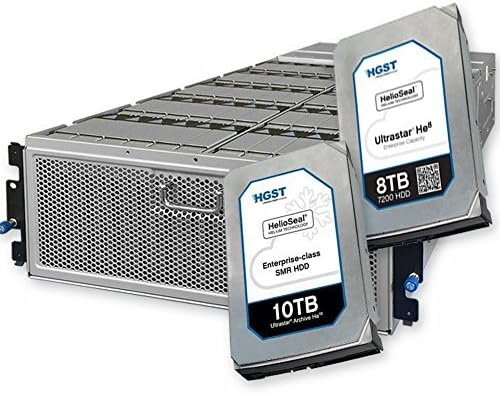
Figure 5: HGST Ultrastar He8 Drives within a Storage Enclosure. This image illustrates multiple HGST Ultrastar He8 hard drives, including an 8TB and a 10TB model, integrated into a server or storage array enclosure, demonstrating their application in data center environments.


