
Introduction
This manual provides comprehensive instructions for the assembly, operation, and maintenance of your Realspace Magellan Collection Corner Desk. Designed to optimize workspace, this desk features a classic cherry finish and integrated storage solutions. Please read this manual thoroughly before beginning assembly or use to ensure proper setup and longevity of your product.
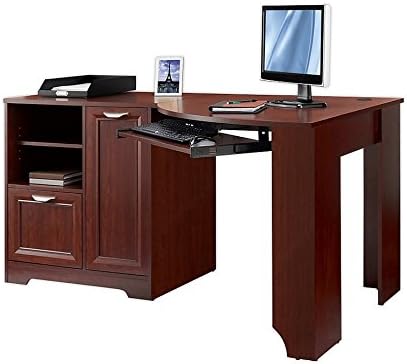
Image: The Realspace Magellan Collection Corner Desk, featuring its corner design, integrated storage cabinet, open shelving, and pull-out keyboard tray. The desk is presented in a classic cherry finish, suitable for home office environments.
Safety Information
- Always follow the assembly instructions carefully to prevent injury or damage to the product.
- This desk is designed for corner placement. Ensure it is properly anchored to the wall for stability, especially if heavy items are placed on it.
- Do not place excessively heavy objects on the edges of the desk to prevent tipping.
- Keep small parts and assembly hardware away from children.
Setup and Assembly
Assembly of the Realspace Magellan Collection Corner Desk is required. While the process is designed to be straightforward, careful attention to the instructions is essential. It is recommended to allocate sufficient time for assembly, as it can take several hours.
- Unpack Components: Carefully remove all parts from the packaging. Verify that all components and hardware listed in the parts list are present and undamaged.
- Organize Hardware: The hardware for this desk is typically labeled by step, simplifying the assembly process. Organize all screws, dowels, and other fasteners according to their corresponding step numbers.
- Follow Step-by-Step Instructions: Adhere strictly to the provided assembly manual. Each step builds upon the previous one. If a step appears unclear, review the diagrams and text before proceeding.
- Seek Assistance: For certain steps, an additional person may be helpful to hold components in place or lift heavier sections.
- Handle with Care: The desk is primarily constructed from particle board. Handle all panels carefully during assembly to avoid chipping or scratching the finish.
- Damaged Parts: In the event of damaged or missing parts upon delivery, contact customer service immediately for replacements. Do not attempt to assemble the desk with damaged components.
Operating Instructions
The Magellan Collection Corner Desk is designed for functional use in a home office environment, offering various features to enhance productivity and organization.
- Extended Desktop Area: Utilize the spacious desktop for multiple monitors, laptops, and other work essentials.
- Closed-Door Cabinet: This cabinet is suitable for housing a CPU tower or storing office supplies. It includes an adjustable and removable shelf, allowing customization of the internal space to fit various items.
- Bottom File Drawer: The integrated file drawer is designed to accommodate both letter- and legal-size files, providing organized document storage.
- Open Adjustable Shelving: The open shelving area is ideal for displaying books, storing software, or organizing other accessories. Adjust the shelf height as needed.
- Keyboard Tray: A pull-out keyboard tray is included for ergonomic keyboard and mouse placement. Note that the size of the tray may not accommodate all gaming setups or larger peripherals.
Maintenance
Proper care and maintenance will help preserve the appearance and functionality of your desk.
- Cleaning: Wipe surfaces regularly with a soft, damp cloth. Avoid abrasive cleaners or harsh chemicals, which can damage the cherry finish.
- Spills: Clean up spills immediately to prevent staining or water damage to the wood finish.
- Surface Protection: Use coasters under beverages and protective pads under hot items or objects with sharp edges to prevent marks and scratches.
- Adhesives: Avoid applying adhesive tapes directly to the desk surface, as removal may cause the finish to peel or lift.
- Sunlight Exposure: Prolonged exposure to direct sunlight can cause fading or discoloration of the finish. Position the desk away from direct sunlight or use window coverings.
Troubleshooting
This section addresses common issues that may arise during assembly or use.
- Assembly Difficulty: If instructions seem unclear, re-examine the diagrams and ensure all parts are oriented correctly. Sometimes, a brief break and fresh perspective can help.
- Damaged or Missing Parts: If any components are damaged or missing upon unboxing, do not proceed with assembly. Contact Realspace customer service for replacement parts.
- Keyboard Tray Issues: If the keyboard tray feels too small or interferes with legroom, consider removing it if it is not essential for your workflow.
- Stability Concerns: Ensure all fasteners are tightened securely. If the desk still feels unstable, verify that it is placed on a level surface and consider anchoring it to a wall as a safety measure.
Specifications
| Feature | Detail |
|---|---|
| Brand | Realspace |
| Model Number | Magellan Collection Corner Desk |
| Product Dimensions (D x W x H) | 39"D x 59.5"W x 30"H |
| Color | Classic Cherry |
| Style | Classic |
| Base Material | Cherry Wood |
| Finish Type | Cherry |
| Special Feature | Adjustable |
| Room Type | Office |
| Recommended Uses | Office |
| Number of Drawers | 1 (File Drawer) |
| Number of Shelves | 2 (Open Shelving) + 1 (Cabinet) |
| Required Assembly | Yes |
| UPC | 735854769949 |
| Manufacturer | CHINA |
Warranty Information
The Realspace Magellan Collection Corner Desk comes with a Limited Warranty. For specific details regarding coverage, duration, and terms, please refer to the warranty documentation included with your purchase or contact Realspace customer support.
Customer Support
For further assistance, replacement parts, or any inquiries not covered in this manual, please contact Realspace customer support. Have your model number and purchase information ready when contacting support.
- Online Support: Visit the official Realspace website for FAQs and support resources.
- Contact Information: Refer to your product packaging or purchase documentation for specific customer service contact details.