
1. Introduction
The On Call Express Blood Glucose Monitoring System is designed for self-testing of blood glucose levels. This system provides reliable, clinically proven accuracy for effective diabetes management. It is intended for in vitro diagnostic use only.
Key features include:
- No Coding Required: Simplifies the testing process.
- Fast Results: Delivers results in as little as 4 seconds.
- Tiny Sample Size: Requires only 0.4 microliters of blood.
- Memory Storage: Stores up to 300 test results with meal markers.
- Audible Fill Detection: Confirms proper sample application.
- Hypo/Hyper Alarms: Alerts for high or low glucose levels.
2. What's in the Box
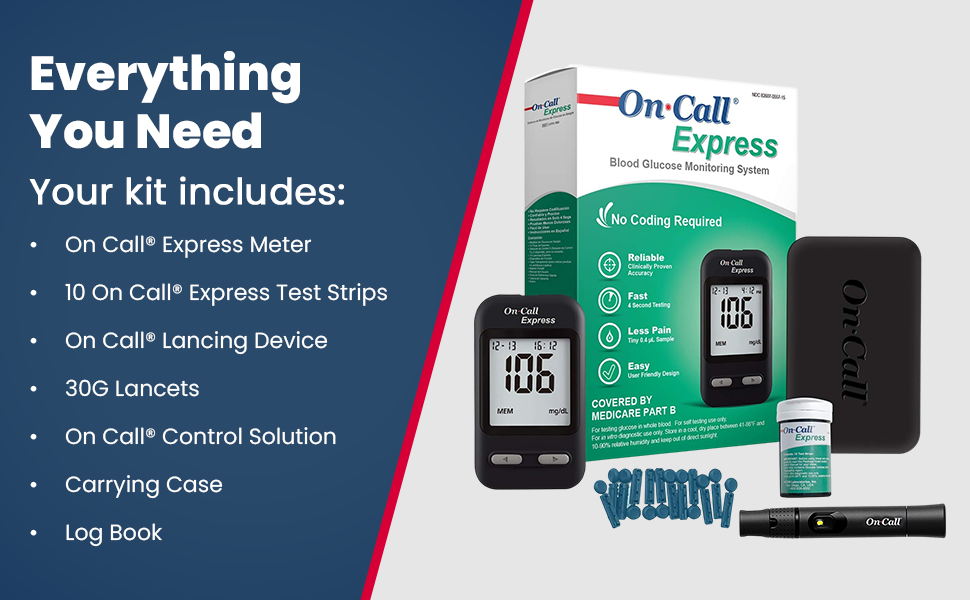
Your On Call Express Diabetes Testing Kit includes the following components:
- On Call Express Blood Glucose Meter
- 10 On Call Express Test Strips
- On Call Lancing Device
- 30G Lancets
- On Call Control Solution
- Carrying Case
- Log Book
3. Setup
3.1. Meter Setup
The On Call Express meter comes with a CR2 battery pre-installed. If the battery needs replacement, open the battery compartment on the back of the meter and insert a new CR2 battery, ensuring correct polarity.
3.2. Lancing Device Preparation
- Unscrew the lancing device cap.
- Insert a new sterile lancet firmly into the lancet holder.
- Twist off the protective cap from the lancet and save it for safe disposal.
- Replace the lancing device cap.
- Adjust the penetration depth by rotating the cap. Start with a lower setting (e.g., 2-3) and adjust as needed for a sufficient blood sample.
- Pull back the cocking barrel until it clicks, indicating it is ready for use.

3.3. Test Strip Insertion
With the meter off, insert a new On Call Express test strip into the test strip port. The meter will automatically turn on and display a blood drop symbol, indicating it is ready for a blood sample.

4. Operating Instructions
4.1. Performing a Blood Glucose Test
- Wash your hands thoroughly with soap and warm water, then dry them completely.
- Prepare the lancing device as described in Section 3.2.
- Insert a test strip into the meter. The meter will turn on and display the blood drop symbol.
- Place the lancing device firmly against the side of your fingertip and press the release button.
- Gently squeeze your finger until a small drop of blood forms.
- Touch the tip of the test strip to the blood drop. The strip will draw the blood into the reaction area. The meter will beep and begin counting down.
- After 4 seconds, your blood glucose result will appear on the display.
- Record your result in the log book provided.
- Eject the used test strip using the ejector button and dispose of it properly.
- Remove the lancet from the lancing device, recap it with its protective cap, and dispose of it in a sharps container.

4.2. Reading and Interpreting Results
Your blood glucose result will be displayed in mg/dL. Consult your healthcare professional for target blood glucose ranges and what your results mean for your personal diabetes management plan.
4.3. Memory Function
The meter automatically stores up to 300 test results with date and time. To review past results, press the 'M' button on the meter. Use the arrow buttons to navigate through the stored readings.
5. Maintenance
5.1. Cleaning the Meter
Wipe the meter exterior with a soft, damp cloth. Do not immerse the meter in water or use harsh cleaning agents. Ensure the test strip port is free of debris.
5.2. Storage
Store the meter and test strips in a cool, dry place between 41-86°F (5-30°C) and 10-90% relative humidity. Keep test strips in their original vial with the cap tightly closed. Do not store in direct sunlight or extreme temperatures. Discard test strips after the expiration date printed on the vial or 6 months after first opening the vial, whichever comes first.
6. Troubleshooting
If you encounter issues with your On Call Express system, refer to the following common problems and solutions:
| Problem | Possible Cause | Solution |
|---|---|---|
| Meter does not turn on | Dead battery or incorrect battery insertion | Replace the CR2 battery, ensuring correct polarity. |
| Error message on display | Refer to the full user manual for specific error codes. Common causes include insufficient blood sample, expired test strip, or meter malfunction. | Repeat the test with a new strip and sufficient blood. If the error persists, contact customer support. |
| Inaccurate results | Improper testing technique, expired strips, or environmental factors. | Review testing steps. Perform a control solution test to check meter and strip accuracy. Ensure proper storage conditions. |
For further assistance, please contact customer support.
7. Specifications
| Feature | Specification |
|---|---|
| Model Number | G115-10D |
| Test Time | 4 Seconds |
| Blood Sample Volume | 0.4 microliters |
| Memory Capacity | 300 test results with date and time |
| Operating Temperature | 5-45°C (41-113°F) |
| Battery Type | 1 x CR2 battery (included) |
| Dimensions (L x W x H) | 4.75" x 2.5" x 6.75" |
| Weight | 9.91 Ounces |

8. Warranty & Support
8.1. Product Warranty
The On Call Express Blood Glucose Monitoring System comes with a 5-year product warranty from the date of purchase. Please retain your proof of purchase for warranty claims.
8.2. Customer Support
For any questions, technical assistance, or troubleshooting not covered in this manual, please contact On Call customer support. They offer 24/7 support.
Customer Support Phone: 1-800-838-9502
You can also visit the On Call Store on Amazon for more information and resources.


