
Lasko 2711
Lasko 2711 37" Tower Fan with Remote Control Instruction Manual
Model: 2711 | Brand: Lasko
Introduction
Thank you for choosing the Lasko 2711 37" Tower Fan. This manual provides essential information for the safe and efficient operation of your new fan. This tower fan features 3 quiet speeds, a 7-hour auto-off timer, widespread oscillation, and a multi-function remote control for enhanced comfort and convenience. Its slim, space-saving design is ideal for various indoor settings.
Important Safety Information
Always prioritize safety when operating electrical appliances. This fan is equipped with the Lasko trusted safety plug, known as The Blue Plug. This feature is designed to cut off electric current to the fan if it detects a potentially hazardous electrical fault in the motor or power supply, ensuring peace of mind during use. Always ensure the fan is placed on a stable, flat surface and keep it away from water or excessive moisture.

Image: Close-up of the Lasko 2711 Tower Fan's power cord featuring The Blue Plug, highlighting its enhanced safety technology.
Package Contents
- Tower Fan
- Remote Control
- User Manual
Setup
Your Lasko 2711 Tower Fan requires simple base assembly. Follow these steps to get your fan ready for use:
- Carefully remove all components from the packaging.
- Assemble the fan base by twisting the two halves together.
- Thread the power cord through the center of the assembled base.
- Align the fan body with the base and twist to securely lock it in place. Ensure the cord is properly routed through the base's underside.
- Place the fan on a stable, level surface near a 120V AC outlet.

Image: The Lasko 2711 37" Tower Fan with its remote control, ready for use after simple assembly.
Operating Instructions
Your Lasko 2711 Tower Fan can be operated using the control panel on top of the unit or the included multi-function remote control.
Control Panel & Remote Functions
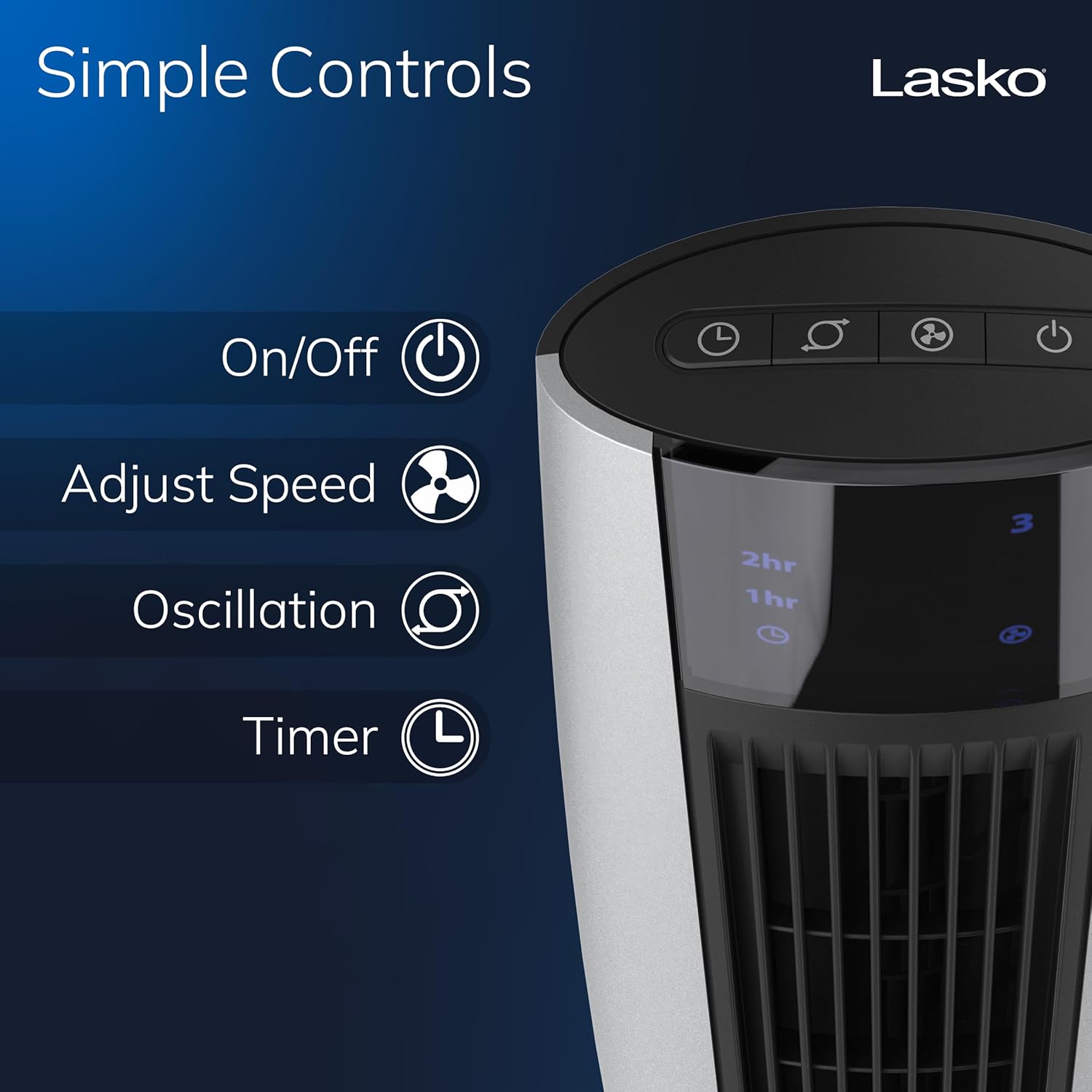
Image: Close-up of the Lasko 2711 Tower Fan's top control panel, showing buttons for On/Off, Adjust Speed, Oscillation, and Timer.
- Power On/Off: Press the power button (U) to turn the fan on or off.
- Speed Adjustment: Cycle through 3 quiet speeds (low, medium, high) by pressing the speed button (F).
- Oscillation: Activate or deactivate the widespread oscillation feature by pressing the oscillation button (O). This distributes air evenly across the room.
- Timer: Set the auto-off timer for up to 7 hours by pressing the timer button (L). The fan will automatically turn off after the set duration.
Remote Control
The multi-function remote control allows you to operate all fan functions from a distance. It also features convenient on-board storage on the back of the fan to keep it organized and within reach.

Image: The Lasko 2711 Tower Fan with its remote control stored in the integrated slot on the back of the unit.
Maintenance
To ensure optimal performance and longevity of your Lasko 2711 Tower Fan, regular cleaning is recommended. The manufacturer suggests hand washing for care. Always unplug the fan before cleaning. Use a soft cloth to wipe down the exterior surfaces. Do not immerse the fan in water.
Troubleshooting
If your fan is not operating as expected, please check the following:
- Ensure the fan is securely plugged into a working 120V AC outlet.
- Verify that The Blue Plug has not tripped. If it has, reset it according to the instructions on the plug.
- Check if the timer function is activated, which might cause the fan to turn off unexpectedly.
- For any persistent issues, refer to the detailed user manual included in your package or contact Lasko customer support.
Specifications
| Brand | Lasko |
| Model Name | Lasko 2711 34" Tower Fan With Remote Control |
| Item Model Number | 2711 |
| Size | 37 Inch |
| Color | Black |
| Product Dimensions | 11.4"D x 11.5"W x 34"H |
| Item Weight | 8.2 Pounds |
| Power Source | AC |
| Wattage | 54 watts |
| Voltage | 120 Volts |
| Number of Power Levels | 3 |
| Control Method | Remote |
| Special Feature | 3 Speeds, Widespread Oscillation, Built-In Carry Handle, Remote control |
| Indoor/Outdoor Usage | Indoor |
| UPC | 046013450166 |
Warranty and Support
The Lasko 2711 37" Tower Fan is backed by a 1-year limited warranty for trusted performance. For support, please refer to the contact information provided in your included user manual or visit the official Lasko website.
Related documents2711


Ask a question about this manual
Ask about setup, troubleshooting, compatibility, parts, safety, or missing instructions. Manuals+ will review the question and use this page’s manual context to help answer it.