Roccat Kone Pure Polar Blue Gaming Mouse User Manual
Model: ROC-11-700-B
Introduction
Welcome to the user manual for your Roccat Kone Pure Polar Blue Gaming Mouse. This high-performance gaming mouse is engineered with a Turbo Core V2 Processor and an 8200 DPI Pro Aim R3 Laser Sensor, designed to provide precision and responsiveness for an optimal gaming experience. This manual will guide you through the setup, operation, maintenance, and troubleshooting of your device.
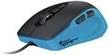
Image: Roccat Kone Pure Polar Blue Gaming Mouse. This image displays the mouse from a top-down, slightly angled perspective, showcasing its ergonomic design and blue accents.
Setup
Follow these steps to set up your Roccat Kone Pure Polar Blue Gaming Mouse:
- Unpack the Mouse: Carefully remove the mouse and any accompanying documentation from its packaging.
- Connect to PC: Plug the USB connector of the Roccat Kone Pure mouse into an available USB port on your computer.
- Driver Installation: Your operating system (Windows/macOS) should automatically detect the mouse and install basic drivers. For full functionality and customization, it is recommended to download and install the latest drivers and software suite from the official Roccat website.
- Software Configuration: Once the software is installed, launch it to configure DPI settings, button assignments, macro functions, and lighting effects according to your preferences.
Operating Instructions
The Roccat Kone Pure Polar Blue Gaming Mouse offers advanced features for enhanced control and precision. Familiarize yourself with its core functions:
- DPI Adjustment: Utilize the dedicated DPI buttons (usually located near the scroll wheel) to cycle through pre-set DPI levels. The 8200 DPI Pro Aim R3 Laser Sensor allows for highly precise tracking.
- Programmable Buttons: The mouse features multiple programmable buttons. Use the Roccat software to assign custom functions, macros, or key binds to these buttons for quick access during gameplay or productivity tasks.
- Scroll Wheel: The robust 2D Titan Wheel provides tactile feedback for precise scrolling and can also be programmed for additional functions.
- Easy-Shift[+]: This technology allows you to assign a secondary function to each button, effectively doubling the number of available commands. Activate Easy-Shift[+] via a designated button (configurable in software) to access these secondary functions.
- Tracking & Calibration: The Pro Aim R3 Laser Sensor offers advanced tracking capabilities. Use the software to calibrate the sensor to your specific mouse pad surface for optimal performance.
Maintenance
Proper maintenance ensures the longevity and optimal performance of your gaming mouse:
- Cleaning:
- Use a soft, dry, lint-free cloth to wipe down the mouse surface regularly.
- For stubborn dirt, slightly dampen the cloth with water or a mild, non-abrasive cleaner. Avoid harsh chemicals.
- Use a cotton swab or compressed air to clean around the scroll wheel and sensor lens. Ensure no debris obstructs the sensor.
- Cable Care: Avoid sharp bends or excessive pulling on the USB cable to prevent damage.
- Storage: When not in use, store the mouse in a clean, dry environment away from extreme temperatures.
Troubleshooting
If you encounter issues with your Roccat Kone Pure Polar Blue Gaming Mouse, refer to the following common solutions:
| Problem | Possible Solution |
|---|---|
| Mouse not responding |
|
| Inaccurate tracking or cursor jumpiness |
|
| Buttons not working or unresponsive |
|
If problems persist, contact Roccat customer support for further assistance.
Specifications
| Feature | Detail |
|---|---|
| Model Name | Kone Pure Polar Blue |
| Model Number | ROC-11-700-B |
| Sensor | Pro Aim R3 Laser Sensor |
| DPI | Up to 8200 DPI |
| Processor | Turbo Core V2 Processor |
| Polling Rate | 1000Hz (1ms response time) |
| Buttons | 7 programmable buttons + 2D Titan Wheel |
| Connectivity | Wired USB |
| Hardware Platform | PC |
| Date First Available | November 11, 2014 |
Warranty and Support
For detailed warranty information and technical support, please refer to the official Roccat website or the warranty card included with your product. Roccat provides comprehensive support for its products.
- Official Website: Visit www.roccat.com for drivers, software, FAQs, and support resources.
- Customer Service: Contact Roccat customer service directly for assistance with product issues or warranty claims.


