
1. Introduction
The Bose CineMate 130 Home Theater System is designed to provide clear, spacious sound for your entertainment. This manual provides essential information for setting up, operating, and maintaining your system.
What's in the Box
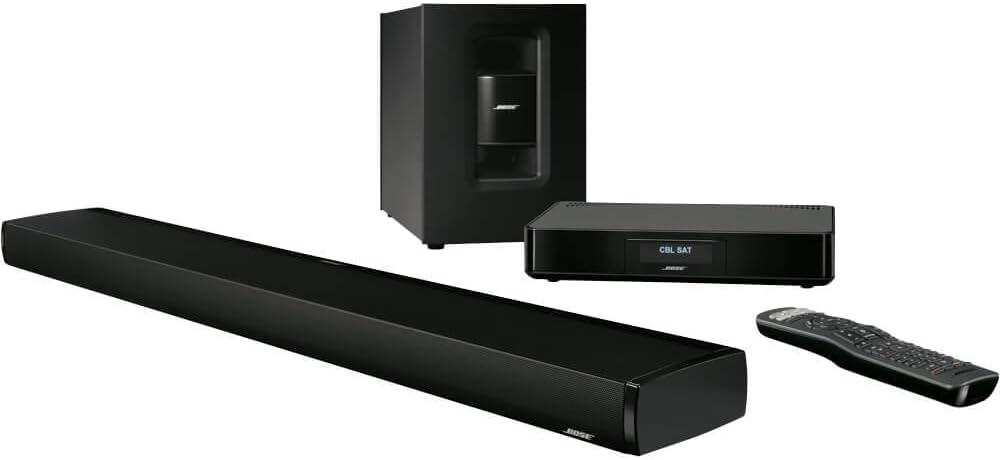
- CineMate 130 soundbar speaker
- Wireless Acoustimass module
- Control console
- Universal remote control
- HDMI cable
2. Setup
2.1 Component Placement
Proper placement of your system components is crucial for optimal sound performance.
- Soundbar Speaker: Place the soundbar in front of your TV, ensuring it is not obstructed. It can be placed on a tabletop or wall-mounted.
- Wireless Acoustimass Module: The wireless design allows flexible placement. Position it anywhere in the room, even out of sight, within 30 feet of the control console for optimal bass performance.
- Control Console: Place the control console near your TV and other entertainment devices for easy connection.

2.2 Connections
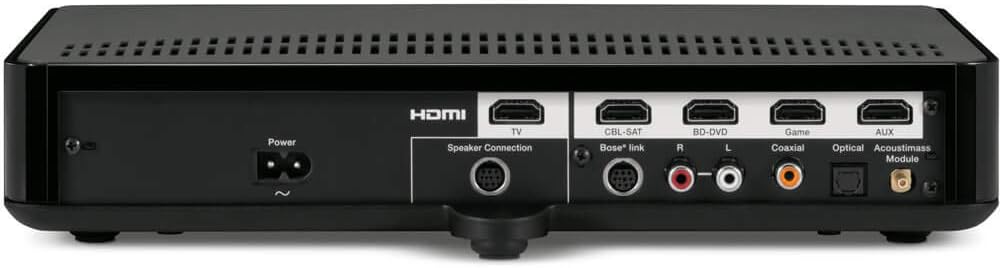
- Connect the soundbar to the control console using the provided speaker cable.
- Connect your TV to the control console's HDMI OUT (TV) port using the supplied HDMI cable.
- Connect your entertainment devices (e.g., Blu-ray player, game console, cable box) to the HDMI IN ports on the control console. The console features 4 HDMI inputs.
- Connect the power cords to the soundbar, Acoustimass module, and control console, then plug them into power outlets.
2.3 ADAPTiQ Audio Calibration
The ADAPTiQ audio calibration system customizes the system's sound to your room's unique acoustics, ensuring optimal performance. Follow the on-screen instructions provided by the system to perform this calibration using the included headset.
Video 1: An overview of the Bose CineMate 130 Home Theater System, demonstrating its features and setup.
3. Operating Your System
3.1 Universal Remote Control
The universal remote control allows you to manage your CineMate 130 system and most connected entertainment devices. Refer to the remote's user guide for programming instructions for specific devices.

3.2 Input Selection
Use the source buttons (e.g., CBL-SAT, BD-DVD, GAME, AUX) on the universal remote to switch between connected devices. The control console's display will indicate the currently selected source.
3.3 SoundTouch Music Streaming (Optional)
If you have purchased the optional SoundTouch adapter, you can stream music wirelessly over your home's Wi-Fi network. Follow the instructions provided with the SoundTouch adapter for setup and operation. This allows access to popular music services and internet radio stations.
4. Maintenance
To ensure the longevity and optimal performance of your Bose CineMate 130 system, follow these maintenance guidelines:
- Cleaning: Use a soft, dry cloth to clean the surfaces of the soundbar, Acoustimass module, and control console. Avoid using liquid cleaners or solvents.
- Ventilation: Ensure adequate ventilation around all components to prevent overheating. Do not block any ventilation openings.
- Cable Management: Keep cables organized and free from kinks or excessive tension to prevent damage.
5. Troubleshooting
If you encounter issues with your CineMate 130 system, refer to the following common troubleshooting steps:
- No Sound:
- Check all cable connections, especially the HDMI cable between the control console and TV, and the speaker cable to the soundbar.
- Ensure the correct input source is selected on the control console.
- Verify that the system volume is not muted or set too low.
- No Bass from Acoustimass Module:
- Confirm the Acoustimass module is powered on and within wireless range of the control console.
- Check for any wireless interference from other devices.
- Remote Control Not Working:
- Replace the batteries in the universal remote.
- Ensure there are no obstructions between the remote and the control console.
- Reprogram the remote if it has lost its settings for specific devices.
For more detailed troubleshooting, please consult the full product manual or Bose customer support.
6. Specifications
| Feature | Detail |
|---|---|
| Model Name | 625907-1300 |
| Speaker Type | Soundbar |
| Special Feature | Radio |
| Compatible Devices | Television, Laptop |
| Surround Sound Channel Configuration | 1.0 |
| Color | Black |
| Is Waterproof | FALSE |
| Warranty Type | Limited |
| Number of Items | 2 |
| Control Method | Remote |
| Wireless Communication Technology | Wi-Fi |
| Power Source | Corded Electric |
| Audio Driver Type | Dynamic Driver |
| Subwoofer Connectivity Technology | Wireless |
| Number Of Circuits | 2 |
| Number of Power Levels | 2 |
| Series Number | 130 |
| UPC | 017817650014 |
| Style | 130 Series |
| Indoor/Outdoor Usage | Indoor |
| Manufacturer | Bose Corporation |
| Shape | rectangular |
| Set Name | Home Theater System |
| Product Dimensions | 12 x 39.88 x 21.31 inches |
| Item Weight | 37.6 pounds |
| Item model number | 625907-1300 |
| Brand | Bose |
| Speaker Maximum Output Power | 120 Watts |
| Connectivity Technology | HDMI, Wi-Fi |
| Audio Output Mode | Stereo |
| Mounting Type | Floor Standing, Tabletop Mount, Wall Mount |
7. Warranty and Support
Warranty Information
The Bose CineMate 130 Home Theater System comes with a Limited Warranty. Please refer to the warranty documentation included with your product for specific terms and conditions, including coverage details and duration.
Customer Support
For further assistance, technical support, or service inquiries, please visit the official Bose support website or contact their customer service. Keep your product model number (CineMate 130, 625907-1300) and serial number handy when contacting support.