
SMANOS W100
SMANOS W100 Smart Home Alarm System User Manual
Model: W100 | Brand: SMANOS
Introduction
Thank you for choosing the SMANOS W100 Smart Home Alarm System. This manual provides detailed instructions for the installation, operation, and maintenance of your new security system. Please read this manual thoroughly before use to ensure proper functionality and safety.
Product Overview
The SMANOS W100 is a state-of-the-art dual-network (Wi-Fi and PSTN) alarm system designed for comprehensive home and office security. Its sleek design integrates seamlessly into any modern environment, featuring a responsive touch panel and clear LED display for intuitive control.
- Elegant design with touch panel and LED display.
- Dual network security: Wi-Fi as primary, PSTN (landline) for backup.
- App notifications and phone calls for alarm alerts.
- Tamper protection and line-cut alarm features.

Figure 1: Complete SMANOS W100 Smart Home Alarm System kit, showcasing the main control panel, a passive infrared (PIR) motion detector, a door/window contact sensor, and two remote controls.
Package Contents
Verify that all items are present in your package:
- 1 x SMANOS W100 Control Panel
- 1 x Wireless PIR Motion Detector
- 1 x Wireless Door/Window Contact Sensor
- 2 x Wireless Remote Controls
- 1 x Power Adapter
- 1 x Telephone Line Cable
- Mounting Hardware
- User Manual (this document)

Figure 2: An organized display of all components included in the SMANOS W100 package, ensuring all parts are accounted for before installation.
Setup
Initial Setup of the Control Panel
- Power Connection: Connect the power adapter to the W100 control panel and plug it into a standard electrical outlet. The LED display will illuminate.
- PSTN Connection (Optional): If you wish to use the landline backup, connect the provided telephone line cable from your wall jack to the PSTN port on the control panel.
- Wi-Fi Configuration: Download the SMANOS app from the App Store (iOS) or Google Play Store (Android). Follow the in-app instructions to connect the W100 to your home Wi-Fi network. This typically involves entering your Wi-Fi password and confirming the connection on the device.

Figure 3: The SMANOS W100 control panel shown alongside a smartphone running the dedicated mobile application, illustrating the system's Wi-Fi and phone line capabilities and app control.
Sensor Pairing
All included sensors are pre-paired with the control panel. If you need to add new sensors or re-pair existing ones:
- Access the 'Add Device' or 'Pairing' section within the SMANOS app or directly on the control panel's menu.
- Activate the sensor (e.g., open the door/window for the contact sensor, or trigger the motion sensor).
- The control panel will confirm successful pairing. Assign a name to the sensor for easy identification (e.g., "Front Door," "Living Room PIR").

Figure 4: A close-up view of the SMANOS wireless door/window contact sensor, consisting of two parts that separate when a door or window is opened, triggering an alarm.
Operation
Arming and Disarming
The system can be armed or disarmed using the control panel, remote controls, or the SMANOS app.
- Arm (Away Mode): Press the Lock button on the control panel or remote, or select 'Arm' in the app. All sensors will be active.
- Home Arm (Stay Mode): Press the Partial Lock button (often depicted as a house icon) on the control panel or remote, or select 'Home Arm' in the app. Perimeter sensors (e.g., door/window) will be active, while internal motion sensors may be bypassed.
- Disarm: Enter your PIN on the control panel, press the Unlock button on the remote, or select 'Disarm' in the app.
- SOS/Panic: Press the SOS button on the control panel or remote to trigger an immediate alarm.

Figure 5: A detailed view of the SMANOS W100 control panel's touch-sensitive keypad and LED display, showing the numerical input and status icons for arming, disarming, and SOS functions.
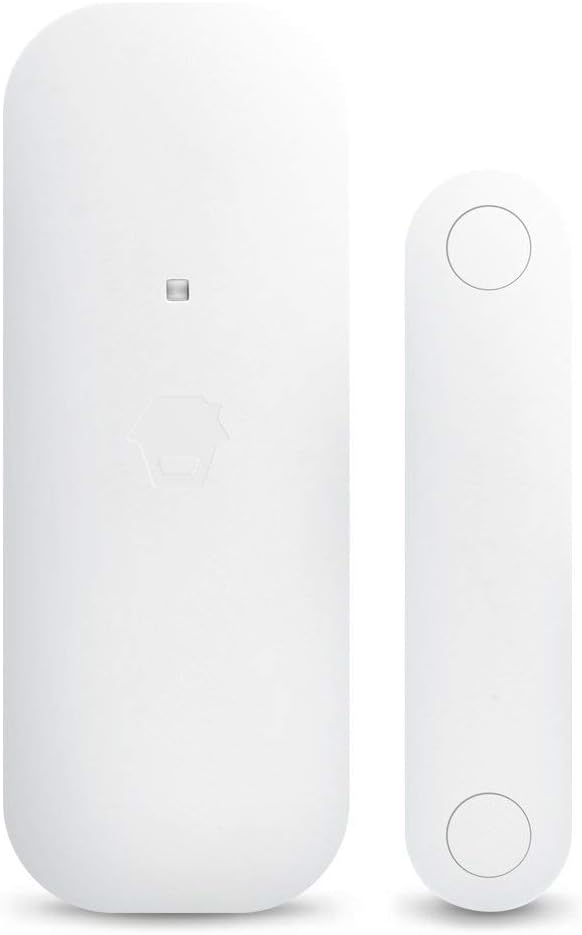
Figure 6: Two SMANOS remote controls, each featuring buttons for arming (lock), disarming (unlock), home arm (house icon), and an SOS panic button for quick access to alarm functions.
App Control
The SMANOS app provides full control over your alarm system from anywhere with an internet connection. You can arm/disarm, check system status, receive notifications, and manage settings.
- Notifications: Receive instant push notifications on your smartphone when an alarm is triggered, a sensor is activated, or the system status changes.
- Remote Management: Arm or disarm your system remotely, view event logs, and manage connected devices.
- User Management: Add or remove authorized users and assign specific access permissions.
Maintenance
Battery Replacement
Sensors and remote controls are battery-powered. The system will notify you via the app or control panel when a battery is low. Replace batteries promptly to ensure continuous protection.
- PIR Motion Detector: Typically uses AA or AAA batteries. Refer to the sensor's compartment for specific battery type.
- Door/Window Sensor: Often uses coin cell batteries (e.g., CR2032).
- Remote Control: Usually uses coin cell batteries.
Always use new, high-quality batteries and dispose of old batteries responsibly.
Cleaning
Wipe the control panel and sensors with a soft, dry cloth. Do not use abrasive cleaners or solvents, as they may damage the surfaces.
Troubleshooting
| Problem | Possible Cause | Solution |
|---|---|---|
| System not connecting to Wi-Fi | Incorrect Wi-Fi password; Router too far; Network issues. | Double-check password; Move control panel closer to router; Restart router. |
| Sensors not triggering alarm | Low battery; Sensor out of range; Sensor not paired correctly. | Replace battery; Relocate sensor closer to control panel; Re-pair sensor. |
| No phone call alerts | PSTN line disconnected; Incorrect phone numbers programmed. | Check PSTN cable connection; Verify programmed phone numbers in app/panel. |
| App not receiving notifications | Phone notification settings disabled; App not running in background; Internet connectivity issues. | Enable app notifications in phone settings; Ensure app is running; Check phone's internet connection. |
Specifications
| Feature | Detail |
|---|---|
| Brand | SMANOS |
| Model | W100 |
| Color | White |
| Power Source | Battery Powered (Main unit has power adapter, sensors are battery) |
| Compatible Devices | Smartphone (iOS, Android) |
| Item Dimensions (LxWxH) | 14.6 x 26 x 17 cm |
| Connectivity Technology | Wireless (Wi-Fi, RF for sensors) |
| Installation Type | Wireless, DIY Installation |
| Alert Type | Motion Only (for PIR sensor) |
| Item Weight | 613 grams |
| Voltage | 3.7 Volts |
Warranty and Support
SMANOS products are designed for reliability and performance. For warranty information, please refer to the warranty card included in your product packaging or visit the official SMANOS website. For technical support, product registration, or frequently asked questions, please visit the SMANOS support page or contact their customer service directly.
Online Resources:
- Official SMANOS Website: www.smanos.com
- Support Page: Refer to the website for specific support contact details and FAQs.
Related documentsW100


Ask a question about this manual
Ask about setup, troubleshooting, compatibility, parts, safety, or missing instructions. Manuals+ will review the question and use this page’s manual context to help answer it.