1. Important Safety Information
Please read this manual carefully before installation and retain it for future reference. Improper installation or use can lead to electrical shock, fire, or personal injury.
- Electrical Safety: Always turn off the main power supply at the circuit breaker before beginning any electrical work. Ensure all wiring connections are secure and comply with local electrical codes. If you are unsure about electrical installation, consult a qualified electrician.
- Mounting: Ensure the ceiling structure can support the weight of the chandelier (approximately 18.5 pounds). Use appropriate mounting hardware for your ceiling type.
- Handling Crystals: Crystals are fragile. Handle them with care to prevent breakage. It is recommended to wear the provided gloves to avoid fingerprints and smudges.
- Bulb Type: Use only GU10 bulbs, maximum 50 Watts per bulb. Do not exceed the recommended wattage.
- Indoor Use Only: This fixture is designed for indoor use in dry locations. Do not expose to moisture or outdoor elements.
2. Package Contents
Verify that all components are present and undamaged before proceeding with installation.
- Chandelier Base (Metal)
- K9 Crystal Balls and Small Crystals (Pre-strung on stainless steel wires)
- Mounting Hardware (Screws, wire nuts, mounting bracket)
- Gloves
- Installation Instruction Manual
Note: GU10 bulbs are not included and must be purchased separately.
3. Specifications
| Feature | Specification |
|---|---|
| Model Name | 2 Balls Raindrop Chandelier |
| Dimensions (Approx.) | 15 inches (Diameter) x 40 inches (Height) |
| Material | K9 Crystal, Metal |
| Light Fixture Form | Close to Ceiling / Flush Mount |
| Bulb Base | GU10 |
| Number of Light Sources | 6 |
| Max Wattage per Bulb | 50 Watts |
| Voltage | 110-120 Volts (AC) |
| Finish Type | Polished |
| Item Weight | 18.52 Pounds |
| Assembly Required | Yes |
4. Setup & Installation
Installation requires basic electrical knowledge. If you are not comfortable performing electrical work, please consult a certified electrician.
4.1 Pre-Installation
- Turn off Power: Locate the circuit breaker controlling the light fixture's location and turn off the power. Verify power is off using a voltage tester.
- Unpack Contents: Carefully unpack all components and lay them out on a clean, soft surface to prevent scratches. Identify all parts against the package contents list.
- Prepare Tools: Gather necessary tools, which typically include a screwdriver, wire strippers, electrical tape, and a ladder.
4.2 Mounting the Fixture Base
- Remove Old Fixture: If replacing an existing fixture, carefully remove it and disconnect its wiring.
- Attach Mounting Bracket: Secure the mounting bracket to the electrical junction box in the ceiling using the provided screws. Ensure it is firmly attached.
- Electrical Connections: Connect the chandelier's wires to your household wiring. Typically, connect the black wire from the fixture to the black wire from the ceiling (live), the white wire from the fixture to the white wire from the ceiling (neutral), and the ground wire from the fixture to the ground wire from the ceiling (or junction box). Use wire nuts to secure connections and wrap with electrical tape for added safety.
- Secure Base: Carefully lift the chandelier base and align it with the mounting bracket. Secure the base to the bracket using the provided screws. Ensure the base is flush against the ceiling.
4.3 Attaching Crystals
This step is time-consuming but crucial for the chandelier's appearance. It is recommended to wear the provided gloves to prevent fingerprints.
- Identify Crystal Strands: The crystal strands are typically labeled or organized by length. Refer to the included diagram for the correct placement of each strand.
- Attach Strands: Each crystal strand has a hook at one end. Carefully attach each hook to the corresponding hole on the chandelier base. Work systematically, perhaps from the longest strands to the shortest, or as indicated in the diagram.
- Handle with Care: Avoid tangling the strands. If working with multiple people, one person can untangle and hand strands to another person on a ladder.
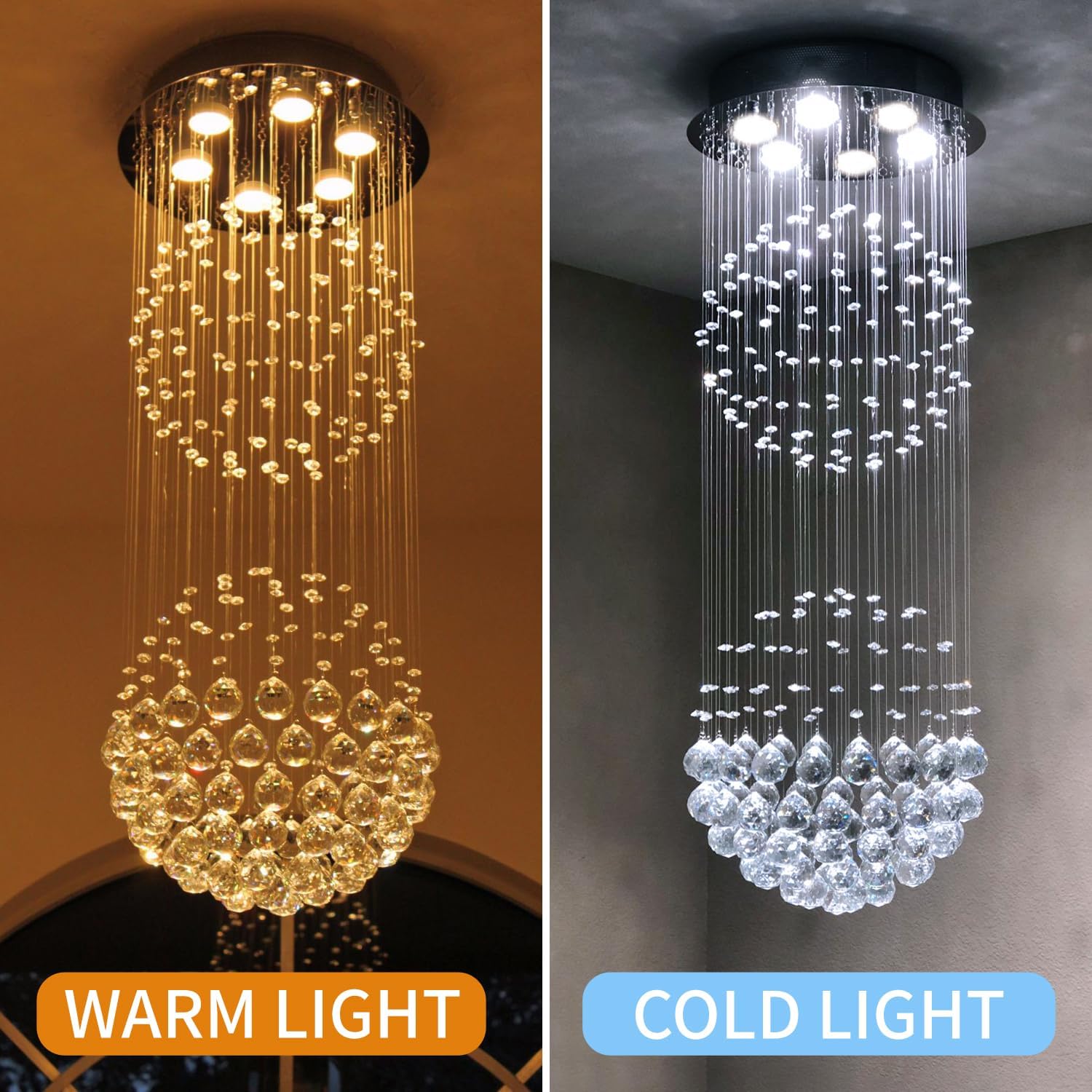
Figure 1: Overview of chandelier components and dimensions (15 inches diameter, 40 inches height).

Figure 2: Detailed view of the K9 crystal elements and the metal base.
5. Operating Instructions
Once installed, operating the chandelier is straightforward.
- Install Bulbs: Insert GU10 bulbs (not included) into the sockets in the chandelier base. Ensure they are securely twisted into place.
- Restore Power: Turn the main power supply back on at the circuit breaker.
- Turn On: Use your wall switch to turn the chandelier on and off.

Figure 3: The chandelier's appearance with different light color temperatures (warm vs. cold light).
6. Maintenance
6.1 Cleaning
- Power Off: Always turn off the power to the fixture before cleaning.
- Dusting: Gently dust the metal parts and crystals with a soft, dry, lint-free cloth.
- Spot Cleaning: For stubborn spots on crystals, use a slightly damp cloth with a mild glass cleaner. Avoid spraying cleaner directly onto the fixture; instead, spray onto the cloth.
- Avoid Abrasives: Do not use abrasive cleaners or materials, as they can scratch the finish or crystals.
6.2 Bulb Replacement
- Power Off: Turn off the power at the circuit breaker and allow bulbs to cool completely before handling.
- Remove Old Bulb: Gently twist and pull the old GU10 bulb from its socket.
- Insert New Bulb: Align the pins of the new GU10 bulb with the socket holes and push gently, then twist to secure.
- Restore Power: Turn the power back on at the circuit breaker.
7. Troubleshooting
If you encounter issues, refer to the following common problems and solutions.
| Problem | Possible Cause | Solution |
|---|---|---|
| Light does not turn on | No power, loose wiring, faulty bulb | Check circuit breaker. Ensure all wire connections are secure. Replace bulb. |
| Light flickers | Loose bulb, incompatible dimmer, faulty wiring | Tighten bulb. Ensure dimmer is compatible with GU10 bulbs. Check wiring connections. |
| Crystals appear dull or smudged | Dust, fingerprints | Clean crystals as per maintenance instructions. |
If problems persist after attempting these solutions, please contact customer support.
8. Warranty and Support
This CRYSTOP chandelier comes with a manufacturer's warranty. For specific warranty details, please refer to the documentation included with your purchase or contact CRYSTOP customer service.
For technical support, replacement parts, or any questions regarding your product, please visit the official CRYSTOP store on Amazon or contact their customer service directly.
CRYSTOP Store Link: Visit the CRYSTOP Store