
Introduction
This manual provides essential information for the proper use and care of your Minolta Hi-matic AF2-M 35mm film camera. Please read these instructions carefully before operating the camera to ensure optimal performance and longevity.
Setup
1. Battery Installation
The Minolta Hi-matic AF2-M requires batteries for operation, which are not included with the camera. Locate the battery compartment, typically on the bottom or side of the camera body. Insert the correct type and number of batteries, ensuring proper polarity (+/-) as indicated inside the compartment. Close the battery compartment securely.
2. Loading Film
To load a 35mm film roll:
- Open the camera back by sliding the latch, usually located on the side or top of the camera.
- Place the film cartridge into the film chamber on the left side.
- Pull the film leader across to the take-up spool on the right side, ensuring it catches onto the spool's teeth.
- Close the camera back firmly until it latches.
- Advance the film by pressing the shutter button or using the film advance lever (if manual) until the frame counter shows '1'. This ensures the film is properly loaded and ready for the first shot.

Image: Rear view of the Minolta Hi-matic AF2-M camera, illustrating the film door latch and film rewind switch. This view is crucial for understanding film loading and unloading procedures.
Operating the Camera
1. Powering On/Off
The camera typically powers on automatically when the lens cover is opened or a dedicated power switch is engaged. To power off, close the lens cover or switch off the power.
2. Autofocus System
The Minolta Hi-matic AF2-M features an autofocus system. To focus, gently press the shutter button halfway down. The camera will automatically detect and focus on the subject. A focus confirmation light or sound may indicate successful focus. Once focused, press the shutter button fully to take the picture.
3. Using the Built-in Flash
This camera includes a built-in flash for low-light conditions. The flash may activate automatically in dim environments or can be manually engaged via a switch, often labeled 'FLASH ON' or similar. Ensure the flash is charged before taking a picture in flash mode. Allow a few seconds for the flash to recycle between shots.
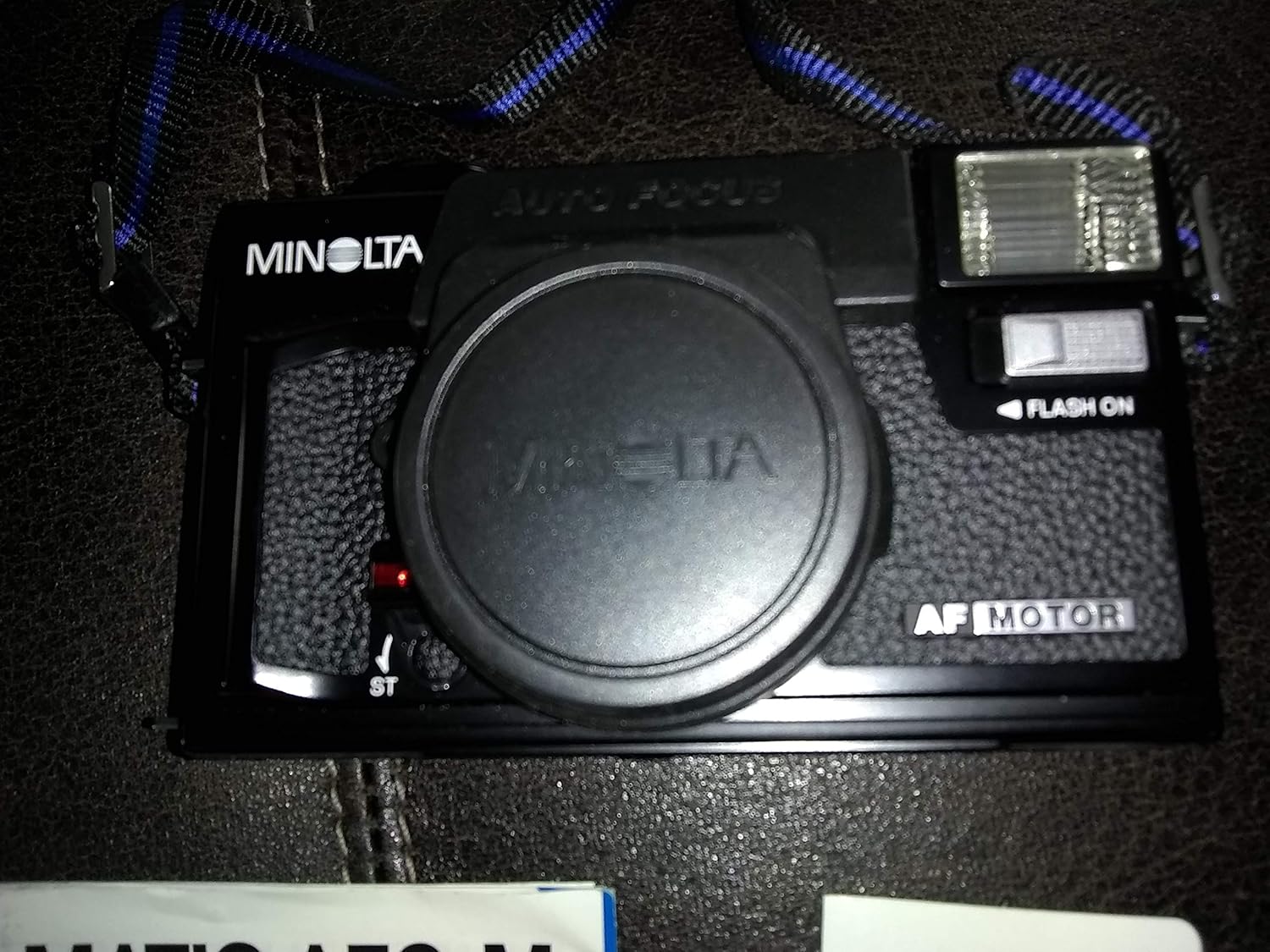
Image: Top-down view of the Minolta Hi-matic AF2-M camera, displaying the lens cap, integrated flash unit, and the 'AUTO FOCUS' designation. This image highlights key operational components.
4. Taking a Picture
- Frame your subject through the viewfinder.
- Press the shutter button halfway to engage autofocus and exposure metering.
- Press the shutter button fully to capture the image.
- The film will automatically advance to the next frame after each shot.
5. Rewinding and Unloading Film
Once all frames on the film roll have been exposed, the camera will typically indicate this (e.g., frame counter at '36' or '24', or an audible signal). To rewind the film:
- Locate the film rewind button or switch, often on the bottom or back of the camera (refer to the image in the Setup section).
- Engage the rewind mechanism. The camera may automatically rewind the film, or you might need to hold the button and turn a rewind crank.
- Once rewinding is complete (indicated by a change in sound or the frame counter returning to 'S' or '0'), open the camera back.
- Remove the rewound film cartridge and take it for development.
Maintenance
1. Cleaning the Lens
Use a soft, lint-free cloth or a specialized lens cleaning brush to gently remove dust and smudges from the lens surface. For stubborn marks, apply a small amount of lens cleaning fluid to the cloth, not directly to the lens. Avoid touching the lens with your fingers.
2. Camera Body Care
Wipe the camera body with a soft, dry cloth to remove dust and dirt. Avoid using harsh chemicals or abrasive materials. Keep the film compartment clean and free of debris to prevent film scratches or malfunctions.
3. Storage
When not in use, store the camera in a cool, dry place, away from direct sunlight, extreme temperatures, and high humidity. It is advisable to remove batteries if the camera will not be used for an extended period to prevent leakage.
Troubleshooting
- Camera does not power on: Check battery installation and ensure batteries are fresh.
- Flash does not fire: Verify the flash is enabled and has sufficient time to charge. Ensure batteries have enough power.
- Film not advancing: Confirm film is properly loaded and the leader is engaged with the take-up spool. Check for any obstructions in the film path.
- Blurry photos: Ensure the autofocus system has locked onto the subject before fully pressing the shutter. Maintain a steady hand or use a tripod if necessary.
- Film door will not close: Check for any film leader or debris obstructing the door mechanism.
Specifications
| Feature | Detail |
|---|---|
| Model Name | Hi-matic AF2-M |
| Brand | Minolta |
| Film Format Type | 35mm |
| Special Feature | Built In Flash |
| Shutter Type | Mechanical |
| Compatible Devices | Camera |
| Item Weight | 1.15 pounds (approx. 0.52 kg) |
| Package Dimensions | 6.5 x 4 x 3.2 inches (approx. 16.5 x 10.2 x 8.1 cm) |
Warranty and Support
Your Minolta Hi-matic AF2-M camera may be accompanied by a Minolta International Warranty Certificate. Please refer to this document for specific terms, conditions, and duration of your warranty coverage.

Image: Contents of the Minolta Hi-matic AF2-M package, including the camera, a protective carrying case, the instruction manual, and the Minolta International Warranty Certificate.
For technical assistance, service, or warranty claims, please contact Minolta customer support or an authorized Minolta service center. Contact information can typically be found on the warranty card or the official Minolta website.


