
1. Product Overview
The Noctua NF-A8 ULN is a highly optimized, premium quality quiet 80mm fan designed for ultra-low-noise applications. It features Noctua’s AAO (Advanced Acoustic Optimisation) frame and sophisticated aerodynamic design measures such as Flow Acceleration Channels, which improve upon the renowned quiet cooling performance of the award-winning NF-R8 series. This ULN version provides super-slow 1400/1100 RPM speed settings, making it ideal for highly noise-sensitive users who require near-silent operation. Its smooth running, reference-class SSO2 bearing, and Noctua's trusted premium quality ensure an elite choice for demanding cooling needs.


2. Package Contents
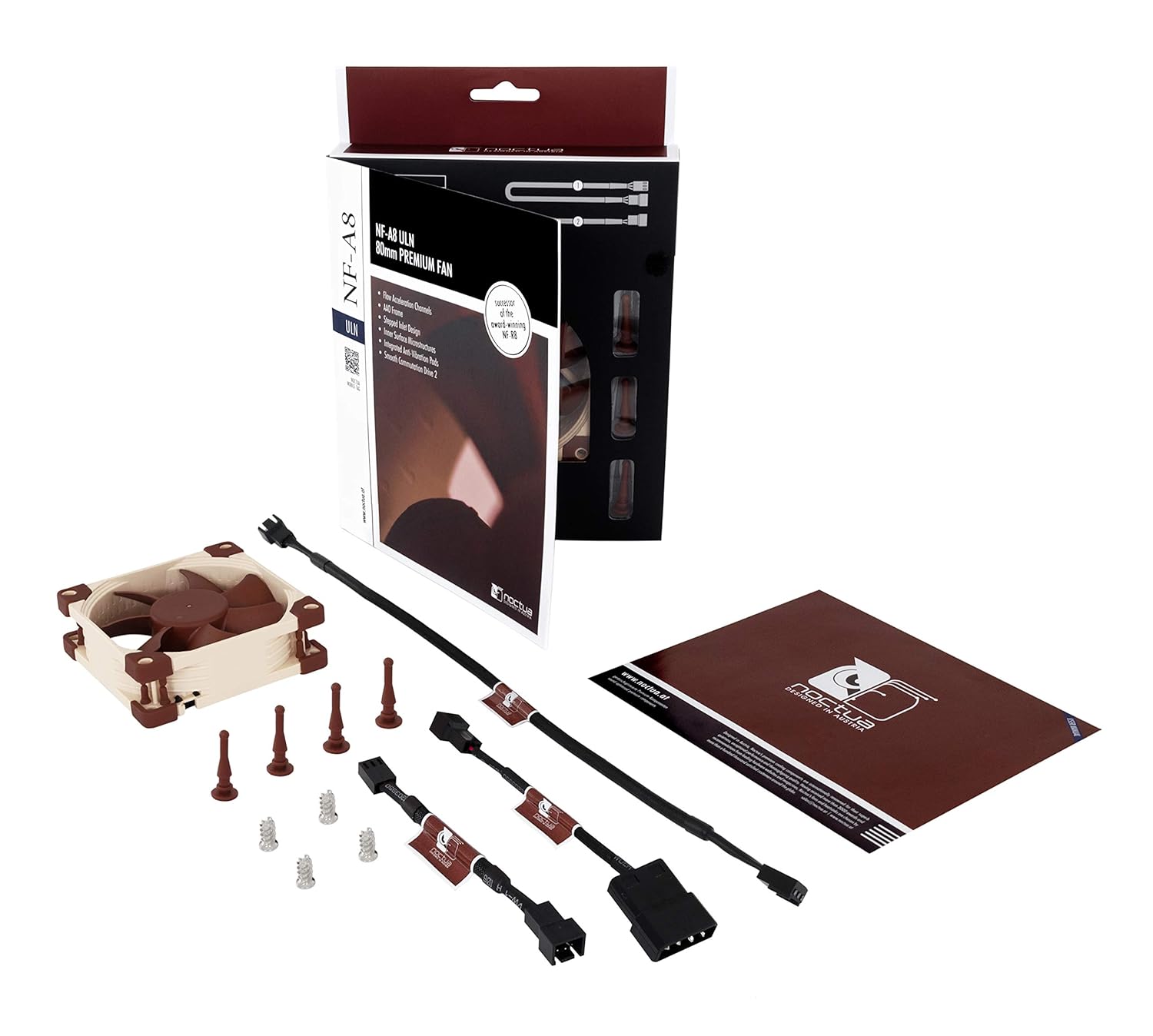
Your Noctua NF-A8 ULN fan package includes the following items:
- Noctua NF-A8 ULN 80x80x25mm fan
- Ultra-Low-Noise Adaptor (L.N.A.)
- 4x Anti-vibration mounts
- 4x Fan screws
- Extension cable
- 3:4-pin power adaptor
3. Setup Instructions
Follow these steps to properly install your Noctua NF-A8 ULN fan:
- Prepare Mounting Location: Identify the desired mounting location within your PC case or device. Ensure there is sufficient space for the 80x80x25mm fan.
- Choose Mounting Method:
- Using Anti-Vibration Mounts: For optimal noise reduction, use the included anti-vibration mounts. Gently pull each mount through the fan's screw holes and then through the mounting holes on your case or device. Ensure they are securely seated.
- Using Fan Screws: Alternatively, use the provided fan screws to secure the fan to your case or device. Do not overtighten the screws.

A close-up of the fan corner, illustrating how the anti-vibration mounts fit into the fan's mounting holes. - Connect Power: The NF-A8 ULN fan uses a 3-pin power connector.
- To Motherboard (3-pin header): Connect the fan's 3-pin connector directly to an available 3-pin fan header on your motherboard.
- Using Ultra-Low-Noise Adaptor (L.N.A.): For even quieter operation, connect the fan to the included Ultra-Low-Noise Adaptor first, then connect the adaptor to your motherboard's 3-pin header. This adaptor reduces the fan speed from 1400 RPM to 1100 RPM.
- Using 3:4-pin Power Adaptor: If your motherboard lacks sufficient 3-pin headers, or if you prefer to power the fan directly from your power supply, use the included 3:4-pin power adaptor. Connect the fan to this adaptor, then connect the adaptor to a 4-pin Molex connector from your power supply. Note that this method typically provides full speed operation unless the ULN adaptor is also used in series.

A detailed view of the fan's 3-pin power connector, ready for connection to a motherboard or adaptor. - Cable Management: Route the fan cable neatly to avoid interference with other components and to ensure proper airflow. Use the extension cable if needed.
4. Operating Instructions
The Noctua NF-A8 ULN fan is designed for continuous, reliable operation. Once installed and powered, it will begin to rotate, providing airflow for cooling. The fan operates at a maximum speed of 1400 RPM, delivering efficient cooling with minimal noise.
To achieve even lower noise levels, utilize the included Ultra-Low-Noise Adaptor (L.N.A.). Connecting the L.N.A. in series with the fan will reduce its maximum speed to 1100 RPM, further decreasing the audible noise output. This is particularly useful in environments where absolute quietness is paramount.
Ensure that the fan blades are unobstructed to maintain optimal performance and prevent damage. Periodically check for any foreign objects that might impede rotation.
5. Maintenance
Regular maintenance helps ensure the longevity and optimal performance of your Noctua NF-A8 ULN fan:
- Cleaning: Periodically clean the fan blades and frame to remove dust buildup. Use a soft brush, compressed air, or a damp cloth. Ensure the fan is powered off and disconnected before cleaning.
- Inspection: Occasionally inspect the fan for any signs of wear or damage, such as loose cables or unusual noises.
- Bearing: The SSO2 bearing is self-lubricating and requires no additional lubrication throughout its lifespan.
6. Troubleshooting
If you encounter issues with your Noctua NF-A8 ULN fan, consider the following:
| Problem | Possible Cause | Solution |
|---|---|---|
| Fan not spinning | No power, incorrect connection, faulty fan header. | Check all power connections. Ensure the 3-pin connector is fully seated. Try connecting to a different fan header or directly to the power supply using the 3:4-pin adaptor. |
| Excessive noise | Fan blades obstructed, loose mounting, fan operating at full speed without ULN adaptor. | Ensure no cables or objects are touching the fan blades. Verify the fan is securely mounted. If quietness is critical, ensure the Ultra-Low-Noise Adaptor is connected. |
| Low airflow | Dust buildup, fan operating at reduced speed (ULN adaptor). | Clean the fan blades and surrounding area. If higher airflow is desired, remove the Ultra-Low-Noise Adaptor. |
7. Specifications
Detailed specifications for the Noctua NF-A8 ULN fan:
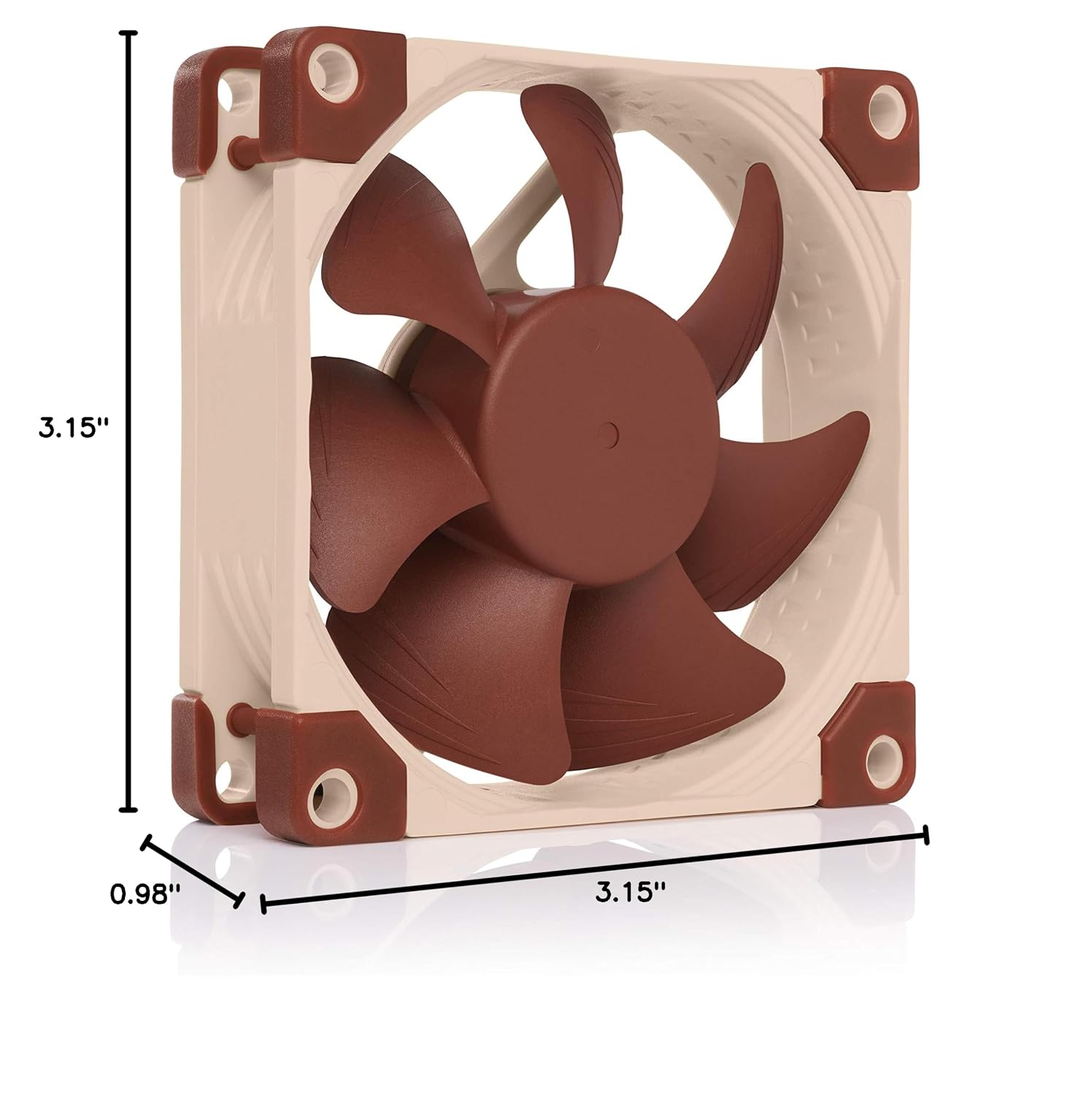
- Dimensions: 80x80x25mm (0.98"L x 3.15"W x 3.15"H)
- Bearing Type: SSO2 (Self-Stabilising Oil-Pressure Bearing)
- Rotational Speed (Max): 1400 RPM
- Rotational Speed with L.N.A.: 1100 RPM
- Airflow Capacity (Max): 34.8 Cubic Meters Per Hour
- Noise Level (Max): 10.4 dB(A)
- Voltage: 12V
- Power Connector: 3-Pin
- Material: Fibre-glass reinforced PBT
- MTTF (Mean Time To Failure): >150,000 hours
- Weight: 0.49 Pounds
8. Warranty & Support
Noctua stands by the quality of its products. The NF-A8 ULN fan is covered by a 6-year manufacturer’s warranty, ensuring long-term reliability and peace of mind.
For technical support, warranty claims, or further assistance, please visit the official Noctua website or contact their customer service directly. You can find more information and resources at Noctua's Official Website.


