
1. Introduction
This manual provides essential information for the safe and correct installation, operation, and maintenance of the BFT R915126 00102 Phebe N Kit. This kit is a 24V gate opener system designed for automated gate operation, utilizing a 433MHz frequency for remote control and requiring a 230V 50Hz power supply. Please read this manual thoroughly before beginning any procedures.
2. Safety Information
Important Safety Instructions:
- Installation and maintenance must be performed by qualified personnel only, in compliance with local electrical and safety regulations.
- Disconnect power to the unit before performing any maintenance or service.
- Keep hands, feet, and loose clothing away from moving parts of the gate and opener.
- Do not allow children to play near the gate or with the remote controls.
- Ensure all safety devices (e.g., photocells, safety edges) are correctly installed and functioning.
- The gate must be in good mechanical condition and move freely before installing the automation system.
3. Package Contents
The BFT R915126 00102 Phebe N Kit typically includes the following components:
- Phebe N 24V Gate Opener Unit
- Control Board (integrated or separate)
- Mounting Brackets and Hardware
- Remote Controls (quantity may vary)
- Instruction Manual and Warranty Information
Note: Specific contents may vary. Please check the packaging for a complete list of included items.
4. Setup and Installation
Installation of the BFT Phebe N Kit requires technical expertise and adherence to electrical safety standards. It is strongly recommended that installation be performed by a certified professional.
4.1 Site Preparation
- Ensure the gate operates smoothly and freely without obstruction.
- Verify that the gate structure is robust enough to support the opener.
- Plan the routing for electrical cables, ensuring they are protected and comply with local regulations.
4.2 Mounting the Opener
Mount the Phebe N opener unit securely to the gate post or structure using the provided brackets and hardware. Ensure the unit is level and aligned correctly with the gate's movement path.
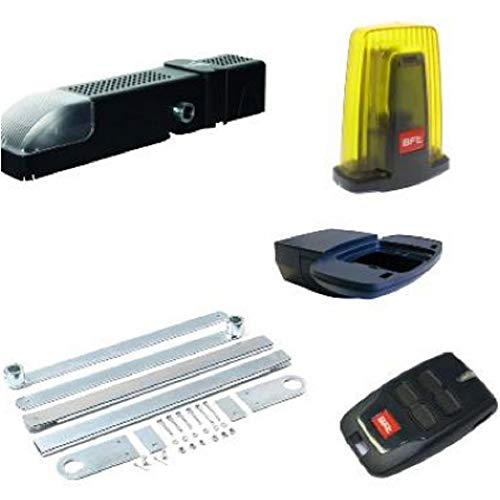
Figure 1: Main unit of the BFT R915126 00102 Phebe N Kit. This image shows the compact design of the gate opener, ready for installation.
4.3 Electrical Connections
- Connect the main power supply (230V 50Hz) to the control board, ensuring proper grounding.
- Connect the 24V motor cables to the designated terminals on the control board.
- Wire all safety devices (photocells, emergency stop buttons) and accessories (keypads, intercoms) according to the control board's wiring diagram.
- All electrical connections must be insulated and protected from environmental elements.
4.4 Remote Control Programming
Refer to the specific instructions provided with your control board for programming the 433MHz remote controls. This typically involves pressing a programming button on the control board and then activating the remote control button.
5. Operating Instructions
Once installed and configured, the BFT Phebe N Kit provides automated gate operation.
5.1 Standard Operation
- Opening the Gate: Press the designated button on your remote control or activation device. The gate will open to its fully open position.
- Closing the Gate: Press the designated button again. The gate will close. Some systems may have an automatic closing feature after a set time delay.
- Stopping the Gate: During movement, pressing the button again will typically stop the gate. A subsequent press may reverse its direction or continue its original movement, depending on the control board's programming.
5.2 Manual Override
In case of power failure or malfunction, the gate can be operated manually. Locate the manual release mechanism on the opener unit (refer to the specific diagram in your control board manual). Use the provided key or lever to disengage the motor, allowing the gate to be moved by hand. Remember to re-engage the motor after manual operation.
6. Maintenance
Regular maintenance ensures the longevity and reliable operation of your BFT Phebe N Kit.
- Monthly: Check the gate's mechanical condition. Ensure hinges, wheels, and tracks are clean and free of obstructions. Verify that safety devices (photocells) are clean and functioning correctly.
- Quarterly: Inspect all electrical connections for signs of wear or corrosion. Check the mounting hardware for tightness. Lubricate moving mechanical parts of the gate (not the opener itself unless specified by BFT) as recommended by the gate manufacturer.
- Annually: Have a qualified technician perform a comprehensive inspection of the entire system, including the motor, control board, and all safety features.
Always disconnect power before performing any maintenance.
7. Troubleshooting
If you encounter issues with your BFT Phebe N Kit, refer to the following common problems and solutions:
| Problem | Possible Cause | Solution |
|---|---|---|
| Gate does not move | No power; Safety device activated; Remote battery low; Motor disengaged | Check power supply and circuit breaker; Inspect safety sensors for obstructions; Replace remote battery; Re-engage motor (manual override) |
| Gate stops unexpectedly | Obstruction detected; Safety device triggered; Mechanical issue with gate | Remove obstructions; Clean safety sensors; Inspect gate for binding or damage |
| Remote control not working | Low battery; Out of range; Not programmed correctly | Replace remote battery; Move closer to the gate; Re-program remote control (refer to section 4.4) |
| Gate moves slowly or with difficulty | Mechanical friction; Low voltage; Motor issue | Lubricate gate hinges/tracks; Check power supply voltage; Contact qualified technician |
If the problem persists after attempting these solutions, please contact a qualified BFT service technician.
8. Specifications
| Feature | Specification |
|---|---|
| Manufacturer | BFT |
| Model Number | R915126 00102 |
| Product Dimensions (L x W x H) | 10 x 30 x 30 cm |
| Product Weight | 5 kilograms |
| Operating Voltage | 24 V |
| Power Supply Input | 230V 50Hz |
| Remote Control Frequency | 433 MHz |
| Batteries Required | No |
| ASIN | B00NEL12LI |
| Date First Available | 8 September 2014 |
9. Warranty and Support
For warranty information, please refer to the documentation provided with your purchase or contact your authorized BFT dealer. BFT products are manufactured to high-quality standards, and specific warranty terms may vary by region and seller.
For technical support, spare parts, or service, please contact your local BFT distributor or the retailer from whom you purchased the product. Please have your model number (R915126 00102) and purchase date available when contacting support.
Note: Information regarding spare parts availability is currently unavailable.