
1. Introduction
Thank you for choosing the Taylor 5504 Humidiguide & Thermometer. This device is designed to accurately display both relative humidity and ambient temperature, providing essential environmental data for your home or office. Its contemporary design allows for versatile placement, either standing on a surface or mounted on a wall.
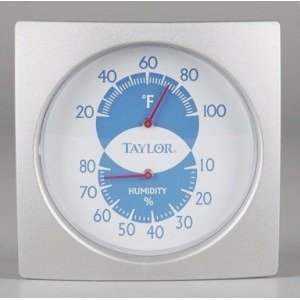
Figure 1: Front view of the Taylor 5504 Humidiguide & Thermometer, displaying its clear dial for temperature and humidity readings.
2. Safety Information
- WARNING: This device is for indoor use only. Avoid exposure to direct sunlight, extreme temperatures, or high humidity levels beyond its operating range to prevent damage.
- Do not immerse the device in water or other liquids.
- Keep out of reach of children and pets.
- Do not attempt to disassemble or repair the unit yourself. Refer to qualified service personnel for any repairs.
- Clean the device with a soft, dry cloth only. Do not use abrasive cleaners or solvents.
3. Setup
- Unpacking: Carefully remove the Humidiguide & Thermometer from its packaging. Inspect the device for any signs of damage.
- Placement:
- Tabletop Use: Place the unit on a stable, flat surface away from direct heat sources, air vents, or windows that may cause inaccurate readings.
- Wall Mounting: The unit is designed for hanging. Use an appropriate fastener (not included) to secure it to a wall in a suitable location. Ensure the unit is level for accurate readings.
- Initial Readings: Allow the device approximately 30 minutes to acclimate to its environment before taking initial readings. This ensures the sensors stabilize to the ambient conditions.
4. Operating Instructions
The Taylor 5504 Humidiguide & Thermometer operates mechanically and requires no batteries. Readings are displayed continuously on its clear dial.
- Reading Temperature: The outer scale of the dial indicates temperature in both Celsius and Fahrenheit. The needle will point to the current ambient temperature.
- Reading Humidity: The inner scale of the dial indicates relative humidity as a percentage (%). The corresponding needle will show the current relative humidity level.
- Optimal Placement: For the most accurate readings, place the unit in a central location within the room, away from direct drafts, heat sources, or areas with rapidly changing conditions.
5. Maintenance
- Cleaning: Wipe the unit with a soft, dry cloth as needed to remove dust. Do not use liquid cleaners, sprays, or abrasive materials, as these can damage the finish or internal components.
- Storage: If storing the device for an extended period, keep it in a cool, dry place, protected from dust and extreme temperatures.
- Calibration: This unit is factory-calibrated. No user calibration is typically required. If you suspect significant inaccuracy, contact customer support.
6. Troubleshooting
| Problem | Possible Cause | Solution |
|---|---|---|
| Inaccurate Temperature/Humidity Readings |
|
|
| Needle is stuck or not moving |
|
|
7. Specifications
| Feature | Detail |
|---|---|
| Brand | Taylor |
| Model Number | 5504 |
| Product Type | Humidiguide & Thermometer |
| Mounting Type | Tabletop / Wall-mountable |
| Operating Humidity Range | 10% to 80% Relative Humidity |
| Upper Temperature Rating | 38°C (100.4°F) |
| Temperature Accuracy | ±1°C |
| Power Source | No batteries required (Mechanical) |
| Product Dimensions | 19 x 5.9 x 7 inches (approximate) |
| Item Weight | 2 Pounds |
| Manufacturer | Taylor Precision Products |
| UPC | 077784055045 |
8. Warranty and Support
Taylor Precision Products warrants this product to be free from defects in material or workmanship for a period of one (1) year for original purchaser from the date of retail purchase. It does not cover damages or wear resulting from accident, misuse, abuse, commercial use, or unauthorized adjustment and/or repair. For warranty service or technical support, please contact Taylor Precision Products customer service. Please retain your purchase receipt as proof of purchase.
For further assistance, visit the official Taylor website or refer to the contact information provided with your product packaging.


