
Introduction
This manual provides comprehensive instructions for the assembly, operation, and maintenance of your Teknetics Delta 4000 Metal Detector. Please read this manual thoroughly before using the device to ensure proper function and to maximize your detecting experience.
Safety Information
- Always obtain permission before searching on private property.
- Avoid searching in areas where underground utilities (cables, pipes) may be present.
- Exercise caution when digging to prevent injury or damage to property.
- Do not operate the detector in thunderstorms or severe weather conditions.
- Keep the detector away from strong magnetic fields.
- Dispose of batteries responsibly according to local regulations.
Package Contents
Your Teknetics Delta 4000 package should include the following items:
- Teknetics Delta 4000 Control Housing
- Search Coil (typically 10-inch concentric)
- Lower, Middle, and Upper Stem Assemblies
- Armrest
- Fasteners for assembly
- User Manual (this document)
Assembly and Setup
Follow these steps to assemble your metal detector:
- Attach the Search Coil: Secure the search coil to the lower stem using the provided bolt and nut. Ensure it is snug but allows for slight angle adjustment.
- Assemble the Stems: Connect the lower, middle, and upper stem sections. Adjust the length for comfortable operation.
- Mount the Control Housing: Slide the control housing onto the upper stem. Tighten any securing mechanisms.
- Attach the Armrest: Secure the armrest to the upper stem, ensuring it provides comfortable support for your forearm.
- Wrap the Cable: Carefully wrap the search coil cable around the stem, leaving enough slack near the coil for adjustment. Plug the cable connector into the control housing.
- Install Batteries: The Teknetics Delta 4000 requires batteries (typically 9V). Open the battery compartment on the control housing and insert the batteries, observing polarity.
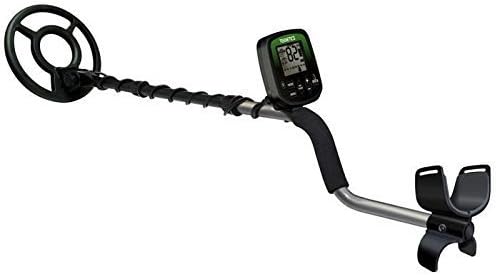
Figure 1: The Teknetics Delta 4000 Metal Detector fully assembled, showing the search coil, stem, control unit, and armrest.
Operating Instructions
Powering On/Off
To power on the detector, press and hold the POWER button. The display will illuminate. To power off, press and hold the POWER button again until the display turns off.
Numeric Target ID
The Delta 4000 features a numeric target identification system. When the search coil passes over a metallic object, a number will appear on the display. This number corresponds to the probable conductivity of the detected object, helping to identify the type of metal before digging. Higher numbers generally indicate more conductive metals like silver or copper, while lower numbers suggest iron or foil.
Multiple Notches (Discrimination)
The multiple notch system allows you to discriminate against unwanted metals. Use the NOTCH buttons to select specific target ID ranges to ignore. This feature helps filter out junk items like bottle caps or pull tabs, focusing your search on more desirable targets.
Pinpoint Function
To precisely locate a detected object, activate the PINPOINT mode. This mode provides a continuous tone that increases in pitch and volume as the search coil is centered directly over the target, allowing for accurate recovery.
Running Depth Display
The running depth display provides an estimated depth of the detected target. This information helps in determining how deep you may need to dig, conserving effort and minimizing ground disturbance.
Search Modes
The Delta 4000 offers three distinct search modes. These modes are designed for various detecting conditions and target preferences. Refer to the on-screen indicators or specific button labels to cycle through and select the appropriate mode for your search environment.
Overload Alarm System
The overload alarm system alerts the user when the detector is encountering an extremely large or shallow target that may be causing signal saturation. This helps prevent misinterpretation of signals from very strong targets.
Maintenance
- Cleaning: Wipe down the detector with a damp cloth after each use. Avoid harsh chemicals. The search coil can be rinsed with water, but ensure the control housing remains dry.
- Battery Care: Remove batteries if the detector will not be used for an extended period to prevent leakage.
- Storage: Store the detector in a cool, dry place, away from direct sunlight and extreme temperatures.
- Cable Inspection: Periodically check the search coil cable for any signs of wear or damage.
Troubleshooting
| Problem | Possible Cause | Solution |
|---|---|---|
| No power | Dead or incorrectly installed batteries | Replace batteries; check polarity |
| Erratic signals / False signals | Electromagnetic interference; mineralized ground; loose coil cable | Move away from power lines/electronics; perform ground balance; tighten coil cable |
| No target ID displayed | Target too deep or too small; discrimination set too high | Adjust sensitivity; lower discrimination settings |
Specifications
- Brand: Teknetics
- Model Numbers: DELTA-10DD or DELTA-11DD
- Power Source: Batteries (type not specified, typically 9V)
- Material: Metal
- Item Weight: 2.3 Pounds (approximately 1.04 kg)
- Product Dimensions: 10"L x 6"W x 28"H (25.4 cm L x 15.24 cm W x 71.12 cm H)
- Recommended Use: Metal Detection
- Features: Numeric Target ID, Multiple Notches, Pinpoint, Running Depth Display, 3 Search Modes, Overload Alarm System
- UPC: 089723120042
Warranty and Support
For warranty information or technical support, please refer to the documentation included with your purchase or visit the official Teknetics website. Keep your proof of purchase for warranty claims.


