
Pentax K-S1
Pentax K-S1 SLR Lens Kit Instruction Manual
Model: K-S1
Your guide to operating and maintaining your Pentax K-S1 SLR Camera.
1. Setup
Before you begin using your Pentax K-S1 camera, please follow these steps to ensure proper setup and functionality.
1.1 Battery Installation
The Pentax K-S1 uses a Lithium Ion battery. Ensure the battery is fully charged before first use. Open the battery compartment cover located at the bottom of the camera body. Insert the battery with the correct orientation, aligning the contacts. Close the cover securely until it clicks into place.
1.2 Attaching the Lens
To attach the DA L 18-55 mm lens, align the red dot on the lens barrel with the red dot on the camera's lens mount. Gently push the lens into the mount and turn it clockwise until it clicks into place. To remove the lens, press the lens release button on the camera body and turn the lens counter-clockwise.
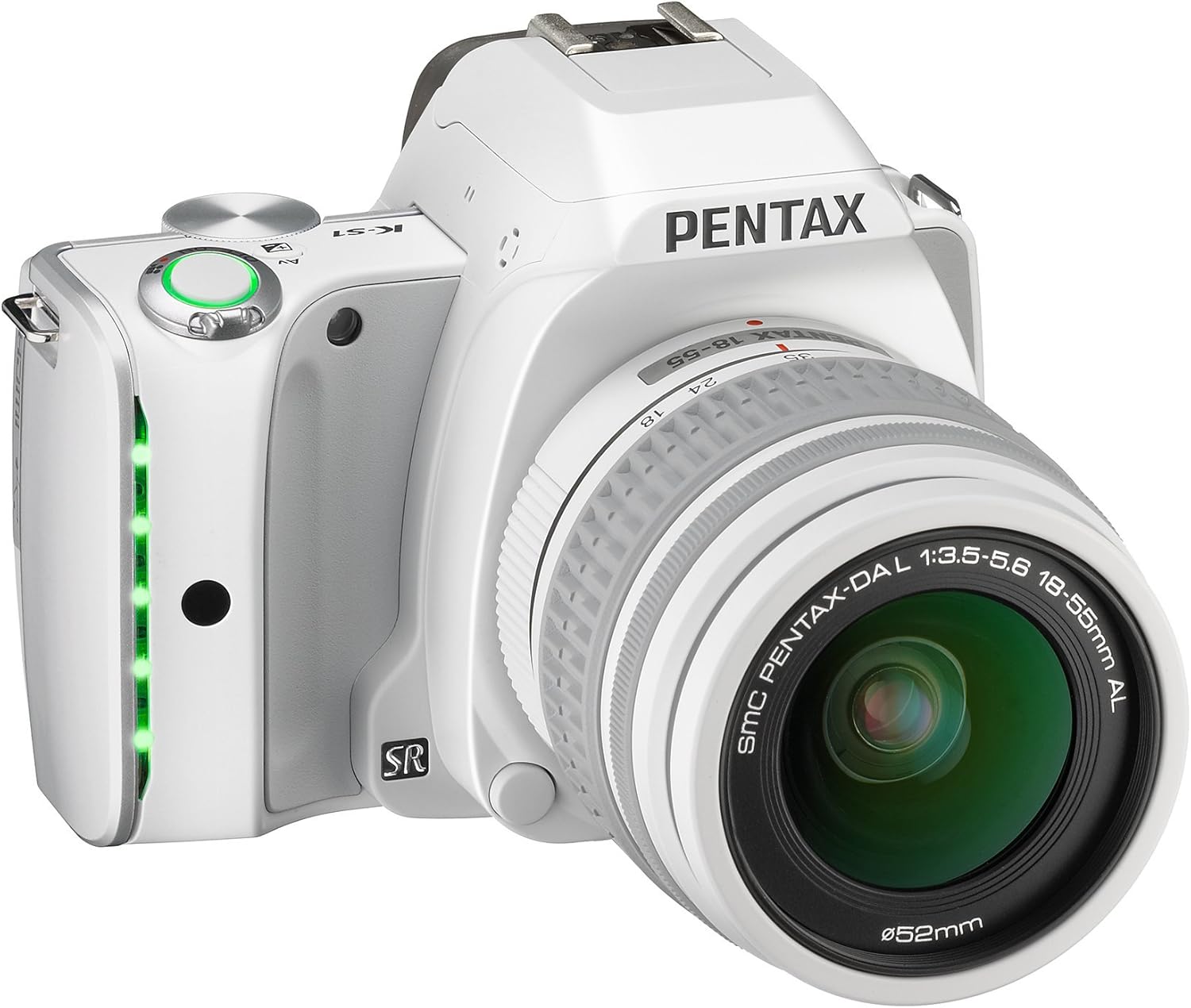
Figure 1: Angled view of the Pentax K-S1 SLR Camera with the DA L 18-55mm Lens attached. This image shows the compact body design and the lens in its default position.
2. Operating the Camera
The Pentax K-S1 offers a range of features for both novice and experienced photographers. Familiarize yourself with the controls and settings to capture stunning images.
2.1 Basic Photography
Turn the camera on using the power switch. Select your desired shooting mode using the mode dial. For beginners, the 'Auto Pict' mode (green camera icon) is recommended as it automatically optimizes settings for various scenes. Press the shutter button halfway to focus, then press fully to take a picture.

Figure 2: Front view of the Pentax K-S1 SLR Camera with the DA L 18-55mm Lens. This view highlights the lens and the camera's grip.
2.2 Advanced Features
The K-S1 includes advanced features for enhanced photographic control:
- 20 MP APS-C CMOS Sensor: Delivers high-resolution images with excellent detail.
- Body Illumination Interface: Innovative LED indicator lamps in the grip and lighted camera controls for intuitive operation.
- 5.4 frames per second continuous shooting: Capture fast-moving subjects with ease.
- ISO Speeds up to 51200: Enables clear images in very low light conditions.
- In-body Shake Reduction: Works with all K-mount lenses to minimize blur from camera shake.
- AA Filter Simulator (SR unit): Provides moiré reduction without sacrificing sharpness.
- Eye-Fi and FLU Card Compatibility: For wireless image transfer.
- Full 1080p h.264 HD video recording: Record high-definition videos.
- In-body RAW development & HDR shooting: Process RAW files and create High Dynamic Range images directly in the camera.
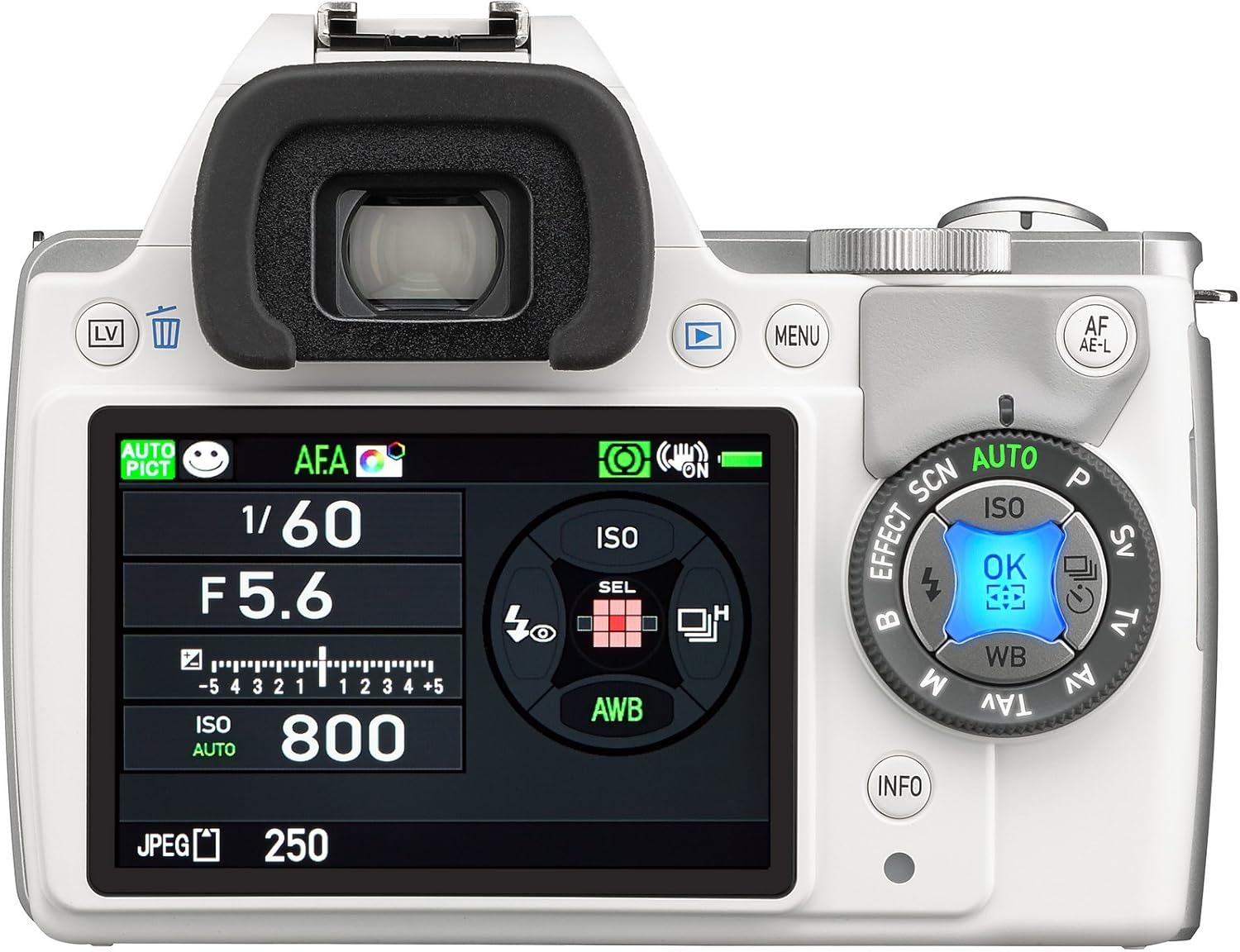
Figure 3: Rear view of the Pentax K-S1 SLR Camera, displaying the LCD screen with exposure settings and the surrounding control dials for quick adjustments.

Figure 4: Top view of the Pentax K-S1 SLR Camera, illustrating the mode dial, shutter button, and hot shoe for external flash units.
3. Maintenance
Proper maintenance ensures the longevity and optimal performance of your Pentax K-S1 camera.
3.1 Cleaning the Camera and Lens
- Use a soft, lint-free cloth to wipe the camera body. For stubborn dirt, slightly dampen the cloth with water.
- For the lens, use a lens brush to remove dust, then gently wipe with a microfiber lens cloth. Avoid touching the lens surface with your fingers.
- Never use organic solvents (e.g., paint thinner, alcohol) to clean the camera or lens.
3.2 Storage
When not in use, store the camera in a cool, dry, and well-ventilated place, away from direct sunlight and high humidity. Remove the battery if the camera will not be used for an extended period.
4. Troubleshooting
If you encounter issues with your Pentax K-S1, refer to the common problems and solutions below.
- Camera does not turn on: Ensure the battery is charged and correctly inserted. Check if the battery contacts are clean.
- Cannot take pictures: Check if the memory card is inserted and has sufficient free space. Ensure the lens is properly attached and the focus mode is set correctly.
- Images are blurry: Verify that the lens is clean. Check focus settings and ensure the Shake Reduction feature is enabled if shooting handheld in low light.
- Flash does not fire: Check flash mode settings. Ensure the flash is not obstructed.
- LCD screen is blank: Press the DISP button to cycle through display modes. Check battery level.
For more complex issues, please contact customer support.
5. Specifications
Detailed technical specifications for the Pentax K-S1 SLR Lens Kit.
| Feature | Specification |
|---|---|
| Brand | Pentax |
| Model Name | K-S1 |
| Model Number | Pentax K-S1 SLR Lens Kit |
| Photo Sensor Resolution | 20 MP |
| Photo Sensor Size | APS-C |
| Image Stabilization | Optical |
| Compatible Mountings | Pentax KAF |
| Maximum Focal Length | 55 mm |
| Optical Zoom | 3 x |
| Maximum Aperture | 3.5 f |
| Expanded ISO Maximum | 51200 |
| Screen Size | 3 Inches |
| Video Resolution | FHD 1080p |
| Item Weight | 1.2 Pounds |
| Connectivity Technology | USB, Wi-Fi |
6. Warranty and Support
Your Pentax K-S1 SLR Lens Kit comes with a manufacturer's warranty. Please refer to the warranty card included in your product packaging for specific terms and conditions.
For technical support, service, or warranty claims, please visit the official Pentax website or contact their customer service department. Keep your proof of purchase handy when contacting support.
Online resources, including FAQs and software updates, may also be available on the Pentax support website.
Related documentsK-S1


Ask a question about this manual
Ask about setup, troubleshooting, compatibility, parts, safety, or missing instructions. Manuals+ will review the question and use this page’s manual context to help answer it.