
Introduction
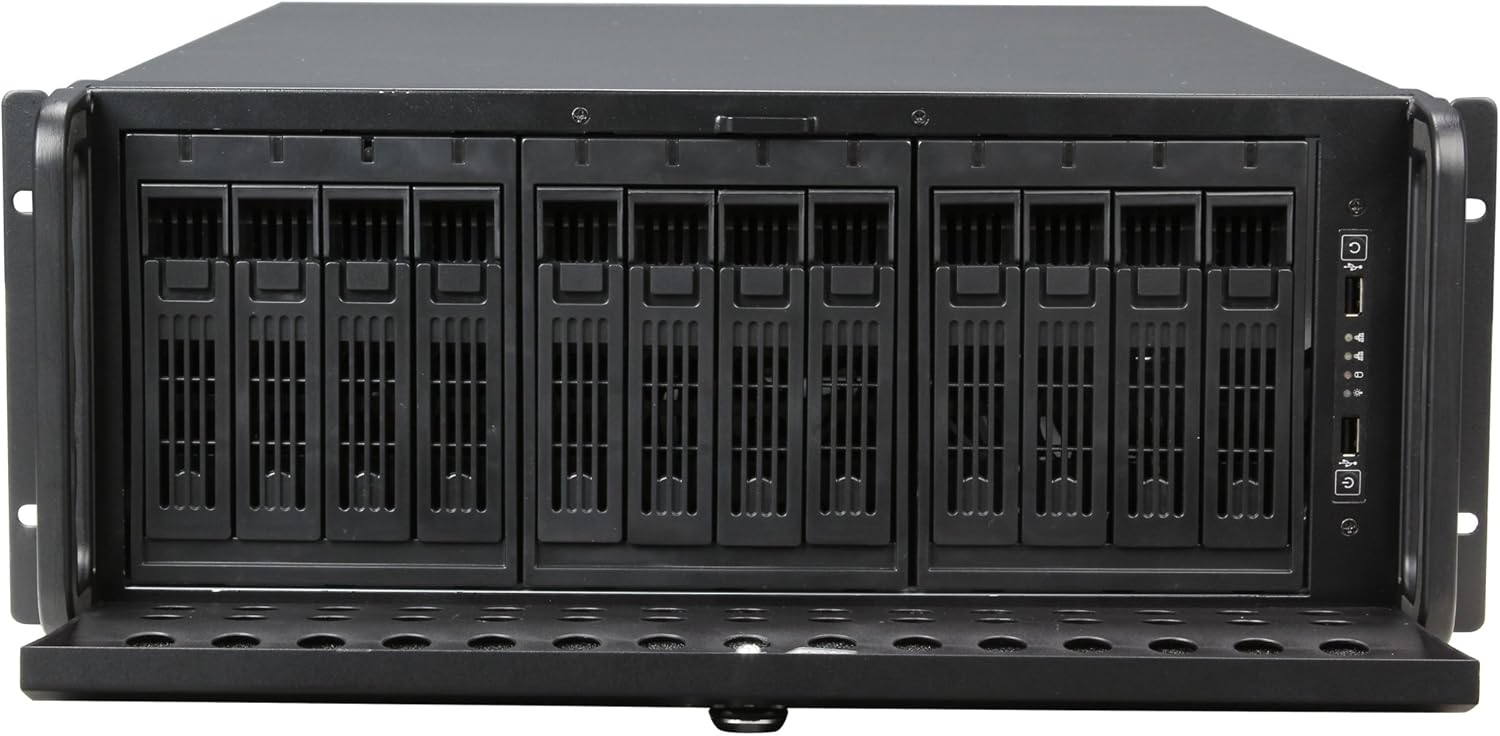
The Rosewill RSV-L4412 is a 4U industrial rack-mount server chassis designed for professional quality and performance. This server case is equipped with 12 hot-swap drive bays, supporting up to 12x 3.5"/2.5" SATA I, II, & III or SAS HDDs. Its robust metal and steel construction, finished with a black exterior coating, provides a durable and reliable housing for high-performance server systems. The spacious interior accommodates powerful hardware, making it an ideal choice for demanding applications such as media handling and storage in 4K workflows.

Product Overview and Features
The RSV-L4412 chassis is engineered for high scalability and efficient operation, offering features crucial for server environments.
- Hot-Swap Bay Construction: Equipped with 12 hot-swap drives, supporting 3.5"/2.5" SATA I, II, & III or SAS HDDs, allowing for drive replacement during system operation.
- Scalability: Supports up to 12 HDDs and features 7 PCI-E slots for server system expansion.
- Motherboard Compatibility: Compatible with 12" x 13" E-ATX, 12" x 9.6" ATX, 11.2" x 8.2" Mini-ATX, and smaller motherboards.
- Dust Resistance: A front door foam filter minimizes dust inflow, protecting internal components.
- Security: Features a stylish black front panel with a key lock for enhanced security.
- I/O Panel: Two front USB 2.0 connectors provide convenient access for peripherals.
- Cooling: Includes 2x 80mm fans and 3x 120mm fans pre-installed for efficient cooling.
- Dimensions: Measures 7.00" (H) x 25.00" (D) x 16.80" (W) including the panel, offering ample internal space.

Setup
Setting up your Rosewill RSV-L4412 server chassis involves several steps, from unboxing to component installation.
Unboxing
The chassis is packaged robustly to withstand shipping. Upon opening the box, you will find the server chassis securely protected by foam inserts. Carefully remove the chassis from its packaging.

Component Installation
- Accessing the Interior: Unscrew the lid screws on the rear of the chassis and carefully slide the lid off to access the interior.
- Motherboard Installation: Install your compatible E-ATX, ATX, or Mini-ATX motherboard onto the pre-installed standoffs. Ensure all necessary standoffs are in place and secure the motherboard with screws.
- Drive Installation: The chassis features 3.5-inch hot-swappable drive caddies. To install a drive, open the front security door, pull out a drive caddy, mount your 3.5" or 2.5" drive (using an adapter if necessary) to the bottom of the caddy with screws, and then slide the caddy back into the bay until it clicks securely.
- Power and Data Connections: Connect the SATA/SAS data cables from the drive backplane to your motherboard or RAID controller. Power the hot-swap modules using Molex power connectors. Adapters may be needed if your power supply does not have enough Molex connectors.
- Front I/O Connections: Connect the front I/O panel cables (USB 2.0, power LED, HD activity LED, NIC activity LEDs, power button, reset button) to the corresponding headers on your motherboard.
For a visual guide on unboxing and initial setup, refer to the video below:
Operating
The Rosewill RSV-L4412 is designed for continuous operation in a server environment.
- Hot-Swapping Drives: The 12 hot-swap bays allow for easy replacement of drives without powering down the entire system, ideal for maintaining uptime in RAID configurations.
- Drive Activity LEDs: Each drive bay has its own activity LED, providing visual feedback on drive status and activity.
- Cooling Performance: The pre-installed 80mm and 120mm fans provide excellent airflow to keep components cool, even under heavy loads. The 4U form factor allows for taller CPU heatsinks and larger diameter fans, contributing to lower noise and better thermal management compared to smaller form factors.
- Virtual Machine Support: This chassis is suitable for building virtual machine (VM) platforms, offering the necessary drive capacity and cooling for such demanding applications.
Maintenance
Regular maintenance ensures the longevity and optimal performance of your server chassis.
- Drive Replacement: Utilize the hot-swap feature to replace failed or failing drives. Ensure proper data backup and RAID rebuild procedures are followed according to your system's configuration.
- Dust Filter Cleaning: Periodically clean the foam dust filter located in the front door panel to maintain optimal airflow and prevent dust buildup inside the chassis.
- Fan Maintenance: The pre-installed fans are of reasonable quality. If noise levels are a concern or fans begin to fail, they can be easily replaced with higher quality, lower noise alternatives.
Troubleshooting
While the RSV-L4412 is built for durability, minor issues may arise.
- Lid Alignment/Cross-threading: If the chassis lid does not align perfectly, causing cross-threading of screws, carefully re-align the lid and ensure screws are inserted straight. Avoid overtightening.
- Drive Detection Issues: Verify that drives are properly seated in their caddies and that all SATA/SAS data and Molex power connections are secure. Check motherboard/RAID controller settings.
- Overheating: Ensure the dust filter is clean and that all fans are operational. Verify proper cable management to avoid obstructing airflow.
Specifications
| Feature | Specification |
|---|---|
| Brand | Rosewill |
| Model Number | RSV-L4412 |
| Chassis Type | Rackmount |
| Form Factor | 4U |
| Color | Black |
| Material | Alloy Steel |
| Product Dimensions (D x W x H) | 16.8"D x 25"W x 16.8"H |
| Item Weight | 39.5 Pounds |
| External 3.5" Drive Bays | 12 (Hot-Swap) |
| Expansion Slots | 7 |
| Front Ports | 2 x USB 2.0 |
| Pre-installed Fans | 2 x 80mm, 3 x 120mm |
| Motherboard Compatibility | 12" x 13" E-ATX; 12" x 9.6" ATX, 11.2" x 8.2" Mini-ATX and below |
| Assembly Required | No |
Included Accessories
The Rosewill RSV-L4412 server chassis comes with a comprehensive set of accessories to facilitate installation:
- RSV-L4412 Hot-Swap Server Case
- Keys for front panel lock
- Various Screws (for motherboard, drives, etc.)
- 12x SATAIII 18" cables
- Motherboard Standoffs
- Speaker
- Replacement Module Locks

Warranty and Support
For warranty information, technical support, or to purchase replacement parts, please visit the official Rosewill website or contact their customer service. Keep your purchase receipt for warranty claims.


