
1. Introduction
The Cellet Portable Bluetooth Wireless Keyboard BKP200 offers a convenient and functional solution for typing on the go. Its foldable design and QWERTY layout with low-profile keys provide an efficient typing experience. The built-in rechargeable lithium battery ensures extended use, making it ideal for smartphones, tablets, laptops, and other Bluetooth-enabled devices.
What's in the Box
- Wireless foldable keyboard
- Keyboard case (doubles as a phone holder stand)
- Micro USB charging cable
- User manual

Image: The Cellet Portable Bluetooth Wireless Keyboard, shown unfolded, alongside its protective case which functions as a phone/tablet stand, and a micro USB charging cable.
2. Important Safety Instructions
Before using this product, please read all instructions carefully and retain them for future reference. Adherence to these guidelines ensures safe operation and prevents damage.
- This product may be used by children and individuals with physical, sensory, or mental disabilities, or those lacking experience and knowledge, provided they receive proper supervision or instruction regarding safe use and understanding of associated hazards.
- Cleaning and maintenance must not be performed by children without supervision.
- Children should be supervised to ensure they do not play with the appliance.
- Use the product only for its intended purpose.
- For indoor use only. Do not expose the product to water, excessive moisture, or snow.
- Do not place the product in or near flammable, explosive, or hazardous objects.
- Do not operate the product with a damaged cord or plug.
- Do not use the product if it has been damaged in any way.
- Do not disassemble the product. Disassembly may result in safety hazards.
- Avoid throwing or shaking the product.
3. Setup
Initial Charging
Before first use, fully charge the keyboard for approximately 1.5 to 2 hours using the provided Micro USB charging cable. The charging indicator light will glow red during charging and turn off once fully charged. If the battery is low, the Bluetooth status light will flash.
Bluetooth Pairing Steps
- Step 1: Unfold the keyboard. The Bluetooth status indicator light will illuminate for 3 seconds and then turn off.
- Step 2: Press the Fn + C buttons simultaneously. The Bluetooth indicator light will begin blinking, indicating it is in pairing mode.
- Step 3: On your device (smartphone, tablet, etc.), activate Bluetooth and search for available devices. Select "Cellet BKP200 Keyboard" from the list to connect.
- Step 4: Once successfully connected, the Bluetooth indicator light on the keyboard will turn off.

Image: The Cellet foldable keyboard displayed with a tablet and smartphone, illustrating its universal compatibility.
4. Operating Instructions
Operating System Selection
To optimize keyboard functionality for your device, select the correct operating system:
- For Android devices: Press and hold Fn + Q.
- For Windows devices: Press and hold Fn + W.
- For iOS devices: Press and hold Fn + E.
Shortcut Key Functions
To use the shortcut keys, press and hold the Fn key while simultaneously pressing the desired shortcut key.
| Function | Key Combination | Notes |
|---|---|---|
| Previous Track | Fn + 1 | |
| Volume Down | Fn + 2 | |
| Volume Up | Fn + 3 | |
| Play/Pause | Fn + 4 | |
| Switching Language | Fn + 5 | |
| Search | Fn + 6 | |
| Copy | Fn + 7 | |
| Cut | Fn + 8 | |
| Select All | Fn + 9 |
System-Specific Functions:
| Android Systems | Function |
|---|---|
| PgUp | Last page |
| PgDn | Next page |
| iOS Systems | Function |
|---|---|
| Home | Home |
| PgUp | Cursor to the top |
| PgDn | Cursor to the bottom |
| Windows Systems | Function |
|---|---|
| Web browser | Open web browser |
| ESC | Escape |
| PgUp | Last page |
| PgDn | Next page |

Image: The keyboard case is shown transforming into a stand, holding both a smartphone and a tablet in landscape orientation for convenient viewing while typing.
5. Maintenance
Proper care and maintenance will extend the life of your Cellet keyboard.
- Clean the keyboard with a soft cloth dampened with water or alcohol.
- Keep the keyboard away from sharp objects.
- Do not place heavy objects on the keyboard.
- Do not microwave the keyboard.
- Do not force or distort the keyboard.
- Keep away from any oil, chemicals, or other organic liquids.
6. Troubleshooting
If you encounter issues with your keyboard, consider the following:
- Keyboard not pairing: Ensure the keyboard is fully charged and in pairing mode (Bluetooth indicator blinking). Check your device's Bluetooth settings to ensure it's discoverable and try re-scanning for devices.
- Keys not responding: Verify the keyboard is connected to your device. If connected, try restarting both the keyboard and your device. Ensure no debris is lodged under the keys.
- Intermittent connection: Ensure the keyboard is within the 10-meter operating range of your device and there are no significant obstructions. Other wireless devices might cause interference.
- Incorrect characters typed: Confirm that you have selected the correct operating system for your device (Fn + Q for Android, Fn + W for Windows, Fn + E for iOS).
- Battery not charging: Check the Micro USB cable and charging port for damage. Try using a different charging cable or power source.
If problems persist, refer to the Cellet support website or contact customer service for further assistance.
7. Specifications
Detailed technical specifications for the Cellet BKP200 Portable Bluetooth Wireless Keyboard:
| Feature | Specification |
|---|---|
| Bluetooth Version | 5.1 |
| Interface | USB-C (for charging) |
| Operating Distance | Up to 10 meters |
| Modulation System | GFSK |
| Operating Voltage | 3.0-4.2V |
| Operating Current | <3.0mA |
| Standby Current | <0.3mA |
| Sleep Current | <0.1mA |
| Charging Current | <200mA |
| Standby Time | Around 100 days |
| Charge Time | <2 hours |
| Lithium Battery Capacity | 110mAh |
| Uninterrupted Working Time | >40 hours |
| Lithium Battery Life | 3 years |
| Lithium Battery Dimensions | 30 x 15 x 23mm |
| Key Force | 50-80g |
| Key Life | 3 million strokes |
| Working Temperature | -10 to +55 ℃ |
| Item Weight | 7.5 ounces |
| Product Dimensions (Folded) | 5.75 x 3.5 x 0.75 inches |
| Product Dimensions (Unfolded) | 11.5 x 3.3 x 0.27 inches (approximate, derived from image) |
| Color | Black |
| Compatible Operating Systems | Android, iOS, Windows |
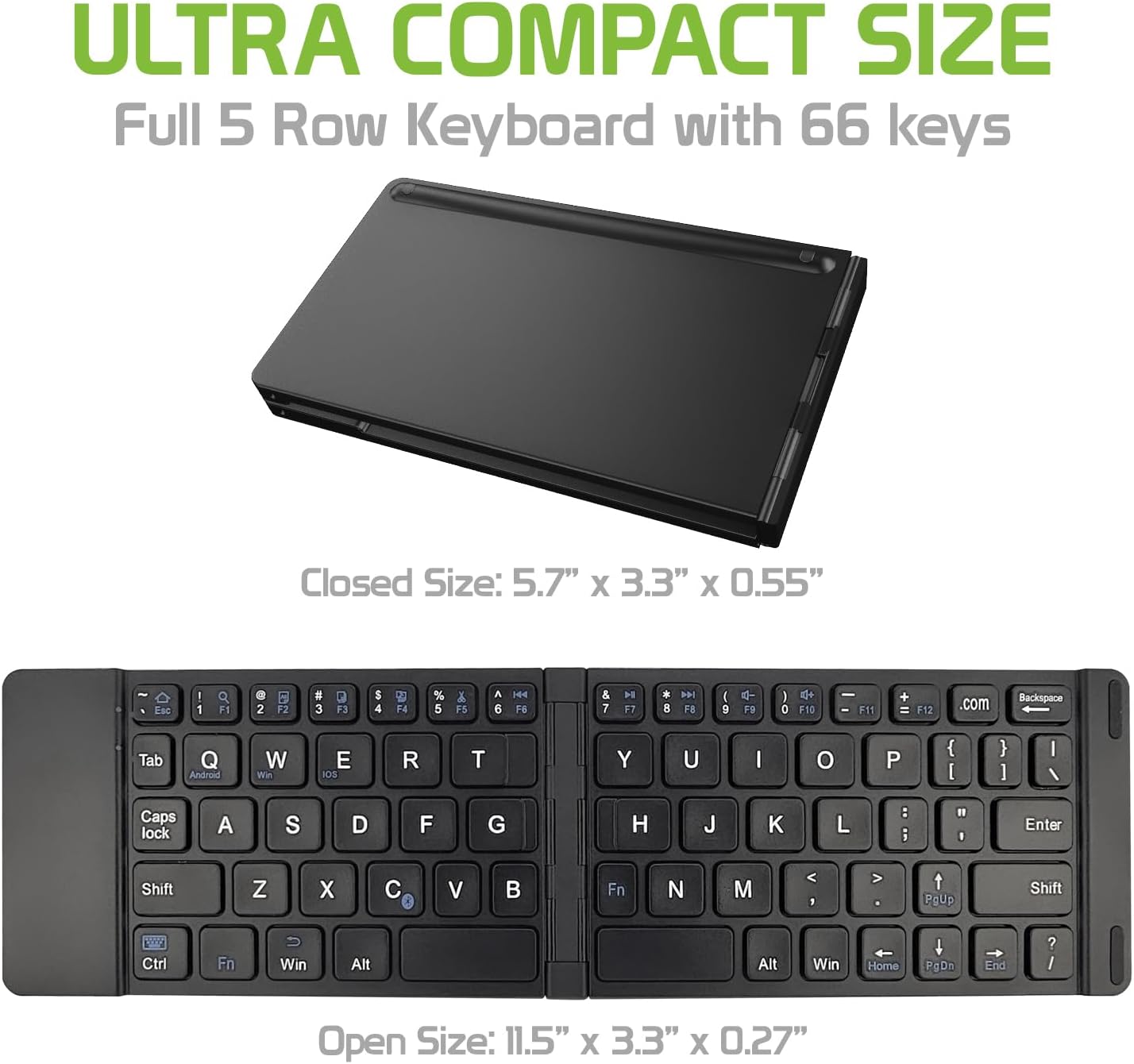
Image: The Cellet keyboard in both its closed, compact state and its unfolded, full-size state, with dimensions indicating its portability and functional size.
8. Warranty and Support
For warranty information or technical support, please visit the official Cellet website or contact their customer service department. Keep your purchase receipt for warranty claims.
Environmentally Friendly Disposal
To dispose of the product responsibly, follow these guidelines:
- Carefully pry up the plastic top to remove it completely. This action will likely render the keyboard unusable.
- Turn the top over and remove any tape securing the battery.
- Separate the battery from the circuit board.
- Dispose of the battery according to local regulations and laws. Recycle remaining keyboard parts where possible.