
1. Introduction
This manual provides instructions for the proper use, setup, and maintenance of your C2G 3ft 75 Ohm BNC Cable. This high-quality cable is designed for reliable video signal transmission in various applications.
2. Safety Information
- Ensure all devices are powered off before connecting or disconnecting the cable.
- Avoid bending the cable sharply, as this can damage the internal conductors and affect signal quality.
- Do not expose the cable to extreme temperatures or moisture.
- Keep the cable away from sources of electromagnetic interference.
- This cable is UL listed, indicating compliance with safety standards.
3. Product Overview
The C2G 3ft 75 Ohm BNC Cable is engineered for video applications requiring a 75 Ohm impedance match. It features nickel-plated BNC connectors and a molded PVC strain relief to protect against wear. The cable is constructed from UL listed coax cable, ensuring durability and performance.
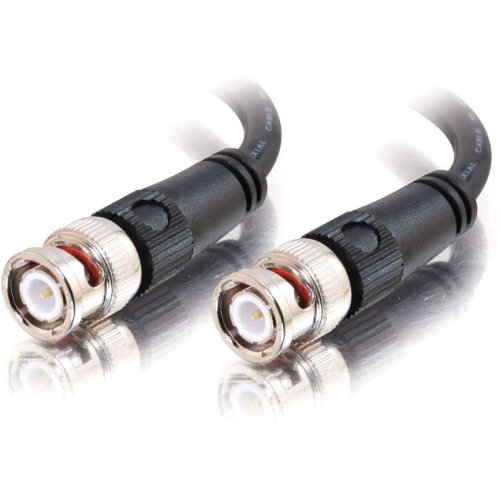
Figure 1: C2G 3ft 75 Ohm BNC Cable. This image shows the black cable with its male BNC connectors on both ends, designed for secure and reliable video connections.
Key Features:
- Length: 3 feet (0.91 meters)
- Impedance: 75 Ohm
- Connectors: Male-to-Male BNC, nickel-plated
- Cable Type: UL Listed Coaxial
- Strain Relief: Molded PVC
- Applications: CCTV, broadcast, studio, boardroom presentation, home theater, etc.
4. Setup
Follow these steps to properly connect your BNC cable:
- Identify Ports: Locate the BNC input and output ports on your source and display devices (e.g., CCTV camera, monitor, DVD player, video switcher).
- Align Connector: Align one male BNC connector on the cable with the corresponding female BNC port on your source device.
- Insert and Twist: Gently push the connector into the port and then twist the outer ring clockwise until it locks securely into place. You should feel a slight click.
- Connect Second End: Repeat the process for the other end of the cable, connecting it to your display or receiving device.
- Verify Connection: Ensure both ends are firmly seated and locked to prevent signal loss or interference.
This cable is compatible with devices requiring a BNC connection for video signals, such as security cameras, video recorders, and professional video equipment.
5. Operating
Once the C2G 3ft 75 Ohm BNC Cable is securely connected between your video source and display device, its operation is passive. The cable facilitates the transmission of the video signal without requiring any user interaction. Simply power on your connected devices, and the video signal should be transmitted.
- Ensure the correct input source is selected on your display device.
- Verify that both the source and display devices are functioning correctly.
6. Maintenance
Proper maintenance ensures the longevity and optimal performance of your BNC cable.
- Cleaning: Use a soft, dry cloth to wipe the cable and connectors. Avoid using harsh chemicals or abrasive cleaners.
- Storage: When not in use, coil the cable loosely. Do not wrap it tightly or kink it. Store in a cool, dry place away from direct sunlight.
- Inspection: Periodically inspect the cable for any signs of damage, such as cuts, fraying, or bent connectors. Replace the cable if damage is observed.
7. Troubleshooting
If you experience issues with your BNC cable, consider the following troubleshooting steps:
- No Signal:
- Ensure both ends of the cable are securely connected and locked into their respective ports.
- Verify that both the source and display devices are powered on and functioning correctly.
- Check if the correct input source is selected on your display device.
- Test the cable with another known working device or try a different BNC cable if available, to isolate the issue.
- Poor Picture Quality (Flickering, Noise):
- Ensure the cable is not bent sharply or kinked.
- Check for any visible damage to the cable or connectors.
- Confirm that the cable is not running parallel to power cables or other sources of electromagnetic interference.
- Verify that the impedance of the cable (75 Ohm) matches the requirements of your devices.
8. Specifications
| Feature | Specification |
|---|---|
| Brand | C2G |
| Model Number | ASC793702AIN02 |
| ASIN | B00MYS32SI |
| GTIN/UPC | 757120400257 |
| Length | 3 feet (approx. 0.91 meters) |
| Impedance | 75 Ohm |
| Connector Type | BNC Male-to-Male |
| Cable Type | Coaxial (UL Listed) |
| Color | Black |
| Compatible Devices | DVD Player, CCTV, Broadcast, Studio, Home Theater equipment with BNC ports |
| Item Weight | 2.4 ounces (approx. 68 grams) |
| Indoor/Outdoor Usage | Indoor, Outdoor |
9. Warranty and Support
For warranty information or technical support regarding your C2G 3ft 75 Ohm BNC Cable, please refer to the official C2G website or contact their customer service directly. Details are typically available on the manufacturer's packaging or website.
Manufacturer: O.E.M. (for C2G)
Brand Website: Visit the C2G Store on Amazon