
Introduction
This manual provides essential information for the setup, operation, maintenance, and troubleshooting of your Classic Cantabile DP-50 Digital Piano. Please read these instructions carefully before using the instrument to ensure proper function and longevity.
1. Setup
1.1 Unpacking and Assembly
Carefully unpack all components from the packaging. It is recommended to retain the original packaging for future transport or storage. The DP-50 Digital Piano requires assembly. Follow the included assembly guide to connect the stand, pedals, and main piano unit. Ensure all screws are securely fastened.
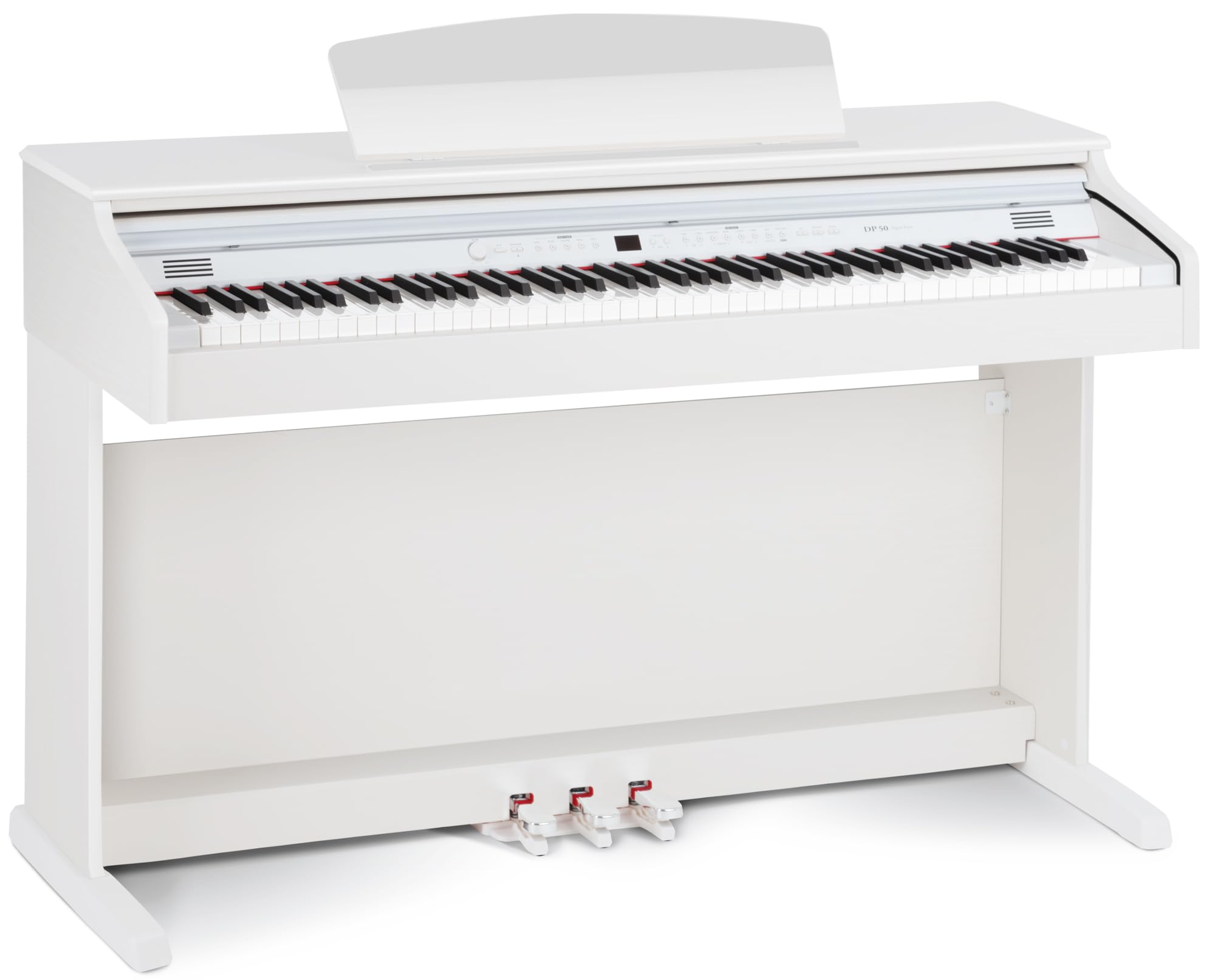
Figure 1: Assembled Classic Cantabile DP-50 Digital Piano.
1.2 Connecting the Pedals
Locate the pedal unit and connect its cable to the designated 'Pedal In' port on the rear panel of the piano. Ensure the connection is firm.
1.3 Power Connection
Connect the power adapter to the DC IN jack on the rear panel of the piano, then plug the adapter into a suitable electrical outlet. Use only the power adapter supplied with the instrument.
2. Operating Instructions
2.1 Power On/Off
Press the POWER button located on the control panel to turn the piano on or off. The LED screen will illuminate upon power-on.
2.2 Key Features
- 88 Weighted Keys: The DP-50 features 88 hammer-action weighted keys with touch response, providing a realistic piano feel.
- Polyphony: The instrument supports a maximum of 64-voice polyphony, allowing for complex musical passages without note drop-out.
- Voices: Select from 14 different instrument voices using the control panel. Refer to the detailed voice list in the full manual for specific options.
- Metronome: Activate the built-in metronome to assist with rhythm and timing practice. Adjust tempo as needed.
2.3 Advanced Functions
- Layer Function: Combine two different voices to play simultaneously when a single key is pressed.
- Split Function: Divide the keyboard into two sections, each playing a different voice.
- Twin-Piano Function: Splits the keyboard into two identical pitch ranges, allowing two players to play the same notes simultaneously, ideal for student-teacher interaction.
- Tune Function: Adjust the overall pitch of the instrument.
- Transpose Function: Shift the pitch of the keyboard up or down in semitone steps.
- MIDI Local: This function allows you to disconnect the keyboard from the internal sound generation, useful when using the piano as a MIDI controller for external software.
2.4 Effects
The DP-50 includes 13 effects, with 8 distinct reverb types. Use the control panel to select and adjust these effects to enhance your sound.
2.5 Recording Function
The instrument features a recording function to capture your performances. Consult the full manual for detailed instructions on how to record, play back, and manage your recordings.
2.6 Demo Songs
The piano comes with 50 pre-installed demo songs. These can be played back for enjoyment or as learning aids.
2.7 Connectivity
The DP-50 offers various connection options:
- USB-Audio/MIDI Interface: Connect to a computer for MIDI data transfer and audio recording/playback.
- Pedal In: For connecting the included 3-pedal unit.
- Stereo Line In/Out: Use the Line In to connect external audio sources (e.g., MP3 player, smartphone) and play them through the piano's speakers. Use the Line Out to connect the piano to external amplifiers, recording devices, or other audio systems.
- 2 Headphone Jacks: Two 3.5mm headphone jacks are provided for silent practice or duet playing with headphones.

Figure 2: Rear panel connections including USB, pedal, line in/out, and headphone jacks.
3. Maintenance
3.1 Cleaning
To clean the piano, use a soft, dry cloth. For stubborn dirt, slightly dampen the cloth with water. Avoid using abrasive cleaners, solvents, or waxes, as these can damage the finish. Do not spray cleaning liquids directly onto the instrument.
3.2 General Care
- Keep the instrument away from direct sunlight, heat sources, and excessive humidity.
- Avoid placing heavy objects on the keyboard or control panel.
- Protect the instrument from dust by using a dust cover when not in use.
- Ensure proper ventilation around the instrument to prevent overheating.
4. Troubleshooting
If you encounter any issues with your DP-50 Digital Piano, please refer to the following common troubleshooting steps:
- No Sound: Check if the power is on, volume is turned up, headphones are not connected (unless intended), and external speakers/amplifiers are properly connected and powered. Ensure the MIDI Local function is not set to OFF if you intend to use the internal sound generator.
- Keys Not Responding: Verify the power supply. If specific keys are unresponsive, contact customer support.
- Distorted Sound: Check volume levels on both the piano and any connected external audio equipment. Ensure cables are securely connected and not damaged.
- Power Issues: Ensure the power adapter is correctly plugged into both the piano and a working electrical outlet. Try a different outlet if necessary.
For issues not covered here, please consult the comprehensive troubleshooting section in the full user manual or contact Classic Cantabile customer support.
5. Specifications
| Feature | Specification |
|---|---|
| Keys | 88 hammer-action weighted keys with Touch Response |
| Polyphony | Max. 64-voice |
| Voices | 14 |
| Pedals | 3 (Sustain, Sostenuto, Soft) |
| Effects | 13 effects, 8 Reverb types |
| Display | LED screen |
| Demo Songs | 50 |
| Connectivity | USB-Audio/MIDI Interface, Pedal In, Stereo Line In/Out, 2x 3.5mm Headphone Jacks |
| Speakers | 2 x 6.5" (stereo 15 W + 15 W) |
| Dimensions (H x W x D) | Approx. 85 cm x 137 cm x 44 cm (33.5" x 53.9" x 17.3") |
| Weight | Approx. 51 kg (112.4 lbs) |
| Material | Wood |
| Color | White (Matte finish) |

Figure 3: Product dimensions.
6. Warranty and Support
For information regarding warranty coverage, technical support, or service, please refer to the warranty card included with your product or visit the official Classic Cantabile website. Contact details for customer service are typically provided in the full user manual or on the manufacturer's website.


