
Introduction
The Motorola Moto G (2nd Generation) is a versatile smartphone designed for everyday use. It features a brilliant display, stereo sound, and an all-day battery. This manual provides essential information for setting up, operating, maintaining, and troubleshooting your device.

Figure 1: Front view of the Motorola Moto G (2nd Generation) smartphone.
Setup
1. Unboxing and Initial Inspection
Upon receiving your Moto G (2nd Generation), carefully open the packaging and inspect the device for any physical damage. The box typically contains the smartphone and a computer USB charger. A wall charger is not included.
2. SIM Card Installation
The Moto G (2nd Generation) supports a single SIM card. Locate the SIM card slot on the device, typically on the side. Use the provided SIM ejector tool (if included) to open the tray. Insert your micro-SIM card into the tray, ensuring it is correctly oriented, then reinsert the tray into the phone.
3. Powering On and Initial Configuration
Press and hold the power button located on the side of the device until the Motorola logo appears. Follow the on-screen prompts to select your language, connect to a Wi-Fi network, and set up your Google account. This process will guide you through essential settings to get your phone ready for use.
Operating Your Device
1. Display and User Interface
The device features a 5-inch IPS LCD display with a resolution of 1280 x 720 pixels. It runs on the Android operating system, offering a near-stock Android experience. Navigate through the interface using touch gestures and on-screen buttons.
2. Audio Features
Enjoy enhanced audio with front-ported stereo speakers. The device also includes a 3.5 mm audio jack for connecting headphones, providing a direct and high-quality audio experience.
3. Storage and RAM
The Moto G (2nd Generation) comes with 8 GB of internal storage. Storage can be expanded using a microSD card (up to 32 GB, sold separately). The device has 1 GB of RAM, ensuring smooth performance for daily tasks.
Camera Features
Capture moments with the integrated camera system.
1. Rear Camera
The main rear camera is 8 megapixels, capable of recording video. It features autofocus and an LED flash for improved low-light performance.
2. Front Camera
A 2-megapixel front-facing camera is available for selfies and video calls.
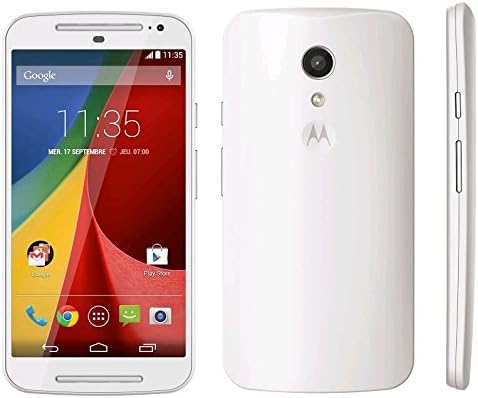
Figure 2: Front and back view of the Motorola Moto G (2nd Generation).
Maintenance
1. Software Updates
Ensure your device is running the latest software version for optimal performance and security. Check for updates periodically through the device settings under 'About phone' or 'System updates'.
2. Cleaning and Protection
Clean your device regularly with a soft, lint-free cloth. Avoid harsh chemicals. The display is protected by Corning Gorilla Glass 3, offering enhanced scratch resistance. Consider using a protective case for additional durability.
Troubleshooting
1. Device Not Responding
If your device becomes unresponsive, press and hold the power button for about 10-15 seconds to force a restart.
2. Connectivity Issues
For Wi-Fi or cellular network problems, try toggling airplane mode on and off. If the issue persists, restart your device or check your network settings.
3. Battery Drain
To optimize battery life, reduce screen brightness, close unused apps, and disable unnecessary features like GPS or Bluetooth when not in use.
Specifications
| Product Dimensions | 3.23 x 1.83 x 6.02 inches |
| Item Weight | 5.3 ounces |
| Operating System | Android |
| RAM | 8 GB (Note: This refers to storage capacity in the provided data, actual RAM is 1GB) |
| Memory Storage Capacity | 8 GB |
| Standing Screen Display Size | 5 Inches |
| Display Resolution | 720 x 1280 pixels |
| CPU Model | Snapdragon |
| CPU Speed | 1.2 GHz |
| Battery Capacity | 2070 Milliamp Hours |
| Rear Camera Resolution | 8MP |
| Special Features | Built-In GPS, Mobile Hotspot Capability, dual-camera, smartphone |
Warranty and Support
For detailed warranty information and support options, please refer to the official Motorola website or contact their customer service. Keep your proof of purchase for warranty claims.


