
1. Safety Information
Before attempting any installation or maintenance, ensure the microwave oven is completely disconnected from its power source. Failure to do so can result in electric shock, injury, or death. Installation of this control board should only be performed by a qualified technician. Always wear appropriate personal protective equipment, such as gloves and safety glasses, when handling electronic components.
This control board contains sensitive electronic components. Avoid touching the components directly to prevent electrostatic discharge (ESD) damage. Store the board in its anti-static packaging until ready for installation.
2. Product Overview
The GE WB27X11081 Microwave Control Board is a genuine replacement part designed to manage the various functions of compatible GE microwave ovens. This board acts as the central processing unit, controlling heating cycles, display functions, and user input from the control panel.
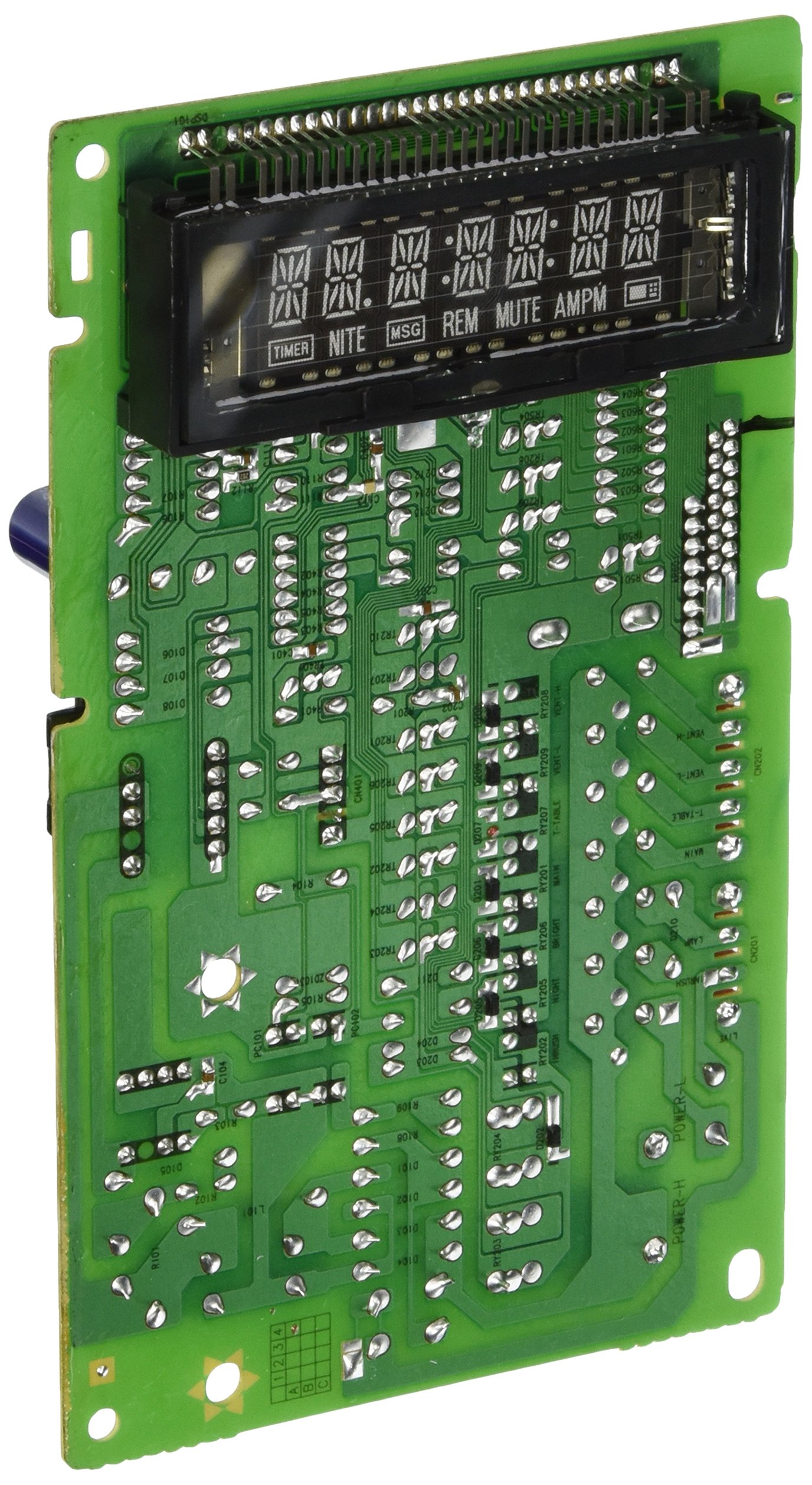
This image displays the GE WB27X11081 Microwave Control Board. Key components visible include multiple relays (black rectangular boxes), capacitors (blue cylindrical components), resistors (small striped components), and various connectors for wiring harnesses. A white label with 'RAS-SM7NV-08' and 'J5247WAF8021342' is affixed to the board, indicating specific manufacturing or model details.
The board features multiple connectors for interfacing with the microwave's display, keypad, power supply, and other functional components. It is crucial to ensure correct connection of all wiring harnesses during installation.
3. Setup and Installation
Installation of the GE WB27X11081 Microwave Control Board requires technical expertise and should be performed by a qualified service technician. The following steps are a general guide and may vary depending on the specific microwave model.
- Disconnect Power: Unplug the microwave oven from the electrical outlet or turn off the circuit breaker supplying power to the appliance.
- Access Control Board: Carefully remove the outer casing or control panel assembly to gain access to the existing control board. Refer to your microwave's service manual for specific disassembly instructions.
- Document Connections: Before disconnecting any wires, take clear photographs or make detailed diagrams of all wire connections to the old control board. Pay close attention to the orientation and position of each connector (e.g., CNB01, CN201, CN202, J101, J103, J109, J113).
- Disconnect Wires: Carefully disconnect all wiring harnesses and ribbon cables from the old control board. Use appropriate tools to avoid damaging the connectors or wires.
- Remove Old Board: Unscrew or unclip the old control board from its mounting brackets.
- Install New Board: Position the new GE WB27X11081 control board in place and secure it with the original screws or clips.
- Reconnect Wires: Using your documented connections, carefully reconnect all wiring harnesses and ribbon cables to the new control board. Ensure each connector is fully seated and correctly oriented.
- Reassemble Microwave: Reattach the control panel assembly and outer casing. Ensure all screws are tightened and panels are securely fitted.
- Restore Power and Test: Plug the microwave back into the electrical outlet or turn on the circuit breaker. Test all microwave functions to ensure proper operation.
4. Operation
The GE WB27X11081 Microwave Control Board operates internally within the microwave oven. It does not have direct user-operable controls. Once installed, the board processes commands from the microwave's user interface (keypad, display) and controls the various components of the microwave, such as the magnetron, turntable motor, and interior light, to execute cooking programs and other functions.
Proper operation of the control board is indicated by the microwave responding correctly to user inputs and performing its intended functions without error codes or malfunctions.
5. Maintenance
The GE WB27X11081 Microwave Control Board is a sealed electronic component and is not designed for user maintenance. No user-serviceable parts are present on the board.
- Cleaning: If the board becomes exposed during service, ensure it remains clean and free of dust or debris. Use a soft, dry brush or compressed air to gently remove any accumulation. Do not use liquid cleaners.
- Environment: Ensure the microwave's internal environment remains dry and free from excessive moisture, which can damage electronic components.
Any issues requiring internal inspection or repair of the control board should be handled by a qualified service technician.
6. Troubleshooting
If your microwave oven exhibits issues after installing the GE WB27X11081 Control Board, consider the following troubleshooting steps. Always disconnect power before inspecting internal components.
- No Power/No Display:
- Verify the microwave is properly plugged into a working electrical outlet.
- Check the household circuit breaker to ensure it has not tripped.
- Inspect all wiring harnesses connected to the control board for secure and correct connections.
- Specific Functions Not Working:
- If certain buttons or functions (e.g., heating, turntable) are not responding, re-check the connections to the control board, especially those related to the affected components.
- Ensure the control panel ribbon cable is correctly seated.
- Error Codes:
- If the microwave displays an error code, consult your microwave oven's user manual or service manual for the meaning of the specific code and recommended actions.
If troubleshooting steps do not resolve the issue, it is recommended to contact a qualified appliance repair technician for further diagnosis and repair.
7. Specifications
| Brand Name | GE |
| Model Info | WB27X11081 |
| Item Weight | 6.4 ounces |
| Product Dimensions | 8 x 4.6 x 2.3 inches |
| Part Number | WB27X11081 |
8. Warranty and Support
For information regarding the warranty of the GE WB27X11081 Microwave Control Board, please refer to the documentation provided with your purchase or contact GE customer support directly. Warranty terms typically cover manufacturing defects.
For technical assistance, installation guidance, or to locate a qualified service technician, please visit the official GE Appliances website or contact their customer service department. Have your microwave oven's model and serial number, along with the control board's part number (WB27X11081), ready when contacting support.


