
Design Toscano MH35067
Design Toscano Unlocking Time Key Wall Clock Instruction Manual
Model: MH35067
Brand: Design Toscano
1. Product Overview
The Design Toscano Unlocking Time Key Wall Clock is a distinctive timepiece designed to enhance your home decor. This over-yard-tall clock features bold Roman numerals, elegant ebony metal hands, and a decorative filigree key crown. Crafted with an all-metal construction and a modern quartz movement, it offers both aesthetic appeal and reliable timekeeping.
- Dimensions: 14.5 inches (W) x 2 inches (D) x 38 inches (H)
- Weight: Approximately 3 lbs
- Material: All metal construction
- Movement: Modern quartz movement

Figure 1.1: The Design Toscano Unlocking Time Key Wall Clock, featuring its unique key design and Roman numeral face.
2. Safety Information
Please read and understand all safety instructions before installing or operating your wall clock. Failure to follow these instructions may result in injury or damage to the product.
- Keep out of reach of children and pets.
- Do not expose the clock to extreme temperatures, direct sunlight, or high humidity.
- Ensure the wall mounting surface is sturdy enough to support the clock's weight.
- Do not attempt to disassemble or modify the clock's internal components.
- Dispose of used batteries properly according to local regulations.
3. Package Contents
Carefully unpack the box and ensure all items are present and in good condition.
- Design Toscano Unlocking Time Key Wall Clock (1 unit)
- Instruction Manual (this document)
Note: 1 AA battery is required for operation and is not included in the package.
4. Setup
4.1. Battery Installation
- Locate the battery compartment on the back of the clock's movement mechanism.
- Insert one (1) fresh AA battery, ensuring the positive (+) and negative (-) terminals align correctly with the markings in the compartment.
- Close the battery compartment cover securely.
4.2. Setting the Time
- On the back of the clock's movement mechanism, locate the time-setting knob (usually a small wheel or dial).
- Gently turn the knob clockwise or counter-clockwise until the clock hands display the correct time.
- Avoid moving the clock hands directly, as this may damage the movement.
4.3. Wall Mounting
This clock is designed for wall mounting. Choose a suitable location that can support the clock's weight and where it will not be easily bumped or knocked down.
- Identify the hanging point on the back of the clock (typically a keyhole slot or a sturdy loop).
- Measure the desired height and position on your wall.
- Install a suitable wall anchor and screw (not included) appropriate for your wall type (e.g., drywall, plaster, wood stud). Ensure the screw protrudes enough to securely hold the clock.
- Carefully hang the clock onto the installed screw, ensuring it is level and stable.

Figure 4.1: The wall clock displayed as part of a home decor arrangement, illustrating its size and presence.
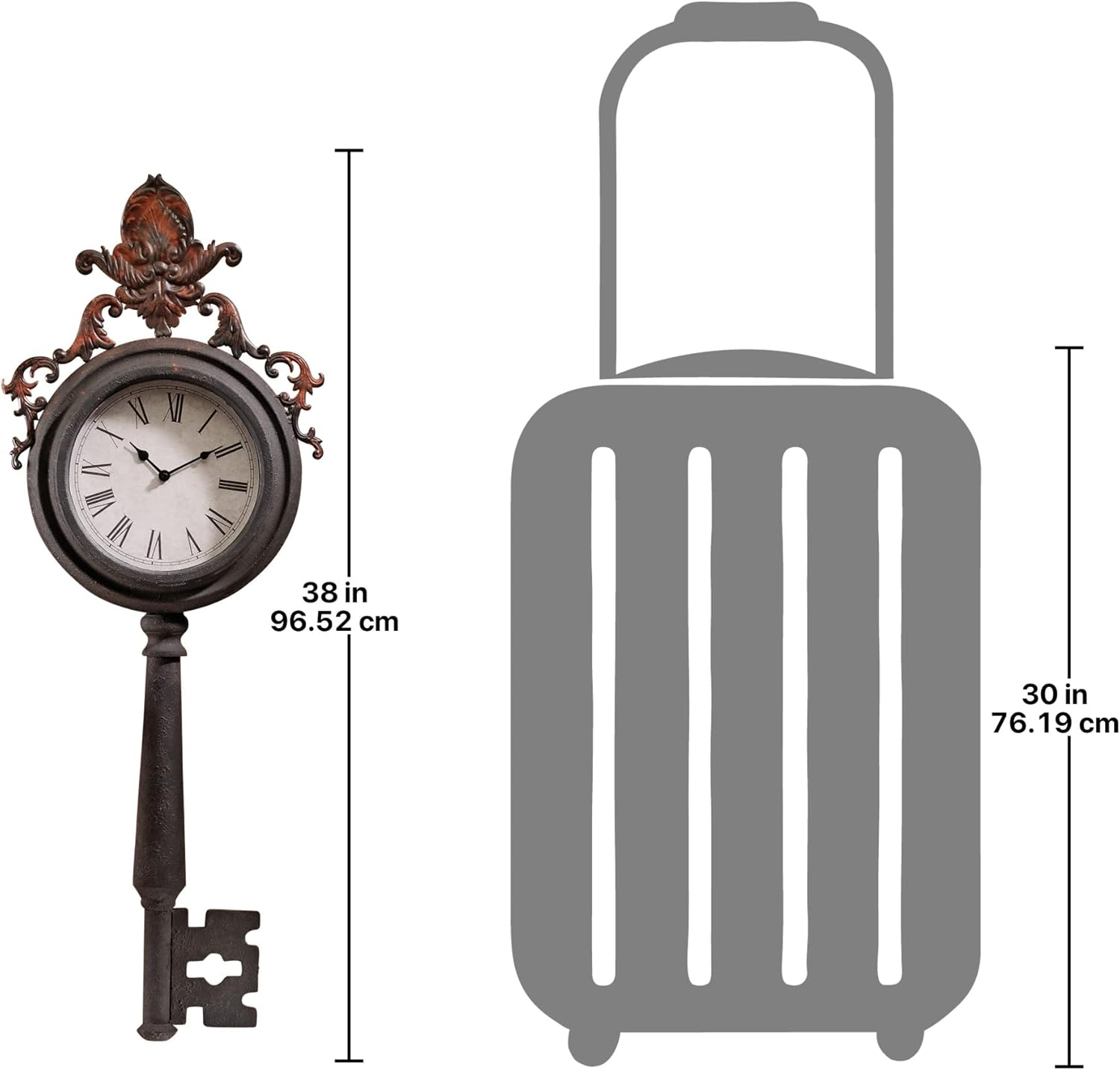
Figure 4.2: Dimensional diagram of the clock, showing its height of 38 inches (96.52 cm) and width of 14.5 inches (36.83 cm), for accurate placement planning.
5. Operating the Clock
Once the battery is installed and the time is set, the clock will begin to operate automatically. The quartz movement ensures accurate timekeeping.
- The clock operates continuously as long as the battery has sufficient power.
- To adjust the time, refer to Section 4.2.
6. Maintenance
6.1. Cleaning
To maintain the appearance of your clock:
- Wipe the clock surface gently with a soft, dry cloth.
- Do not use abrasive cleaners, solvents, or polishes, as these may damage the finish.
6.2. Battery Replacement
Replace the AA battery when the clock stops or begins to lose time. Refer to Section 4.1 for battery installation instructions.
7. Troubleshooting
| Problem | Possible Cause | Solution |
|---|---|---|
| Clock not working | Battery is dead or incorrectly installed. | Replace the battery with a fresh AA battery, ensuring correct polarity. |
| Clock runs fast or slow | Low battery power or movement issue. | Replace the battery. If the issue persists, the quartz movement may require professional inspection or replacement. |
| Hands are stuck or not moving smoothly | Hands are bent or obstructed. | Gently check if the hands are touching each other or the clock face. Carefully bend them back into position if necessary, ensuring they clear each other. |
8. Specifications
| Feature | Detail |
|---|---|
| Brand | Design Toscano |
| Model Number | MH35067 |
| Color | Black |
| Display Type | Analog |
| Style | Modern |
| Special Feature | Roman Numeral |
| Power Source | Battery Powered (1 AA battery required) |
| Shape | Rectangular (Key shape) |
| Material | Metal |
| Mounting Type | Wall Mount |
| Watch Movement | Quartz |
| Product Dimensions | 2 x 14.5 x 38 inches |
| Item Weight | 3 pounds |
| Assembly Required | No |
9. Warranty and Support
9.1. Warranty Information
If you are not satisfied with your purchase, it must be returned within 60 days for you to receive a refund or exchange. Please note that you are responsible for the safe return of merchandise and for all shipping costs. Shipping charges are non-refundable once your order has been shipped. Customized orders and personalized items are non-refundable.
9.2. Customer Support
For further assistance, questions, or to report any issues with your Design Toscano Unlocking Time Key Wall Clock, please contact Design Toscano customer support through their official website or the retailer where you purchased the product.
Visit the Design Toscano Store: Design Toscano Store
Ask a question about this manual
Ask about setup, troubleshooting, compatibility, parts, safety, or missing instructions. Manuals+ will review the question and use this page’s manual context to help answer it.