
1. Introduction
The Syma X5C RC Explorers Quad Copter is a versatile and stable drone equipped with a 6-axis gyro stabilization system, making it suitable for both indoor and outdoor flight. Its modular design simplifies assembly and maintenance. Key features include 360-degree eversion for impressive aerial maneuvers and an integrated HD camera for capturing photos and videos.
2. Package Contents
Please verify that all items listed below are included in your package:
- 1 x Syma X5C RC Quad Copter
- 1 x 2.4G Remote Controller (does not include 1.5V AA batteries)
- 1 x USB charging cable
- 4 x Rotating blades (spare)
- 4 x Protection frames (propeller guards)
- 2 x Landing skids
- 1 x Screwdriver
- 1 x 3.7V 500mAh LiPO battery
- 1 x User Manual
3. Setup Guide
3.1 Charging the Quadcopter Battery
Connect the provided USB charging cable to the 3.7V 500mAh LiPO battery and a USB power source. The charging time is approximately 100 minutes. Ensure the battery is fully charged before first use.
3.2 Installing Quadcopter Battery
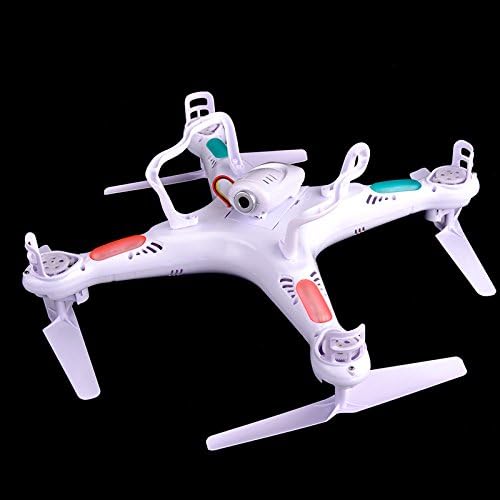
Open the battery compartment on the underside of the quadcopter. Insert the charged 3.7V 500mAh LiPO battery and securely close the compartment. The image above shows the underside of the quadcopter, where the battery compartment is located.
3.3 Installing Remote Controller Batteries
The 2.4G Remote Controller requires 1.5V AA batteries (not included). Open the battery compartment on the back of the remote and insert the batteries, observing polarity. Close the compartment.
3.4 Attaching Propeller Guards and Landing Skids

Carefully attach the four protection frames (propeller guards) to the motor arms of the quadcopter. Then, attach the two landing skids to the underside of the main body. Use the provided screwdriver if necessary. The image above illustrates the quadcopter with its propeller guards installed.
3.5 Attaching the HD Camera

Locate the camera port on the underside of the quadcopter. Gently slide and secure the HD camera into place, ensuring a firm connection. The image above shows the quadcopter with the camera module attached to its underside.
3.6 Binding the Quadcopter to the Remote
Place the quadcopter on a flat, level surface. Turn on the quadcopter, then turn on the remote controller. Push the left throttle stick all the way up, then all the way down. The indicator lights on the quadcopter will stop flashing and become solid, indicating successful binding.
4. Operating Instructions
4.1 Basic Flight Controls
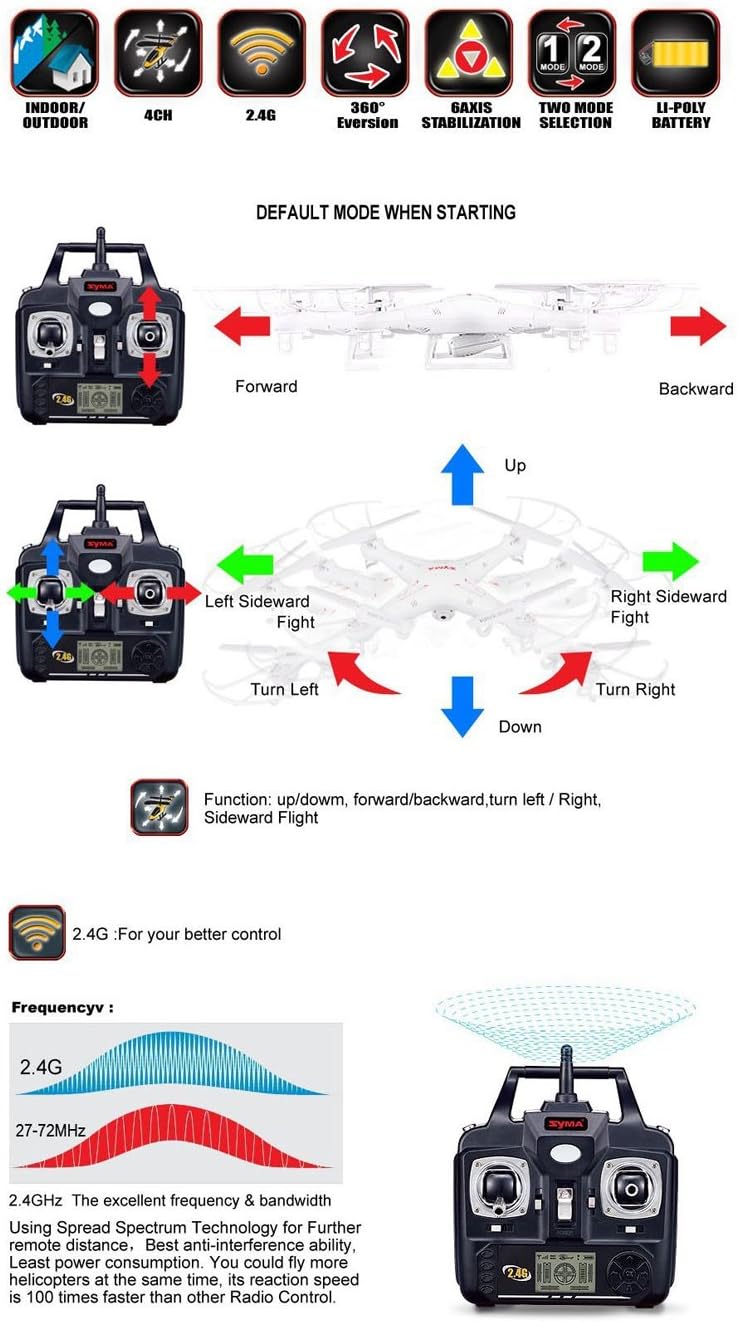
Familiarize yourself with the remote controller's functions:
- Left Joystick (Throttle/Yaw): Push up/down for altitude control (throttle). Push left/right for rotation (yaw).
- Right Joystick (Pitch/Roll): Push up/down for forward/backward movement (pitch). Push left/right for sideward movement (roll).
The diagram above provides a visual guide to the remote control's layout and how its movements translate to quadcopter flight.
4.2 Flight Modes (High/Low Speed)
The Syma X5C features two flight modes: low speed for beginners and high speed for experienced pilots. Press the top-left button on the remote controller to switch between modes. A beep will confirm the change.
4.3 360-Degree Eversion

To perform a 360-degree flip, press the top-right button on the remote controller. Then, push the right joystick in the desired direction of the flip (forward, backward, left, or right). Ensure sufficient altitude before attempting this maneuver. The diagram above illustrates the 360-degree eversion capability.
4.4 Camera Operation
To take photos, press the camera button on the remote. To start/stop video recording, press the video button. Ensure a microSD card (not included) is inserted into the camera for storage.
4.5 Pre-Flight Check
Before each flight, ensure batteries are charged, propellers are securely attached, and the quadcopter is bound to the remote.
4.6 Take-off and Landing
Gently push the left throttle stick up to take off. To land, slowly pull the left throttle stick down until the quadcopter touches the ground.
5. Maintenance
- Clean the quadcopter regularly with a soft, dry cloth. Avoid using water or solvents.
- Inspect propellers for damage before each flight. Replace any bent or broken blades using the provided screwdriver and spare blades.
- Store the quadcopter and remote in a cool, dry place away from direct sunlight. Remove batteries from the remote for long-term storage.
- Do not overcharge or over-discharge the LiPO battery. Allow it to cool down before recharging.
6. Troubleshooting
| Problem | Possible Cause | Solution |
|---|---|---|
| Quadcopter does not respond to remote | Not bound Low battery (quadcopter) Low battery (remote) | Re-bind the quadcopter and remote (see Setup section). Charge the quadcopter battery. Replace AA batteries in the remote controller. |
| Unstable flight / Drifting | Gyro not calibrated Damaged propellers | Place quadcopter on a flat surface, turn on, then push both joysticks to the bottom-right corner for a few seconds until lights flash, then release. Inspect and replace any damaged propellers. |
| Short flight time | Battery not fully charged Old/worn battery | Ensure battery is fully charged (approx. 100 minutes). Consider replacing the LiPO battery. |
| Camera not recording/taking photos | No microSD card Full microSD card | Insert a formatted microSD card into the camera. Transfer files from the microSD card and delete them to free up space. |
| Quadcopter crashes frequently | Beginner pilot Wind interference | Practice in low-speed mode and open areas. Avoid flying in strong winds. |
7. Specifications
| Feature | Detail |
|---|---|
| Brand | Syma |
| Model Name | 4 Channel 2.4GHz RC Explorers |
| Special Feature | 6-axis gyro stabilization system, HD camera, 360 degree eversion, wind resistance, colorful flashing lights, blade protector |
| Age Range (Description) | Adult (14 years and up) |
| Color | White |
| Effective Still Resolution | 2 MP |
| Connectivity Technology | Wi-Fi |
| Included Components | SYMA-X5C (Quadcopter, Remote, USB cable, Blades, Protection frames, Landing skids, Screwdriver, LiPO battery, User Manual) |
| Skill Level | Beginner |
| Item Weight | 1.6 Pounds |
| Battery Capacity | 500 Milliamp Hours (3.7V LiPO) |
| Video Capture Format | MP4 |
| Remote Control Technology | RC |
| Control Type | Remote Control |
| Maximum Range | 50 Meters |
| Material | Copter |
| Wireless Communication Technology | Wi-Fi |
| Battery Cell Composition | Lithium Polymer |
| Are Batteries Included | Yes (for quadcopter) |
| Remote Control Included? | Yes |
| Rechargeable Battery Included | No (refers to AA for remote, quadcopter battery is rechargeable) |
| Product Dimensions | 16.5"L x 12.2"W x 3.8"H |
| Item model number | SYSX5C |
| Batteries | 1 Lithium Metal batteries required. (included) |
8. Warranty and Support
For warranty information and further support, please refer to the documentation included with your purchase or visit the official Syma website. You can also explore the Syma brand store on Amazon for additional products and resources: SYMA Store.


