
1. Introduction
This instruction manual provides essential information for the safe and effective installation, operation, and maintenance of the ABB MCB-10 Contact Block. Please read this manual thoroughly before attempting any installation or operation to ensure proper function and safety.
The ABB MCB-10 is a 1 Normally Open (NO) contact block designed for industrial control applications, rated for 8 Amps at 120 Volts.
2. Safety Information
WARNING: Electrical shock hazard. Only qualified personnel should perform installation, maintenance, and troubleshooting procedures. Disconnect all power before working on the device.
- Always follow local and national electrical codes and regulations.
- Ensure the power supply is disconnected and locked out before installation or servicing.
- Verify that the voltage and current ratings of the contact block match the application requirements.
- The device conforms to IEC 60947-5-1 and EN 60947-5-1 standards.
3. Product Overview
The ABB MCB-10 is a single-pole, normally open (1NO) contact block. It is designed for modular mounting with compatible control devices, providing a reliable switching function in control circuits.
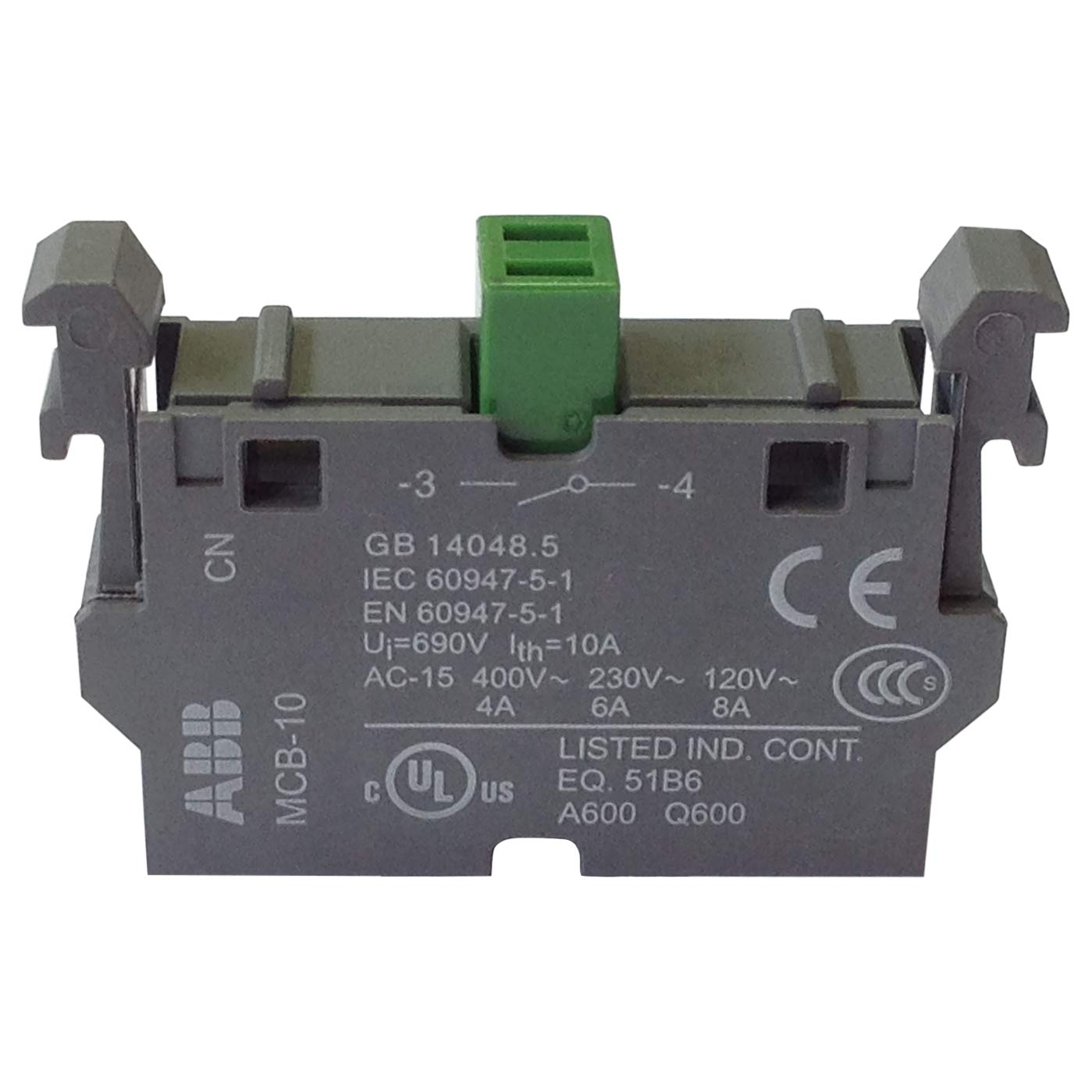
Figure 1: Front view of the ABB MCB-10 Contact Block. The image displays the grey plastic housing with green terminal block, showing markings for model number MCB-10, brand ABB, and electrical ratings including IEC 60947-5-1, EN 60947-5-1, Ui=690V, Ith=10A, and AC-15 ratings for 400V, 230V, and 120V.
4. Installation
Follow these steps for proper installation of the MCB-10 Contact Block:
- Power Disconnection: Ensure all power to the control circuit is disconnected and verified using appropriate safety procedures.
- Mounting: The MCB-10 is designed for plug-in mounting. Align the contact block with the corresponding slots on the control device (e.g., push button, selector switch) and press firmly until it clicks into place. Refer to the control device's manual for specific mounting instructions if necessary.
- Wiring:
- Identify the terminals on the contact block. The MCB-10 is a 1NO (Normally Open) contact, meaning the circuit is open when the actuator is at rest and closes when the actuator is pressed.
- Connect the appropriate wires to the terminals. Ensure secure connections to prevent loose contacts and potential hazards.
- The contact block is rated for 120V and 8A for AC-15 applications. Verify that the connected circuit's voltage and current do not exceed these ratings.
- Verification: After wiring, double-check all connections for tightness and correct polarity.
- Power Restoration: Once installation is complete and verified, restore power to the circuit.
5. Operation
The ABB MCB-10 Contact Block functions as a Normally Open (NO) contact. When integrated with a compatible actuator (e.g., a push button), pressing the actuator will close the contact, allowing current to flow through the circuit. Releasing the actuator will open the contact, interrupting the circuit.
Ensure the contact block is used within its specified electrical ratings (e.g., 120V, 8A AC-15) to guarantee reliable operation and prevent damage.
6. Maintenance
The ABB MCB-10 Contact Block is designed for long-term reliability with minimal maintenance. However, periodic inspection is recommended:
- Visual Inspection: Regularly check the contact block for any signs of physical damage, discoloration, or loose connections.
- Cleaning: If necessary, gently clean the exterior of the contact block with a dry, lint-free cloth. Do not use abrasive cleaners or solvents.
- Connection Check: Periodically verify that all wire connections are secure and tight.
WARNING: Always disconnect power before performing any maintenance or inspection.
7. Troubleshooting
If the contact block is not functioning as expected, consider the following common issues:
- No Circuit Activation:
- Check if power is supplied to the circuit.
- Verify all wiring connections are correct and secure.
- Ensure the actuator (e.g., push button) is properly installed and functioning.
- Inspect the contact block for visible damage.
- Intermittent Operation:
- Check for loose wire connections.
- Ensure the contact block is securely mounted to the control device.
If issues persist, contact qualified electrical personnel or ABB customer support.
8. Specifications
| Parameter | Value |
|---|---|
| Model Number | MCB-10 |
| Contact Type | 1 Normally Open (1NO) |
| Rated Insulation Voltage (Ui) | 690V |
| Conventional Thermal Current (Ith) | 10A |
| AC-15 Rating (400V) | 4A |
| AC-15 Rating (230V) | 6A |
| AC-15 Rating (120V) | 8A |
| Standards | IEC 60947-5-1, EN 60947-5-1, GB 14048.5 |
| Product Dimensions | 2 x 4 x 1 inches; 0.32 ounces |
| Mounting Type | Plug-In Mount |
| Material | Plastic |
| Color | Grey |
| Certifications | UL Listed (C US), CE |
9. Warranty and Support
For information regarding product warranty, technical support, or service, please contact ABB customer service or visit the official ABB website. Ensure you have your product model number (MCB-10) available when seeking support.
This product is manufactured by ABB.


