
1. Introduction
The ASA Electronics Advent ACM150B is a high-efficiency, roof-top air conditioner designed for recreational vehicles (RVs). This unit provides 15,000 BTU of cooling capacity, optimized for the demands of RV use. It features a robust design for quiet operation and includes environmentally-friendly refrigerant. This manual provides essential information for the proper installation, operation, and maintenance of your Advent ACM150B air conditioner.

Image 1.1: Exterior view of the Advent ACM150B RV Air Conditioner in black.
2. Safety Information
Read all instructions carefully before installation and operation. Failure to follow these instructions may result in property damage, personal injury, or death. Keep this manual for future reference.
- Ensure the power supply to the RV is disconnected before performing any installation or maintenance.
- Installation should be performed by a qualified technician.
- Do not operate the unit with damaged wiring or components.
- Use only manufacturer-approved replacement parts.
- This product contains chemicals known to the State of California to cause cancer and birth defects or other reproductive harm. Wash hands after handling.
3. Setup and Installation
The Advent ACM150B is designed to fit into a standard 14 1/4" x 14 1/4" vent opening, allowing for easy replacement of existing units. Ducted or non-ducted ceiling packages are available and sold separately. An adapter kit may be required to replace select Coleman and Carrier roof top units.
3.1. Components Overview

Image 3.1: Internal view showing the evaporator, compressor, and condenser coils.
3.2. Ceiling Vent Options
Various ceiling vent options are available and sold separately to complete your installation, including ducted and non-ducted systems with control panels or remote controls.

Image 3.2: The ACRG15 ceiling vent with remote control, available separately.

Image 3.3: The ACBD non-ducted vent with manual controls, available separately.
3.3. Heater Option
A 5500 BTU heater option (ACMHHD) is available and sold separately for additional climate control.

Image 3.4: The ACMHHD 5500 BTU heater option, sold separately.
4. Operating Instructions
The Advent ACM150B air conditioner is operated via a remote control or a control panel, depending on the ceiling assembly chosen. The unit features three blower speeds for customized airflow and includes a dust filter for improved air quality.
- Power On/Off: Use the power button on the remote or control panel to turn the unit on or off.
- Mode Selection: Select between cooling, fan-only, or heat (if optional heater is installed) modes.
- Temperature Adjustment: Set your desired temperature using the up/down arrows.
- Fan Speed: Choose from low, medium, or high fan speeds.
- Fast Cooling: The unit is designed for fast cooling, quickly reducing the RV interior temperature.
5. Maintenance
Regular maintenance ensures optimal performance and longevity of your air conditioner. Always disconnect power before performing any maintenance.
5.1. Filter Cleaning
The Advent ACM150B features removable and washable filters. It is recommended to clean these filters monthly, or more frequently with heavy use, to maintain air quality and cooling efficiency.
- Locate the filter access on the ceiling assembly.
- Remove the filter(s) carefully.
- Wash the filter(s) with mild soap and water.
- Allow the filter(s) to dry completely before reinstallation.
- Reinstall the dry filter(s) into the unit.
5.2. Exterior Cleaning
Periodically inspect the exterior of the unit for debris accumulation. Clean the exterior with a soft cloth and mild detergent. Ensure the condenser coils are free from obstructions for efficient heat dissipation.
6. Troubleshooting
This section provides solutions to common issues you might encounter with your air conditioner. For problems not listed here, contact customer support.
| Problem | Possible Cause | Solution |
|---|---|---|
| Unit does not turn on | No power supply; tripped breaker; loose wiring. | Check RV power connection; reset circuit breaker; inspect wiring (by qualified technician). |
| Insufficient cooling | Dirty air filter; blocked condenser coils; low refrigerant. | Clean or replace air filter; clear obstructions from coils; contact service for refrigerant check. |
| Unusual noise during operation | Loose components; debris in fan; motor issue. | Inspect for loose parts; remove debris; contact service if motor noise persists. |
| Water leakage | Clogged drain pan; improper installation of water seal gasket. | Clear drain pan; ensure proper gasket seal (by qualified technician). |
7. Specifications
Key technical specifications for the Advent ACM150B RV Air Conditioner.
- Model: ACM150B
- Cooling Power: 15,000 British Thermal Units (BTU)
- Capacity: 1.25 Tons
- Voltage: 120 Volts
- Wattage: 684 watts
- Refrigerant: R 410A (Non-ozone depleting)
- Installation Type: Roof-top
- Product Dimensions (D x W x H): 35.1" x 29.9" x 13.2"
- Item Weight: 68.4 Pounds
- Control Method: Remote Control (with compatible ceiling assembly)
- Blower Speeds: 3
- Filter Type: Reusable, washable
- Color: Black (also available in White, model ACM135 & 150)
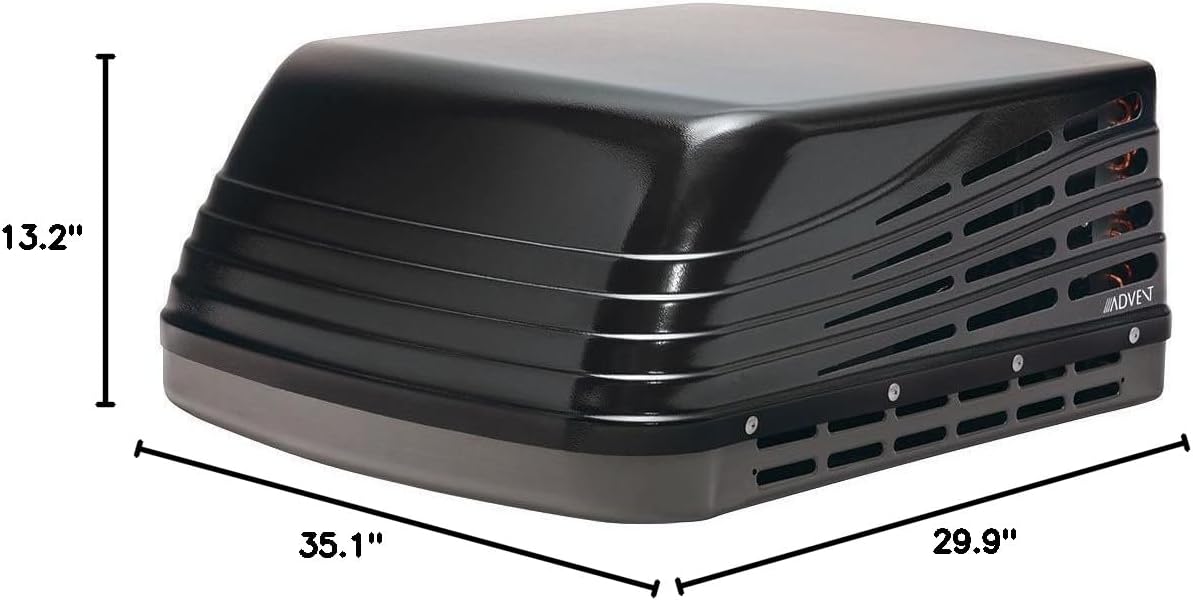
Image 7.1: Dimensional view of the Advent ACM150B unit.

Image 7.2: The ACM135 and ACM150 models are available in both black and white.
8. Warranty and Support
The ASA Electronics Advent ACM150B RV Air Conditioner comes with a 2-year manufacturer's warranty. This warranty covers defects in materials and workmanship under normal use.
8.1. Warranty Claims
For warranty service, please retain your proof of purchase. Contact ASA Electronics customer support for assistance with warranty claims or technical support.
8.2. Customer Support
For technical assistance, parts, or service inquiries, please contact ASA Electronics directly. Refer to the contact information provided with your product packaging or visit the official ASA Electronics website.


