1. Introduction
This manual provides essential information for the safe and effective use of your Silverline Audio Replacement Power Supply/AC Adapter, Model KY-999. This adapter is designed to provide reliable power to compatible musical instrument effects processors and preamps.
Compatible Devices:
- DOD PS200R-120 Power Supply
- VOTec Vocal FX Processor MIC Pre
- BASSTec BASS Preamp/FX Processor
2. Safety Information
Please read and understand all safety instructions before using this product. Failure to follow these instructions may result in electric shock, fire, or damage to the product or connected devices.
- Do not expose the adapter to water, rain, or excessive moisture.
- Do not disassemble or modify the adapter.
- Ensure the power outlet voltage matches the adapter's input specifications (100-240V AC).
- Avoid placing the adapter in direct sunlight or near heat sources.
- Keep out of reach of children.
- Unplug the adapter from the wall outlet when not in use for extended periods.
This power supply is compliant with FCC, CE, and RoHS safety standards. It incorporates safety features such as automatic overload cut-off, automatic thermal cut-off, short circuit protection, and over-voltage protection to ensure the safety of your devices.
3. Product Overview
The Silverline Audio KY-999 is a compact and efficient power adapter designed for specific audio equipment. It features a standard US plug, a durable cord, and a barrel connector with specific polarity.

Figure 3.1: The Silverline Audio KY-999 power supply, showing the main adapter unit, coiled power cord, and the barrel connector. A diagram illustrating the center negative (-) and outer positive (+) polarity is also visible.
The adapter's slim design helps free up space on power strips, allowing for more efficient use of outlets.
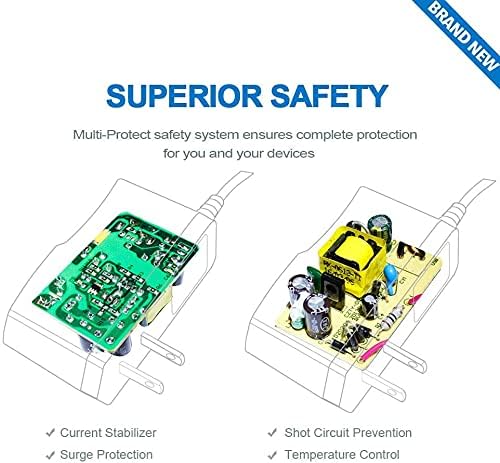
Figure 3.2: An illustrative diagram showing the internal circuitry of the power supply, highlighting key safety components such as current stabilizers, surge protection, short circuit prevention, and temperature control. This demonstrates the multi-protect safety system.
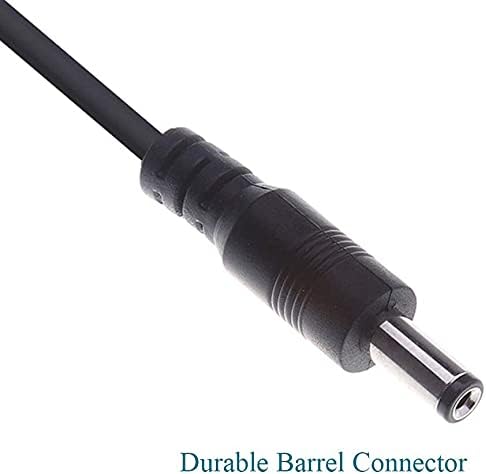
Figure 3.3: A close-up view of the durable barrel connector, which is the output plug that connects to your compatible audio device. This image emphasizes the robust construction of the connector.
4. Setup
- Verify Compatibility: Ensure your device requires a 9V DC power supply with a 1A current rating and a center negative (-) / outer positive (+) barrel connector. Refer to your device's manual for exact specifications.
- Connect to Device: Insert the barrel connector of the KY-999 power supply firmly into the power input jack of your compatible audio device.
- Connect to Power Outlet: Plug the AC adapter into a standard wall outlet (100-240V AC).
- Power On Device: Turn on your audio device. It should now receive power from the adapter.
5. Operating Instructions
Once properly connected, the Silverline Audio KY-999 power supply operates automatically. It is designed for continuous use within its specified voltage and current limits.
- The adapter is suitable for worldwide use with input voltages ranging from 100V to 240V AC.
- Ensure the adapter is not covered during operation to allow for proper heat dissipation.
- If using with multiple pedals via a daisy chain adapter cable (sold separately), ensure the total current draw of all connected pedals does not exceed 1A.
6. Maintenance
The Silverline Audio KY-999 power supply requires minimal maintenance.
- Cleaning: Disconnect the adapter from the power outlet and your device before cleaning. Use a soft, dry cloth to wipe the exterior. Do not use liquid cleaners or solvents.
- Storage: When not in use, store the adapter in a cool, dry place away from direct sunlight and extreme temperatures. Avoid tightly coiling the cord to prevent damage.
- Inspection: Periodically inspect the cord and connector for any signs of damage, fraying, or bending. If damage is observed, discontinue use and replace the adapter.
7. Troubleshooting
If you experience issues with your power supply, refer to the following common troubleshooting steps:
- No Power to Device:
- Ensure the adapter is securely plugged into both the wall outlet and your device.
- Check if the wall outlet is functional by plugging in another device.
- Verify that your device's power switch is in the 'ON' position.
- Confirm that your device's power requirements (voltage, current, polarity) match the adapter's specifications.
- Device Malfunction/Noise:
- Ensure the adapter's output specifications (9V DC, 1A, center negative) precisely match your device's requirements. Incorrect specifications can cause damage or malfunction.
- Test the device with its original power supply (if available) to rule out issues with the device itself.
If the problem persists after following these steps, please contact Silverline Audio customer support.
8. Specifications
| Model Number | KY-999 |
| Input Voltage | 100-240V AC, 50/60Hz |
| Output Voltage | 9V DC |
| Output Current | 1A (1000mA) |
| Cord Length | 46 inches (approx. 1.17 meters) |
| Tip Polarity | Center Negative (-), Outer Positive (+) |
| Connector Type | Barrel Connector |
| Color | Black |
| Safety Standards | FCC, CE, RoHS |
| Safety Features | Automatic Overload cut-off, Automatic Thermal cut-off, Short circuit protection, Over Voltage protection |
9. Warranty Information
This Silverline Audio product is covered by a standard manufacturer's warranty against defects in materials and workmanship. The warranty period and terms may vary. Please retain your proof of purchase for any warranty claims.
For specific warranty details, including duration and coverage, please refer to the seller's return policy or contact Silverline Audio directly.
10. Support
For technical assistance, customer service, or inquiries regarding your Silverline Audio KY-999 power supply, please contact Silverline Audio through their official channels or the retailer from whom you purchased the product.
Please have your model number (KY-999) and purchase information ready when contacting support.


