1. Introduction
The Gain Express PH-803 is a versatile 2-in-1 controller and monitor designed for continuous measurement and control of both pH and ORP (Oxidation-Reduction Potential) levels in various water environments. This device is ideal for applications such as aquariums, hydroponics, swimming pools, spas, and laboratories, where precise water quality management is essential. It features a dual display for simultaneous readings and integrated power relay control to automate connected devices based on set parameters.
2. Product Overview
The PH-803 system includes the main controller unit, separate pH and ORP electrodes, and a power relay control unit. The main unit displays real-time pH and ORP values and allows for setting control points. The power relay unit provides outlets for connecting external equipment.

Figure 2.1: Complete PH-803 system including the controller, electrodes, and calibration solutions.

Figure 2.2: Detailed view of the PH-803 controller and power relay unit with labeled components.
2.1 Components
- Main Controller Unit: Features a dual digital display for pH and ORP, control buttons, and input terminals for electrodes.
- Power Relay Control Unit: Provides two AC outlets, one for pH-controlled devices and one for ORP-controlled devices.
- pH Electrode: Detachable probe with BNC connector for pH measurement.
- ORP Electrode: Detachable probe with BNC connector for ORP measurement.
- AC Power Adapter: For continuous power supply to the unit.
- Calibration Solutions: Typically includes pH 4.003, pH 6.864, and pH 9.182 buffer solutions. ORP calibration solution is not typically included and may need to be acquired separately.
- Mounting Bracket: For securing the unit.
3. Features
- Instant Dual Measurement: Simultaneously displays pH values from 0.00 to 14.00pH and ORP values from -1999 to 1999mV.
- Continuous Monitoring: Designed for long-term water quality monitoring and control with AC power.
- Output Power Relay Control: Allows connection of external devices (e.g., oxygen pumps, CO2 regulators, ozonizers) to be triggered on/off based on user-defined pH or ORP set points.
- Detachable Electrodes: Both pH and ORP electrodes are detachable with 300cm long cables and BNC connectors, allowing for easy replacement if worn.
- Wide Applications: Suitable for aquariums, hydroponics, swimming pools, spas, fish tanks, ponds, laboratories, and gardening.
4. Specifications

Figure 4.1: Display of measuring range and accuracy for the PH-803.
| Parameter | Specification |
|---|---|
| Measuring Range pH | 0.00 ~ 14.00 pH |
| Measuring Range ORP | ±1999 mV |
| Accuracy pH | ±0.1% + 0.02 pH |
| Accuracy ORP | ±5 mV |
| Power Requirement | AC230V ± 10% 50/60 Hz (or regional equivalent) |
| Power Consumption | 2 Watts |
| Operating Temperature | 0 to 50 °C (32 to 122 °F) |
| Ambient Humidity | ≤90% R.H. |
| Relay Contact | 5A for AC250V |
| Output Voltage | Same as power supply voltage |
| Product Dimensions | 8 x 10 x 3 inches (approx. 20.3 x 25.4 x 7.6 cm) |
| Item Weight | 3.04 Pounds (approx. 1.38 kg) |
5. Setup
5.1 Unpacking and Inspection
Carefully unpack all components. Inspect for any visible damage. Ensure all listed components in Section 2.1 are present.
5.2 Connecting Electrodes
- Locate the pH input terminal and ORP input terminal on the bottom of the main controller unit.
- Connect the pH electrode's BNC connector to the pH input terminal by aligning the connector and twisting until secure.
- Connect the ORP electrode's BNC connector to the ORP input terminal in the same manner.
- Ensure the electrode caps are removed before placing them into the water to be measured.
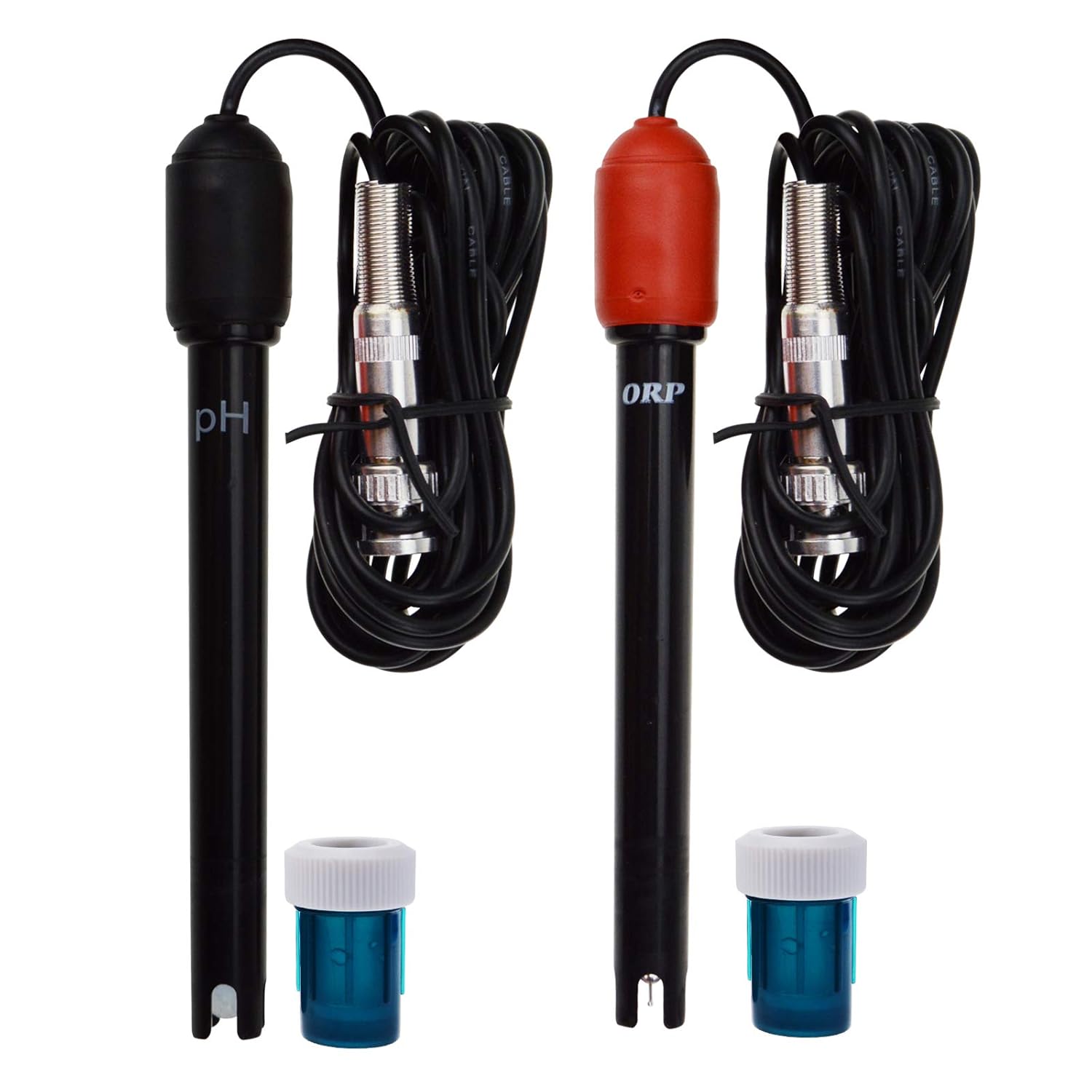
Figure 5.1: pH and ORP electrodes with BNC connectors.
5.3 Mounting the Unit
The controller unit can be mounted using the provided metal holder or by utilizing the keyhole slots on the back of the unit for wall mounting.

Figure 5.2: Rear view of the PH-803 controller showing mounting slots for a metal holder or wall screws.
5.4 Powering On
Plug the AC power adapter into a suitable power outlet and connect it to the main controller unit. The display should illuminate, showing current pH and ORP readings.
6. Operation
6.1 Understanding the Display
The top digital display shows the pH value, and the bottom display shows the ORP value. Indicator lights (PH ALARM, ORP ALARM) will illuminate when the measured values exceed the set control points.

Figure 6.1: PH-803 controller in operation, displaying real-time pH and ORP readings.
6.2 Setting Control Points (pH and ORP)
The PH-803 allows you to set high and low control points for both pH and ORP. When the measured value goes outside these set points, the corresponding relay output will activate.
- For pH:
- Press the PH-SET button. The pH display will flash.
- Use the PH HI and PH LO adjustment knobs (located under the protective cover) to set the desired high and low pH thresholds.
- Press PH-SET again to save and exit.
- For ORP:
- Press the ORP-SET button. The ORP display will flash.
- Use the ORP HI and ORP LO adjustment knobs (located under the protective cover) to set the desired high and low ORP thresholds.
- Press ORP-SET again to save and exit.

Figure 6.2: Adjusting a setting knob on the PH-803 controller.
6.3 Connecting External Devices
The power relay control unit has two outlets: one for pH control and one for ORP control. Plug your external devices into the appropriate outlet.
- The pH outlet will activate/deactivate based on the pH set points.
- The ORP outlet will activate/deactivate based on the ORP set points.
For example, if you want to increase pH, connect a dosing pump for a pH-increasing solution to the pH outlet and set the pH LO point. If the pH drops below this point, the pump will turn on.
7. Calibration
Regular calibration is crucial for maintaining the accuracy of your PH-803 controller. Use fresh, high-quality buffer solutions for calibration.
7.1 pH Calibration
The PH-803 typically uses a two-point or three-point pH calibration. It is recommended to calibrate with pH 6.86 (or 7.00) first, followed by pH 4.00 (for acidic range) or pH 9.18 (for alkaline range).
- Ensure the pH electrode is clean and dry.
- Immerse the pH electrode into the pH 6.86 (or 7.00) buffer solution.
- Press the PH7 button. The pH display will flash.
- Use a small screwdriver to adjust the PH7 trim pot (located under the protective cover) until the display reads 6.86 (or 7.00).
- Rinse the electrode with distilled water.
- Immerse the pH electrode into the pH 4.00 buffer solution.
- Press the PH4 button. The pH display will flash.
- Use a small screwdriver to adjust the PH4 trim pot until the display reads 4.00.
- Alternatively, for alkaline environments, use pH 9.18 buffer solution and adjust the PH9 trim pot (if available, otherwise use PH4 for the second point).
- Rinse the electrode and return it to the water to be monitored.
7.2 ORP Calibration
ORP calibration typically requires a specific ORP calibration solution (e.g., 256mV or 220mV). This solution is often not included with the unit.
- Ensure the ORP electrode is clean and dry.
- Immerse the ORP electrode into the ORP calibration solution (e.g., 256mV).
- Press the ORP-SET button. The ORP display will flash.
- Use a small screwdriver to adjust the ORP-SET trim pot until the display reads the value of your calibration solution (e.g., 256mV).
- Rinse the electrode and return it to the water to be monitored.
8. Maintenance
8.1 Electrode Cleaning
Electrodes should be cleaned regularly (e.g., monthly or bi-monthly) to ensure accurate readings. Rinse electrodes with distilled water after each use and before calibration.
- For general cleaning, soak the electrode in a mild cleaning solution or distilled water for 15-30 minutes.
- For stubborn deposits, consult specialized electrode cleaning solutions.
- Avoid abrasive cleaning methods that could damage the electrode membrane.
8.2 Electrode Storage
When not in use, store electrodes with their protective caps filled with electrode storage solution or pH 4.00 buffer solution. Never store electrodes dry, as this can damage the sensor.
8.3 Electrode Replacement
Electrodes have a limited lifespan and will eventually need replacement. If calibration becomes difficult or readings are consistently inaccurate despite cleaning, it may be time to replace the electrodes. The detachable design allows for easy replacement.
9. Troubleshooting
| Problem | Possible Cause | Solution |
|---|---|---|
| Inaccurate readings | Dirty electrodes, expired calibration solutions, damaged electrodes, incorrect calibration. | Clean electrodes. Use fresh calibration solutions. Recalibrate the unit. Replace electrodes if damaged or old. |
| Difficulty calibrating pH | Incorrect calibration procedure, old buffer solutions, faulty electrode. | Follow calibration steps precisely. Ensure buffer solutions are fresh. Try a new pH electrode. |
| External device not activating/deactivating | Incorrect set points, device not plugged in correctly, faulty relay. | Verify pH/ORP set points. Ensure external device is properly connected to the correct outlet. Check if the external device itself is functional. |
| Display not working | No power, faulty unit. | Check power connection. Ensure power outlet is functional. Contact support if unit remains unresponsive. |
10. Warranty and Support
For warranty information, please refer to the documentation provided with your purchase or contact the seller directly. Gain Express products typically come with a manufacturer's warranty against defects in materials and workmanship.
For technical support or further assistance, please contact your retailer or the Gain Express customer service department. Contact details can usually be found on the product packaging or the official Gain Express website.


