
1. Introduction
Welcome to the user manual for your Precor TRM 885 Treadmill with P80 Console. This document provides essential information to help you assemble, operate, and maintain your treadmill safely and effectively. The TRM 885 is designed for optimal performance and durability, offering a superior exercise experience for commercial fitness training, high-performance workouts, and rehabilitation.
2. Safety Information
Please read all instructions before using this equipment. Adhere to all warnings and instructions provided in this manual and on the treadmill itself. Keep children and pets away from the equipment during operation.
- Always consult with a healthcare professional before starting any new exercise program.
- Ensure the treadmill is placed on a level surface with adequate clearance around it.
- Do not operate the treadmill if it has a damaged cord or plug, or if it is not working properly.
- Wear appropriate athletic footwear and clothing.
- Use the safety clip at all times during operation.
- Keep hands clear of all moving parts.
- Proposition 65 Warning: This product may expose you to chemicals known to the State of California to cause cancer and birth defects or other reproductive harm.
3. Setup
The Precor TRM 885 Treadmill requires assembly. Please follow the detailed assembly instructions provided in the separate assembly guide that came with your product. Ensure all components are securely fastened before use.
Power Requirements: Connect the treadmill to a grounded outlet using the provided power cord. The input power is 1250 Watts.
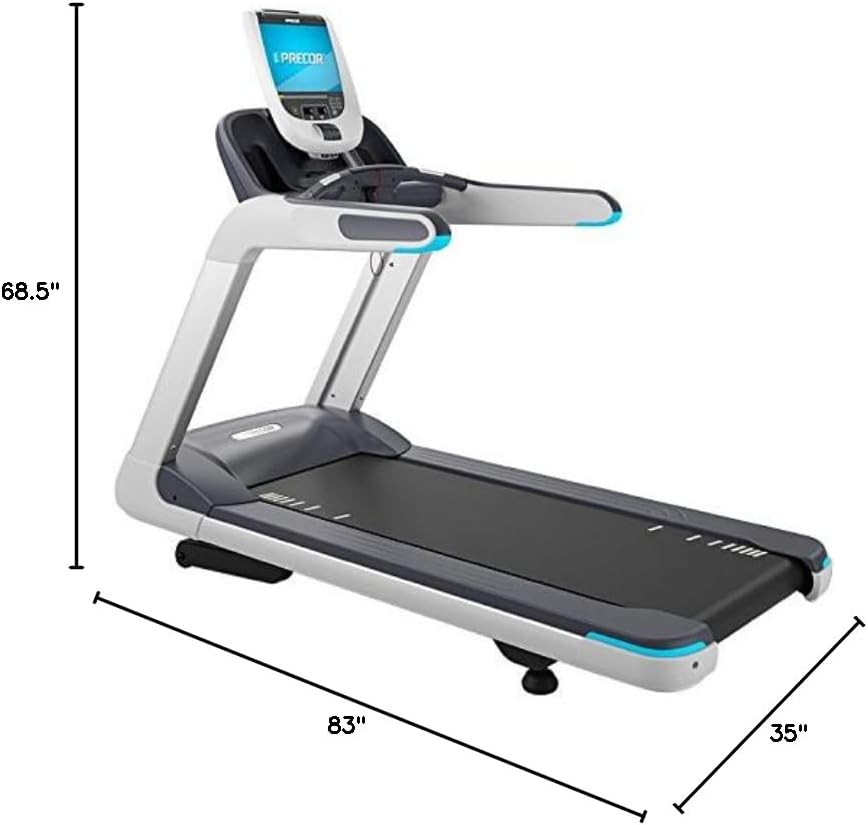
Image: Precor TRM 885 Treadmill with its dimensions. The treadmill measures approximately 83 inches in depth, 35 inches in width, and 68.5 inches in height.

Image: Front view of the Precor TRM 885 Treadmill, showcasing its P80 console and robust design.
4. Operating Instructions
The P80 Console features an LCD display for easy navigation and monitoring of your workout metrics. The treadmill offers 22 pre-programmed workouts to suit various fitness levels and goals.
4.1 Starting a Workout
- Step onto the treadmill, ensuring your feet are on the side rails.
- Attach the safety clip to your clothing.
- Select your desired program or press 'Quick Start' to begin a manual workout.
- The belt will start moving at a low speed. Begin walking and gradually increase speed.
4.2 Adjusting Speed and Incline
Use the controls on the P80 Console to adjust the speed and incline. The treadmill can reach a maximum speed of 16 miles per hour. The console displays real-time metrics including speed and incline.
4.3 Ending a Workout
To stop the workout, press the 'Stop' button on the console. The belt will gradually slow down and come to a complete stop. Remove the safety clip and step off the treadmill.
5. Maintenance
Regular maintenance ensures the longevity and optimal performance of your Precor TRM 885 Treadmill.
- Cleaning: Wipe down the console and exterior surfaces with a damp cloth after each use. Avoid using abrasive cleaners.
- Belt Lubrication: Refer to the separate maintenance guide for instructions on lubricating the running belt. This is crucial for smooth operation and to prevent wear.
- Belt Tension and Alignment: Periodically check the running belt for proper tension and alignment. Adjust as needed according to the maintenance guide.
- Motor Compartment: Keep the area around the motor compartment clean and free of dust and debris.
6. Troubleshooting
If you encounter issues with your Precor TRM 885 Treadmill, refer to the following common troubleshooting tips. For more complex issues, contact Precor customer support.
- Treadmill not powering on: Ensure the power cord is securely plugged into a grounded outlet and the treadmill's power switch is in the 'On' position. Check the circuit breaker.
- Belt slipping or hesitating: This may indicate the belt needs lubrication or adjustment. Refer to the maintenance section.
- Unusual noises: Stop the treadmill immediately and inspect for any loose parts or obstructions.
- Console display issues: Try restarting the treadmill by unplugging it for 30 seconds and plugging it back in.
7. Specifications
| Feature | Specification |
|---|---|
| Brand | Precor |
| Model Number | PHRCTPRV8853621EN |
| Color | black |
| Product Grade | commercial |
| Product Dimensions (LxWxH) | 83"D x 35"W x 68.5"H |
| Item Weight | 430 Pounds |
| Material | Alloy Steel |
| Maximum Speed | 16 Miles per Hour |
| Special Feature | Portable |
| Recommended Uses | commercial fitness training, high-performance workouts, rehabilitation |
| Target Audience | Adult |
| Maximum Horsepower | 4 Horsepower |
| Assembly Required | Yes |
| Display Type | LCD |
| Number of Programs | 22 |
| Connectivity Technology | power cord |
| Metrics Measured | Speed, Incline |
| Maximum Weight Recommendation | 350 Pounds |
| Deck Length | 38.5 Inches |
| Frame Material | Alloy Steel |
| Input Power | 1250 Watts |
8. Warranty and Support
Precor products are built to the highest standards of quality and durability. For specific warranty details regarding your Precor TRM 885 Treadmill, please refer to the warranty documentation included with your purchase or visit the official Precor website.
For technical support, parts, or service inquiries, please contact Precor customer service. You can find contact information on the official Precor website or through the retailer where you purchased the product.
Visit the Precor Store on Amazon for more information on Precor products.