1. Introduction
This manual provides detailed instructions for the safe and effective operation and maintenance of your Gain Express OZX-300AT Ozone Generator. Please read this manual thoroughly before using the device to ensure proper function and to prevent potential hazards.

Image: The Gain Express OZX-300AT Ozone Generator unit with included diffuser stones.

Image: Overview of the ozone generator's features, including adjustable output, digital timer, and maximum ozone output for various uses.
2. Important Safety Information
WARNING: Ozone is a powerful oxidant and can be harmful if inhaled in high concentrations. Always ensure proper ventilation and avoid direct exposure to ozone during operation.
- Do not operate the device in occupied spaces. Ensure no humans or pets are present during ozone generation.
- Allow sufficient time for ozone to dissipate before re-entering treated areas.
- Use only as directed in this manual.
- Keep out of reach of children.
- Do not immerse the device in water or other liquids.
- Ensure the power supply matches the device's requirements.
- Do not block air inlets or outlets during operation.
- If using for water purification, ensure the ozone is diffused into water and not released into the air in high concentrations.
3. Package Contents
Verify that all items are present in your package:
- Gain Express OZX-300AT Ozone Generator Unit
- Air Dryer (with moisture-absorbing silica beads)
- 2 x Air Hoses (tubing)
- 2 x Ceramic Diffuser Stones
- Instruction Manual (this document)

Image: The ozone generator unit, air dryer, two air hoses, and two ceramic diffuser stones.
4. Product Overview
The Gain Express OZX-300AT is an industrial-grade ozone generator designed for effective odor removal and water purification. It features adjustable ozone output and a programmable timer for precise control.
4.1. Device Components

Image: Front view of the ozone generator with key components labeled. These include the Power Switch, Display, Power Button, Up Button, Down Button, Ozone Inlet, Ozone Outlet, and O3 Output Adjust dial.
- Power Switch: Main on/off switch for the device.
- Display: Digital screen showing the timer setting.
- Power Button: Activates or deactivates ozone generation.
- Up/Down Buttons: Adjust the timer setting.
- Ozone Inlet: Point where ambient air enters the device.
- Ozone Outlet: Point where generated ozone exits the device.
- O3 Output Adjust Dial: Rotary dial to regulate ozone output from 100% to less than 40%.
4.2. Dimensions and Weight

Image: The device measures approximately 215mm (length) x 150mm (width) x 60mm (height) and weighs 800 grams.
5. Specifications
| Feature | Detail |
|---|---|
| Brand | Gain Express |
| Model Number | OZX-300AT |
| Product Dimensions | 2.36"D x 5.91"W x 8.46"H (approx. 60mm D x 150mm W x 215mm H) |
| Item Weight | 1.76 pounds (approx. 800 grams) |
| Controller Type | Button Control |
| Wattage | 20 watts |
| Special Feature | Adjustable Ozone output level |
| Filter Class | Moisture Absorbing Silica Beads (in Air Dryer) |
| Power Source | Corded Electric |
| Maximum Ozone Output (without air dryer) | 200 mg/hr |
| Maximum Ozone Output (with air dryer) | 500 mg/hr |
| Internal Air Pump Output | 1-2 L/min |
| Timer Intervals | 1, 3, 5, 10, 20, 30, 40, 50, 60, 70, 80, 90 minutes, and Constant ON |
| Ozone Generating Method | Corona Discharge (Ozone Tube) |
| Gas Resource | Ambient Air |

Image: Visual representation of the product specifications.
6. Setup
Follow these steps to set up your ozone generator:
- Placement: Place the ozone generator on a stable, flat surface in a well-ventilated area. Ensure it is away from direct sunlight, heat sources, and moisture.
- Air Dryer Connection (Optional, for higher output):
- Connect one end of an air hose to the Ozone Inlet on the device.
- Connect the other end of this hose to one port of the Air Dryer.
- Connect a second air hose to the other port of the Air Dryer.
- Connect the free end of the second air hose to the Ozone Outlet on the device.
- The air dryer contains silica beads that absorb moisture, enhancing ozone production up to 500 mg/hr.
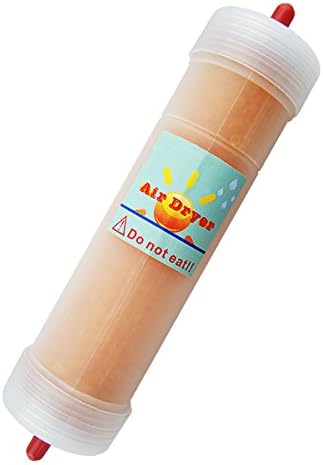
Image: The air dryer, containing moisture-absorbing silica beads, used to enhance ozone output.
- Diffuser Stone Connection (for water treatment):
- If using for water purification, connect an air hose to the Ozone Outlet.
- Attach a ceramic diffuser stone to the free end of the air hose.
- Place the diffuser stone into the water to be treated.

Image: Two air hoses and two ceramic diffuser stones, showing their approximate dimensions.
- Power Connection: Plug the power cord into a suitable electrical outlet.
7. Operating Instructions
The OZX-300AT offers both timed operation and a "Constant ON" function.
7.1. Powering On/Off
- Ensure the device is properly set up and connected to power.
- Flip the main Power Switch (located on the side/rear of the unit) to the "ON" position. The display will illuminate.
- To turn off the device, flip the main Power Switch to the "OFF" position.

Image: The red power switch, typically located on the side of the unit, controls the main power.
7.2. Setting the Timer
- With the device powered on, press the "Power Button" (usually labeled "on/off" or similar) to activate the timer setting mode.
- Use the "Up" and "Down" arrow buttons to select the desired operating time. Available intervals are 1, 3, 5, 10, 20, 30, 40, 50, 60, 70, 80, and 90 minutes.
- Once the time is set, the device will begin ozone generation and count down. It will automatically shut off when the timer reaches zero.
7.3. Constant ON Function
To operate the device continuously:
- With the device powered on, use the "Up" or "Down" buttons to cycle through the timer settings until "ON" or "CO" (Constant ON) is displayed.
- The device will generate ozone continuously until manually turned off via the Power Button or the main Power Switch.
- Caution: Use the Constant ON function with extreme care and only in applications where continuous ozone generation is safe and necessary, such as industrial water treatment with appropriate monitoring. Never use in occupied spaces.
7.4. Adjusting Ozone Output
- Locate the "O3 Output Adjust" dial on the device.
- Rotate the dial to increase or decrease the ozone output level. The dial allows regulation from 100% down to less than 40% of the maximum output.
- Adjust the output based on the specific application and the volume of air or water being treated.

Image: The device indicates maximum ozone output levels and the adjustable output dial.
8. Applications
The Gain Express OZX-300AT Ozone Generator is suitable for various applications:
- Water Purification: Use with diffuser stones to treat water in aquariums, fish ponds, or for general water treatment. The adjustable output allows for precise control, especially when used with a Redox (ORP) controller.
- Odor Elimination: Effectively removes odors in indoor environments, including homes and commercial spaces. This includes odors from smoke, pets, cooking, and general stale air.

Image: The ozone generator positioned near water with fruit, illustrating its use in water purification.

Image: Examples of areas where the ozone generator can be used for odor elimination, such as bedrooms, new houses, kitchens, and living rooms.
9. Maintenance
9.1. Air Dryer Maintenance
The air dryer contains moisture-absorbing silica beads. Over time, these beads will change color, indicating they have absorbed moisture and need to be recharged or replaced.
- Recharging: Refer to the air dryer's specific instructions for recharging the silica beads. Typically, this involves heating them in an oven at a low temperature until their original color is restored.
- Replacement: If recharging is not feasible or effective, replace the silica beads or the entire air dryer unit.
9.2. General Cleaning
- Ensure the device is unplugged before cleaning.
- Wipe the exterior of the unit with a soft, dry cloth.
- Do not use abrasive cleaners or solvents.
- Keep the air inlet and outlet free from dust and obstructions.
10. Troubleshooting
| Problem | Possible Cause | Solution |
|---|---|---|
| Device does not power on. | No power supply; Power switch off; Faulty power cord. | Check power outlet; Ensure power switch is ON; Inspect power cord for damage. |
| No ozone output. | Timer not set or expired; Output dial set too low; Air hoses blocked; Internal fault. | Set timer or select "Constant ON"; Adjust output dial; Check air hoses for kinks or blockages; Contact support if problem persists. |
| Reduced ozone output. | Air dryer saturated; Output dial set too low; Dirty air inlet. | Recharge or replace air dryer silica beads; Adjust output dial; Clean air inlet. |
| Unusual noise during operation. | Internal air pump issue; Obstruction. | Ensure no external obstructions. If noise is excessive or abnormal, discontinue use and contact support. |
11. Warranty and Support
For warranty information or technical support, please contact Gain Express customer service. Refer to your purchase documentation for specific warranty terms and contact details.
You can also visit the official Gain Express store for more information: Gain Express Store


