
Introduction
This manual provides comprehensive instructions for the Marea B35223/8 Men's Watch. Please read this manual carefully to ensure proper use and maintenance of your watch. This digital watch features time display, alarm, chime, chronograph, timer, and dual time functions, along with a backlight for low-light conditions.
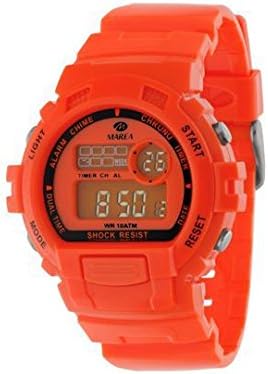
Image: Front view of the Marea B35223/8 Men's Digital Watch. The watch features a vibrant orange case and strap, a digital display showing '8:50', and various function labels around the bezel and buttons, including 'LIGHT', 'ALARM CHIME', 'DUAL TIME', 'MODE', 'CHRONO', 'START', 'TIMER', 'DATE', and 'RESET'. It also indicates 'WR 10ATM' for water resistance and 'SHOCK RESIST'.
Setup and Initial Configuration
Setting Time and Date
- In normal time display mode, press the MODE button repeatedly until the seconds start flashing. This indicates time setting mode.
- Press the RESET button to cycle through the setting items: seconds, hour, minute, month, date, day of the week.
- Use the START button to adjust the flashing item. For hours, pay attention to AM/PM indicator if present.
- Once all settings are correct, press the MODE button to exit the setting mode and return to normal time display.
Setting the Alarm
- From normal time display, press the MODE button once to enter Alarm Mode. The alarm time will be displayed.
- Press the RESET button to select the hour or minute setting. The selected item will flash.
- Use the START button to adjust the flashing hour or minute.
- Press the MODE button to confirm and exit Alarm Mode.
- To turn the alarm ON/OFF, in Alarm Mode, press the START button. An alarm icon will appear/disappear to indicate its status.
Operating Instructions
Using the Chronograph (Stopwatch)
- Press the MODE button repeatedly until "CHRONO" or "STW" appears on the display.
- Press START to begin timing.
- Press START again to pause timing.
- Press RESET to reset the stopwatch to zero.
Using the Timer
- Press the MODE button repeatedly until "TIMER" or "TMR" appears.
- Press RESET to set the timer duration (hours, minutes, seconds). Use START to adjust values.
- Press START to begin the countdown.
- The watch will beep when the timer reaches zero.
Dual Time Function
- Press the MODE button repeatedly until "DUAL TIME" or "DT" appears.
- In this mode, you can set a second time zone independently. Follow similar steps as setting the main time.
Using the Backlight (LIGHT)
- Press the LIGHT button (usually top-left) to illuminate the display for a few seconds.
Maintenance and Care
- Cleaning: Wipe the watch regularly with a soft, dry cloth. For stubborn dirt, a slightly damp cloth can be used, followed by drying. Avoid harsh chemicals or abrasive cleaners.
- Water Resistance (WR 10ATM): This watch is water resistant up to 100 meters (10 ATM). It is suitable for swimming, snorkeling, and showering. However, avoid operating buttons underwater. Not suitable for diving.
- Shock Resistance: The watch is designed to be shock resistant. However, avoid excessive impacts or dropping the watch from significant heights.
- Temperature: Avoid exposing the watch to extreme temperatures (hot or cold) for prolonged periods, as this can affect battery life and display performance.
- Battery Replacement: When the display dims or functions become erratic, it may be time to replace the battery. It is recommended to have this done by a qualified watch technician to ensure water resistance is maintained.
Troubleshooting
| Problem | Possible Cause | Solution |
|---|---|---|
| Display is blank or dim. | Low battery. | Replace the battery. |
| Buttons are unresponsive. | Watch is in a locked mode or internal malfunction. | Try pressing all buttons to see if it unlocks. If not, consult a technician. |
| Time is incorrect. | Time needs to be reset or battery is low. | Refer to "Setting Time and Date" section. Replace battery if issue persists. |
| Water inside the watch. | Buttons operated underwater or seal compromised. | Immediately take to a qualified watch technician for inspection and repair to prevent further damage. |
Specifications
- Model: B35223/8
- Brand: Marea
- Type: Digital Wristwatch
- Gender: Men's
- Water Resistance: 10 ATM (100 meters / 330 feet)
- Features: Time, Date, Day, Alarm, Chime, Chronograph, Timer, Dual Time, Backlight, Shock Resist
- Manufacturer: Marea Relojes
Warranty and Support
For warranty information and customer support, please refer to the warranty card included with your purchase or visit the official Marea website. Keep your proof of purchase for any warranty claims.
If you encounter issues not covered in this manual, please contact Marea customer service for assistance.