
1. Introduction
Thank you for choosing the Aquacomputer airplex GIGANT 3360 Aluminum Radiator. This high-performance radiator is designed for advanced water cooling systems in desktop computers, providing efficient heat dissipation for optimal system stability and performance. This manual provides essential information for the safe installation, operation, and maintenance of your radiator.
2. Safety Information
- Always disconnect power from your computer before installing or performing maintenance on any components.
- Handle the radiator with care to avoid damaging the fins or connection ports.
- Ensure all water cooling components are properly sealed and leak-tested before powering on your system.
- Use only approved coolants for water cooling systems. Mixing incompatible coolants can lead to corrosion and system failure.
- Keep the product away from children and pets.
- Do not attempt to modify the radiator. Unauthorized modifications will void the warranty and may cause damage.
3. Package Contents
Please check the package contents upon receipt. If any items are missing or damaged, contact your retailer immediately.
- 1x Aquacomputer airplex GIGANT 3360 Aluminum Radiator
- Mounting screws for fans and chassis (quantity may vary based on specific model/bundle)
- User Manual (this document)
4. Product Overview
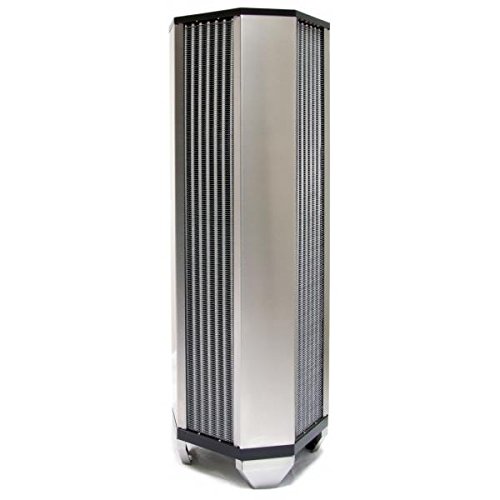
Image 1: Aquacomputer airplex GIGANT 3360 Aluminum Radiator. This image shows the overall structure of the large aluminum radiator, highlighting its fin array and G1/4 ports.
The Aquacomputer airplex GIGANT 3360 is a large-format aluminum radiator designed for maximum heat exchange. Its robust construction and optimized fin design ensure efficient cooling for demanding PC setups. It features standard G1/4 inch threads for easy integration into custom water cooling loops.
Key features include:
- Material: High-quality Aluminum
- Port Type: G1/4 inch threads for fittings
- Compatibility: Designed for desktop computer water cooling systems
- Cooling Method: Water cooling, assisted by fan airflow
5. Setup and Installation
Proper installation is crucial for the performance and longevity of your water cooling system. Follow these steps carefully.
- Preparation: Ensure your computer is powered off and disconnected from the mains. Open your computer case and identify the mounting location for the radiator. Due to its size, this radiator typically requires a large case with dedicated mounting points.
- Fan Installation: Attach the cooling fans (not included) to the radiator using the provided screws. Ensure the fans are oriented to push or pull air through the radiator fins in the desired direction for optimal airflow within your case.
- Radiator Mounting: Secure the radiator assembly (radiator with fans) to your computer chassis using appropriate screws. Ensure it is firmly mounted to prevent vibrations.
- Fitting Installation: Screw G1/4 fittings (not included) into the radiator ports. Hand-tighten them initially, then use a wrench to gently tighten them further, ensuring a secure, leak-free seal. Do not overtighten.
- Loop Connection: Connect the radiator to your water cooling loop using appropriate tubing. Ensure all connections are secure and tubing is not kinked.
- Leak Testing: Before powering on your computer, perform a thorough leak test. Fill the loop with coolant and run the pump (if separate) for several hours, checking all connections for any signs of leakage. Use paper towels or a leak detector for better visibility. Only proceed once you are certain there are no leaks.
- Cable Management: Connect any fan cables to your motherboard or fan controller (4-pin connectors are common for PWM control).
6. Operating Instructions
Once installed and leak-tested, your Aquacomputer airplex GIGANT 3360 radiator operates as part of your custom water cooling loop. The radiator's primary function is to dissipate heat from the coolant into the surrounding air, facilitated by attached fans.
- Fan Control: If using 4-pin PWM fans, you can control their speed via your motherboard's BIOS/UEFI settings or dedicated fan control software. Adjust fan curves to balance cooling performance and noise levels according to your preference.
- Coolant Flow: Ensure your pump provides adequate flow rate through the radiator for efficient heat transfer.
- Temperature Monitoring: Regularly monitor your system's temperatures using software to ensure the water cooling system is functioning optimally.
7. Maintenance
Regular maintenance helps ensure the longevity and efficiency of your water cooling system.
- Dust Removal: Periodically clean dust from the radiator fins and fans using compressed air or a soft brush. Accumulated dust can significantly reduce cooling performance.
- Coolant Check: Inspect the coolant level and clarity regularly. If the coolant appears discolored or cloudy, it may be time for a coolant flush and refill.
- Leak Inspection: Occasionally check all fittings and tubing for any signs of leaks or degradation.
- Coolant Replacement: Follow the recommendations of your coolant manufacturer for replacement intervals, typically every 6-12 months.
8. Troubleshooting
If you encounter issues with your water cooling system, consider the following common troubleshooting steps:
- Poor Cooling Performance:
- Check for dust buildup on radiator fins.
- Ensure fans are operating correctly and at adequate speed.
- Verify pump is functioning and coolant is flowing.
- Check for air bubbles trapped in the loop.
- Ensure proper thermal paste application on CPU/GPU blocks.
- Leaks:
- Immediately power off the system.
- Identify the source of the leak.
- Tighten fittings or replace damaged tubing/O-rings.
- Perform another leak test before powering on.
- Unusual Noise:
- Check fans for obstructions or worn bearings.
- Ensure the radiator is securely mounted to prevent rattling.
- Listen for pump noise; air in the pump can cause gurgling sounds.
9. Specifications
| Feature | Detail |
|---|---|
| Model | 33303 |
| Brand | Aquacomputer |
| Material | Aluminum |
| Dimensions (L x W x H) | 310 x 310 x 960 mm (approximate, based on product description) |
| Weight | 19.48 kg (42.95 lbs) |
| Port Type | G1/4 inch |
| Compatible Devices | Desktop Computers |
| Cooling Method | Water (assisted by air from fans) |
| Typical Fan Connector | 4-pin (for PWM control) |
| Typical Noise Level (with fans) | Up to 25 Decibel (depending on fan choice and speed) |
| GTIN | 04260073416405 |
| ASIN | B00M9A75L6 |
10. Warranty and Support
Warranty: The Aquacomputer airplex GIGANT 3360 Aluminum Radiator comes with a 1-year warranty from the date of purchase. This warranty covers manufacturing defects under normal use. It does not cover damage resulting from improper installation, misuse, unauthorized modifications, or natural disasters.
Technical Support: For technical assistance, troubleshooting beyond this manual, or warranty claims, please contact your retailer or the official Aquacomputer support channels. Please have your product model number (33303) and proof of purchase ready when contacting support.
You can find more information and contact details on the official Aquacomputer website: www.aquacomputer.de