Introduction to Your Apple iPod Touch
The Apple iPod Touch (5th Generation) is a versatile portable media player and handheld device, offering a wide range of features including music playback, video, photography, internet browsing, and access to a vast library of applications. This manual provides essential information for setting up, operating, maintaining, and troubleshooting your device.
This particular iPod Touch is an Apple Recertified product. Apple Recertified devices are pre-owned Apple products that undergo Apple's stringent refurbishment process. This ensures that the device looks, feels, and works exactly like a new product, often with new components such as the battery, casing, and screen, but offered at a significant value.
Product Overview
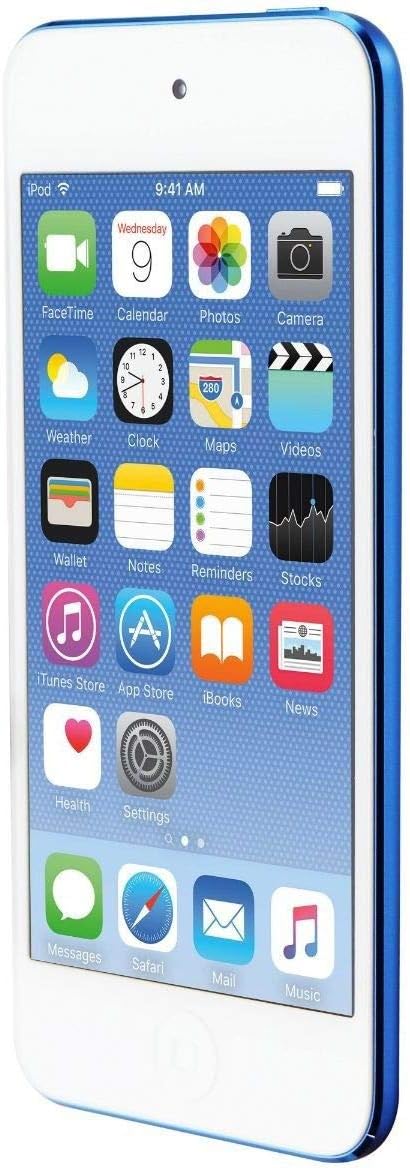
Figure 1: Front view of the Apple iPod Touch (5th Generation) in blue, displaying its vibrant home screen with various application icons.
Key Features:
- Sleek Design: Thin and lightweight, designed for portability and comfortable handling.
- Retina Display: A vibrant 4-inch multi-touch display for clear visuals.
- Integrated Cameras: Front and rear cameras for photos, videos, and FaceTime calls.
- Wireless Connectivity: Wi-Fi and Bluetooth capabilities for internet access and accessory pairing.
- App Ecosystem: Access to the App Store for a wide range of applications and games.
Controls and Ports:
Familiar controls include the Home button, Sleep/Wake button, and Volume buttons. Ports typically include a Lightning connector for charging and data transfer, and a 3.5mm headphone jack.
Setup Guide
1. Initial Charging:
Before first use, fully charge your iPod Touch using the included Lightning to USB cable and wall charger. Connect the Lightning connector to the bottom of your iPod Touch and the USB end to the wall charger, then plug into a power outlet. A full charge typically takes a few hours.
2. Power On:
Press and hold the Sleep/Wake button (located on the top edge) until the Apple logo appears.
3. Initial Setup Assistant:
Follow the on-screen instructions to set up your device. This includes selecting your language and region, connecting to a Wi-Fi network, enabling Location Services, setting up a passcode, and signing in with or creating an Apple ID. An Apple ID is essential for downloading apps, music, and other content.
4. Connecting to a Computer:
To sync music, videos, and other media, connect your iPod Touch to a computer using the included USB cable. Use iTunes (on Windows) or Finder (on macOS Catalina or later) to manage your device's content.
Operating Your iPod Touch
Navigation:
- Touchscreen Gestures: Tap to select, pinch to zoom, swipe to scroll, and slide to move items.
- Home Button: Press once to return to the Home screen. Double-press to open the App Switcher.
- Control Center: Swipe up from the bottom edge of the screen to access quick settings like Wi-Fi, Bluetooth, and screen brightness.
- Notification Center: Swipe down from the top edge of the screen to view notifications.
Music Playback:
Use the Music app to browse and play your music library. You can create playlists, shuffle songs, and adjust volume using the side buttons or on-screen controls.
App Usage:
Download and install applications from the App Store. Organize apps into folders on your Home screen for easy access.
Camera Functions:
Open the Camera app to take photos and record videos. Tap the screen to focus, and use the volume buttons as a shutter release.
Maintenance
- Cleaning: Use a soft, lint-free cloth to clean the screen and exterior. Avoid abrasive materials or harsh chemicals.
- Battery Care: To prolong battery life, avoid extreme temperatures. For long-term storage, charge the device to about 50% before powering it off.
- Software Updates: Regularly update your iPod Touch to the latest iOS version to ensure optimal performance and security. Go to Settings > General > Software Update.
- Backup: Periodically back up your device to iCloud or your computer to protect your data.
Troubleshooting
- Device Unresponsive: If your iPod Touch is unresponsive, perform a force restart by holding down the Sleep/Wake button and the Home button simultaneously until the Apple logo appears.
- Connectivity Issues: For Wi-Fi or Bluetooth problems, try toggling the respective settings off and on, or restart your device and router.
- App Crashing: If an app is crashing, try closing it from the App Switcher and reopening it. If the issue persists, delete and reinstall the app.
- Storage Full: Manage your storage by deleting unused apps, photos, and videos. Check storage usage in Settings > General > iPod Storage.
Specifications
| Feature | Detail |
|---|---|
| Brand | Apple |
| Model Name | iPod Touch (5th Generation) |
| Item Model Number | FD717LL/A |
| Color | Blue |
| Memory Storage Capacity | 32 GB |
| Screen Size | 4 Inches |
| Product Dimensions | 2.31 x 4.86 x 0.24 inches |
| Item Weight | 3.1 ounces |
| Batteries | 1 Lithium Ion batteries required |
| Connectivity Technology | Wireless |
| Supported Standards | MP3, MP4 |
Warranty and Support
Your Apple Recertified iPod Touch comes with a full one-year warranty, providing coverage similar to a new product. Additionally, you receive complimentary 90-day telephone technical support from Apple.
If you encounter any issues with your device, you can bring it to an authorized Apple Store for assistance. For further support, please refer to the official Apple support website or contact their technical support line.
Official Product Video: Understanding Apple Recertified Products
This video provides an overview of Apple Recertified products, explaining the refurbishment process and the benefits of purchasing such devices, including their condition and warranty.


