
1. Introduction
This user manual provides essential information for the proper installation, operation, and maintenance of your Fermax F03311 LOFT Intercom System. Please read these instructions carefully before beginning installation or use to ensure optimal performance and safety. Keep this manual for future reference.
2. Product Overview
The Fermax F03311 LOFT is an advanced intercom system designed for clear audio and video communication within residential or commercial buildings. It features a sleek design and robust functionality for managing access and communication at your entrance.
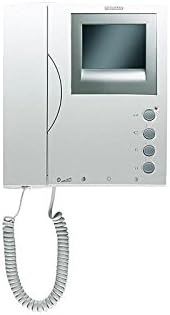
Figure 2.1: Front view of the Fermax F03311 LOFT Intercom System, showing the handset, screen, and control buttons.
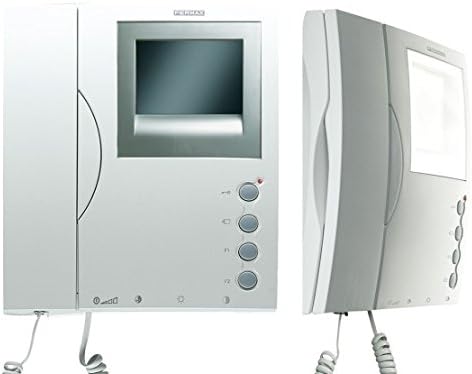
Figure 2.2: Front and side views of the Fermax F03311 LOFT Intercom System, highlighting its compact design.
Key Features:
- Audio System: 3-wire bus connection for reliable audio transmission.
- Video System: Supports UTP CAT5, 5-wire, or 3-wire + coax for video signal.
- Maximum Distance: Up to 200 meters from the first entrance panel to the last dwelling unit.
3. Setup and Installation
Installation of the Fermax F03311 LOFT Intercom System requires basic electrical knowledge. It is recommended that installation be performed by a qualified technician to ensure correct wiring and safe operation.
3.1 Safety Precautions
- Always disconnect power to the installation area before beginning any wiring work.
- Ensure all connections are secure and insulated to prevent short circuits.
- Follow local electrical codes and regulations.
3.2 Wiring Instructions
- Audio Connection: Connect the intercom unit using a 3-wire bus system. Refer to the wiring diagram provided with your specific installation kit for exact terminal assignments.
- Video Connection: For video functionality, use UTP CAT5 cable, a 5-wire system, or a 3-wire system combined with a coaxial cable. Ensure proper shielding and termination for video signals.
- Power Connection: Connect the unit to a suitable wired electrical power source as specified in the technical documentation.
- Mounting: The unit is designed for tabletop mounting. Secure it firmly in the desired location.
The system supports a maximum distance of 200 meters between the outdoor entrance panel and the furthest indoor unit. Ensure cable lengths do not exceed this limit for optimal performance.
4. Operating Instructions
The Fermax F03311 LOFT Intercom System is designed for user-friendly operation.
4.1 Answering a Call
- When a visitor presses the call button at the entrance panel, your intercom unit will ring.
- Lift the handset to establish audio communication with the visitor.
- If your unit has a screen, the video feed from the entrance panel will automatically display.
4.2 Opening the Door
- During an active call, press the door release button (typically marked with a key icon) on your intercom unit to unlock the entrance door.
- The door will remain unlocked for a short period, allowing the visitor to enter.
4.3 Adjusting Volume
- Some models may feature volume control buttons. Refer to the specific controls on your unit to adjust the speaker and ringer volume.
5. Maintenance
Regular maintenance ensures the longevity and optimal performance of your Fermax F03311 LOFT Intercom System.
5.1 Cleaning
- Use a soft, dry cloth to clean the exterior surfaces of the intercom unit.
- For stubborn marks, slightly dampen the cloth with water. Avoid using abrasive cleaners, solvents, or harsh chemicals, as these can damage the finish.
- Do not spray cleaning liquids directly onto the unit.
5.2 General Care
- Avoid exposing the unit to extreme temperatures, direct sunlight for prolonged periods, or high humidity.
- Ensure the handset is properly seated in its cradle when not in use.
6. Troubleshooting
If you encounter issues with your Fermax F03311 LOFT Intercom System, refer to the following common problems and solutions:
6.1 No Audio or Poor Audio Quality
- Check Power: Ensure the unit is receiving power.
- Check Wiring: Verify that the 3-wire audio bus connections are secure and correctly wired at both the indoor unit and the outdoor panel.
- Volume Settings: Adjust the volume controls on your unit, if available.
6.2 No Video or Poor Video Quality
- Check Power: Confirm the unit is powered on.
- Check Wiring: Inspect the video wiring (UTP CAT5, 5-wire, or 3-wire + coax) for loose connections, damage, or incorrect polarity.
- Cable Length: Ensure the cable length does not exceed the maximum recommended distance of 200 meters.
6.3 Door Not Opening
- Active Call: Ensure you are in an active call with the visitor before pressing the door release button.
- Wiring: Check the wiring to the door strike or electric lock for proper connection and functionality.
- Power to Lock: Verify that the door lock mechanism is receiving power.
If these steps do not resolve the issue, contact Fermax customer support or a qualified technician.
7. Specifications
| Feature | Detail |
|---|---|
| Manufacturer | Fermax |
| Part Number | F03311 |
| Item Model Number | LOFT |
| Product Dimensions | 20 x 6 x 22 cm |
| Product Weight | 800 g |
| Power Source | Corded Electric |
| Mounting Type | Tabletop Mount |
| Speaker Type | Outdoor (referring to the system's outdoor component) |
| Maximum Speaker Output Power | 25 Watt |
| Included Components | 1x FERMAX LOFT Intercom (black/white, 3311) |
| Batteries Required? | No |
| Batteries Included? | No |
| Measurement System | Metric |
| Date First Available | January 15, 2020 |
8. Warranty and Support
For information regarding warranty coverage, technical support, or service, please refer to the documentation provided with your purchase or visit the official Fermax website. Contact details for customer service can typically be found there.


