
1. Introduction
This manual provides detailed instructions for the safe operation, setup, and maintenance of your Haktoys HAK907C RC Video Camera Quadcopter. Please read this manual thoroughly before operating the quadcopter to ensure proper use and to prevent damage or injury.
The HAK907C is a 4-channel quadcopter featuring a 6-axis gyroscope for stable flight, LED lights, and a lightweight, crash-resistant foam structure. It operates on a 2.4GHz frequency and includes a video camera for aerial recording.
2. Package Contents
Verify that all items listed below are included in your package:
- 1 x HAK907 Quadcopter with built-in 3.7V 650mAh Rechargeable Li-Ion Battery
- 1 x 2.4GHz Remote Control
- 1 x USB Charger
- 1 x Screwdriver
- 1 x Instructions Manual (this document)
- 1 x CAM900 Full Camera Set
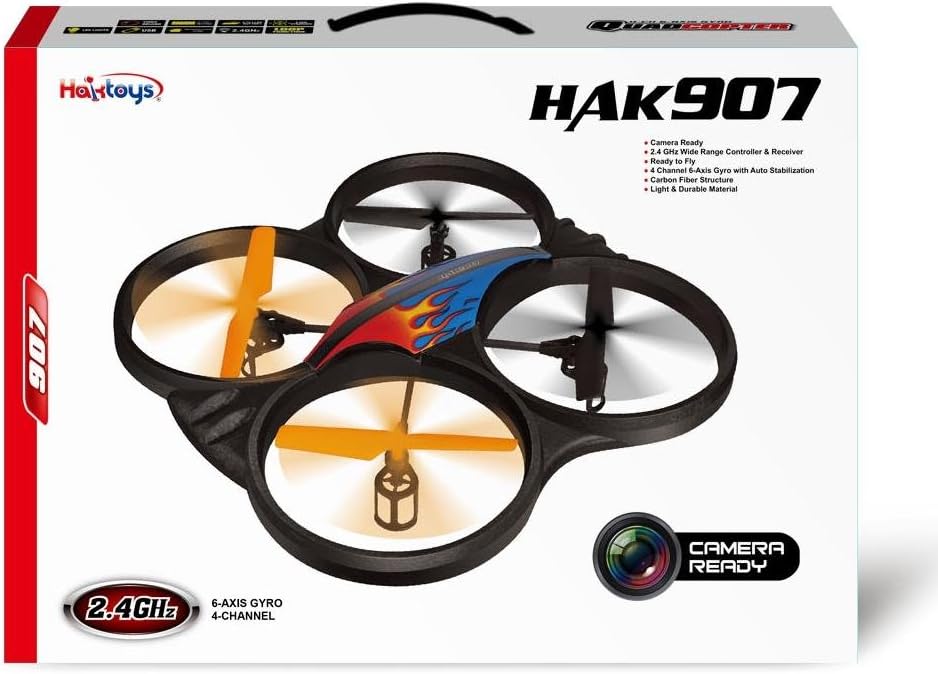
Image: Retail box of the Haktoys HAK907C quadcopter, showing the drone and key features.
3. Safety Information
- Always operate the quadcopter in open areas, away from people, animals, buildings, and power lines.
- Do not fly in strong winds or adverse weather conditions.
- Keep fingers, hair, and loose clothing away from rotating propellers.
- Adult supervision is recommended for users under 14 years of age.
- Do not modify or disassemble the quadcopter or its components.
- Ensure the battery is fully charged before each flight.
- Allow the motors to cool down for a few minutes after each flight to extend their lifespan.
- Do not expose the battery to extreme temperatures or direct sunlight.
- Dispose of batteries responsibly according to local regulations.
4. Setup
4.1. Charging the Quadcopter Battery
The quadcopter is powered by a built-in 3.7V 650mAh Li-Po battery. Use the provided USB charger to charge the battery.
- Connect the USB charger to a USB power source (e.g., computer USB port, USB wall adapter).
- Connect the quadcopter's battery to the USB charger.
- The charging indicator on the USB charger will show the charging status (refer to charger's specific indicator behavior).
- Charging typically takes approximately 90 minutes for a full charge.
- Disconnect the battery once charging is complete. Do not overcharge.
4.2. Installing Remote Control Batteries
The 2.4GHz remote control requires 6 x 1.5V AA batteries (not included).
- Open the battery compartment on the back of the remote control using the provided screwdriver.
- Insert 6 AA batteries, ensuring correct polarity (+/-).
- Close the battery compartment and secure it with the screw.

Image: The 2.4GHz remote control for the Haktoys HAK907C quadcopter, showing its various buttons and joysticks.
4.3. Pairing the Quadcopter and Remote Control
- Place the quadcopter on a flat, level surface.
- Turn on the quadcopter by connecting its battery. The LED lights on the quadcopter will flash.
- Turn on the remote control.
- Push the left joystick (throttle) all the way up, then all the way down.
- The LED lights on the quadcopter will stop flashing and remain solid, indicating successful pairing.
5. Operating Instructions
5.1. Basic Flight Controls
Familiarize yourself with the remote control layout and functions:
- Left Joystick (Throttle/Yaw):
- Push up/down: Increase/decrease altitude (Throttle).
- Push left/right: Rotate quadcopter left/right (Yaw).
- Right Joystick (Pitch/Roll):
- Push up/down: Move quadcopter forward/backward (Pitch).
- Push left/right: Move quadcopter left/right (Roll/Aileron).
- Trim Buttons: Used to fine-tune the quadcopter's stability if it drifts in any direction. Adjust small increments until stable.
5.2. Speed Modes
The HAK907C offers three speed modes: 30%, 60%, and 100%. Press the speed button on the remote control to cycle through these modes. A lower speed is recommended for beginners and indoor flight, while higher speeds are suitable for experienced pilots and outdoor conditions.
5.3. Loop Function (360° Eversion)
To perform a 360° loop:
- Ensure the quadcopter is flying at a sufficient altitude (at least 3 meters / 10 feet).
- Press the "Loop" button on the remote control.
- Immediately push the right joystick in the desired direction (forward, backward, left, or right) to initiate the flip.
- The quadcopter will perform a 360° flip in that direction.

Image: Diagram illustrating the 360-degree loop function of the quadcopter.
5.4. Low-Battery Warning
When the quadcopter's battery is low, the LED lights will begin to flash, indicating it's time to land the quadcopter and recharge the battery. Land immediately to avoid loss of control.
6. Camera Operation (CAM900)
The HAK907C includes a CAM900 camera set for video recording. Refer to the separate instructions provided with the CAM900 for detailed setup and operation of the camera. Generally, the camera will attach to the underside of the quadcopter and record to a memory card (not included) when activated via the remote control.
7. Maintenance
- Motor Cooling: Allow a short break after each landing and during flight to prevent motors and circuit board from overheating, which extends their lifespan.
- Rotor Blade Replacement: If a rotor blade is damaged, replace it with a new one. Note that rotor blades are NOT interchangeable; ensure you install the correct blade (A or B) in its designated position.
- Cleaning: Use a soft, dry cloth to clean the quadcopter. Do not use solvents or harsh chemicals.
- Storage: Store the quadcopter and remote control in a cool, dry place away from direct sunlight when not in use.
8. Troubleshooting
| Problem | Possible Cause | Solution |
|---|---|---|
| Quadcopter does not respond to remote control. | Not paired, low battery in quadcopter or remote, remote control off. | Ensure both are powered on and paired correctly. Charge quadcopter battery. Replace remote control batteries. |
| Quadcopter drifts during flight. | Uneven surface during startup, trim settings incorrect, minor damage. | Place on a flat surface before powering on. Adjust trim buttons. Check for bent propellers or damage. |
| Quadcopter has insufficient power or short flight time. | Battery not fully charged, old battery, motors overheating. | Fully charge the battery. Consider purchasing a new battery if performance degrades. Allow motors to cool between flights. |
| Propellers do not spin. | Obstruction, motor failure, battery issue. | Check for obstructions. Ensure battery is connected and charged. If a motor is faulty, it may require replacement. |
9. Specifications
| Model Name | HAK907C |
| Brand | Haktoys |
| Quadcopter Dimensions | 13"L x 13"W x 2.8"H (33cm x 33cm x 7.5cm) |
| Diagonal Length | 17 inches |
| Weight | 5 Ounces (0.32 lbs) |
| Channels | 4-Channel |
| Frequency | 2.4GHz |
| Gyroscope | 6-Axis Gyroscope with Auto Stabilization |
| Battery (Quadcopter) | 3.7V 650mAh Rechargeable Li-Po Battery |
| Charging Time | Approx. 90 minutes |
| Flight Time | 8-10 minutes |
| Flight Range | Up to 300 feet |
| Remote Control Batteries | 6 x 1.5V AA batteries (not included) |
| Material | Carbon Fiber structure, EPO protective foam |
| Recommended Age | 14 years and up |

Image: Diagram showing the dimensions of the Haktoys HAK907C quadcopter (33cm x 33cm x 7.5cm).

Image: Icons representing key features: Video Record, AA Batteries Required, 7.4V Li-Po Battery (Note: product description states 3.7V 650mAh), 6 Axis Gyroscope, LED Lights, USB, Indoor/Outdoor Flying, 2.4GHz, Loop Function.
10. Warranty and Support
Haktoys stands by its products. If you encounter any issues or have questions regarding your HAK907C quadcopter, please contact Haktoys customer support. Refer to the packaging or the official Haktoys website for contact information.
For additional flight time, spare batteries are available separately. Rotor blades are not interchangeable; ensure correct installation when replacing.