1. Introduction
This manual provides essential information for the safe and effective use of your Domyos VS 730 Elliptical Trainer. Please read all instructions carefully before assembly and operation. Retain this manual for future reference.
2. Safety Information
To ensure your safety and prolong the life of your equipment, observe the following precautions:
- Consult a physician before starting any exercise program.
- Keep children and pets away from the equipment during use.
- Place the elliptical trainer on a flat, stable surface. Ensure adequate space around the machine.
- Wear appropriate exercise clothing and athletic shoes.
- Inspect the equipment for loose or worn parts before each use. Do not use if damaged.
- Do not exceed the maximum user weight limit (refer to specifications).
- Stop exercising immediately if you feel faint, dizzy, or experience pain.
3. Package Contents
Carefully unpack all components and verify that all parts are present. If any parts are missing or damaged, contact Domyos customer support.
- Main Frame
- Handlebars
- Pedal Arms and Pedals
- Stabilizers
- Console and Sensor Cables
- Hardware Kit (bolts, washers, nuts, tools)
- User Manual
4. Assembly and Setup
Follow these steps to assemble your Domyos VS 730 Elliptical Trainer. It is recommended to have two people for assembly.
4.1. Base Frame Assembly
- Attach the front and rear stabilizers to the main frame using the provided bolts and washers. Ensure they are securely tightened.
- Place the assembled base on a level surface.
4.2. Pedal and Crank Installation
Attach the pedal arms to the crank mechanism. Pay attention to the 'L' (left) and 'R' (right) markings on the pedals and crank arms to ensure correct orientation. Tighten securely.
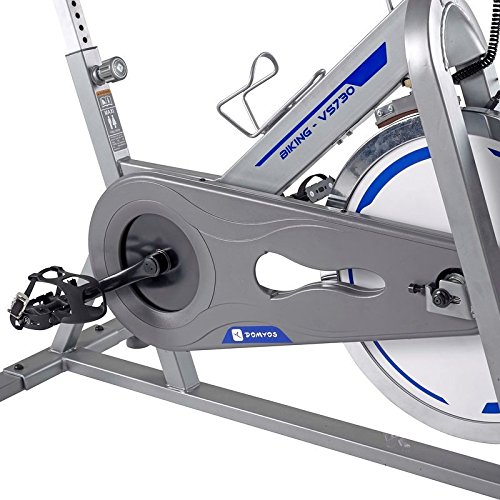
Figure 1: Detail of the pedal and crank assembly on the Domyos VS 730 elliptical trainer.
4.3. Handlebar and Console Installation
- Connect the handlebar posts to the main frame.
- Attach the console to the designated bracket on the handlebars. Connect all sensor cables from the main frame to the console.

Figure 2: The digital console of the Domyos VS 730, showing various workout data.
4.4. Final Inspection
After assembly, ensure all bolts and nuts are securely tightened. Check that all moving parts operate smoothly without obstruction.

Figure 3: The Domyos VS 730 Elliptical Trainer fully assembled.
5. Operating Instructions
5.1. Adjusting Resistance
The Domyos VS 730 features an adjustable resistance system. Locate the resistance knob, typically found near the handlebars or flywheel. Turn the knob clockwise to increase resistance and counter-clockwise to decrease it.

Figure 4: The flywheel and resistance system of the Domyos VS 730.
5.2. Using the Console
The console displays various workout metrics. Insert batteries (if required) into the console compartment. Press the 'SELECT' button to cycle through different display modes such as Time, Distance, Speed, and Calories. To reset the values, press and hold the 'SELECT' button for a few seconds.
5.3. Starting Your Workout
- Step onto the pedals, one foot at a time, ensuring a balanced position.
- Grasp the handlebars firmly.
- Begin pedaling in a smooth, controlled motion. The console will automatically activate and begin tracking your workout.
5.4. Transporting the Elliptical
The Domyos VS 730 is equipped with transport wheels for easy relocation. To move the machine, lift the rear stabilizer slightly and roll the elliptical using the front transport wheels.
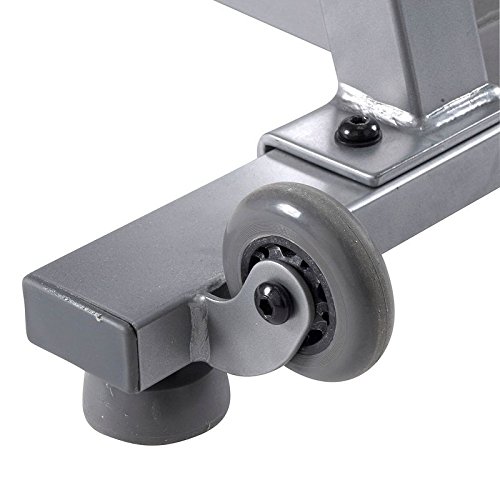
Figure 5: Transport wheel for easy movement of the Domyos VS 730.
6. Maintenance
Regular maintenance ensures optimal performance and longevity of your elliptical trainer.
- Cleaning: Wipe down the machine with a damp cloth after each use to remove sweat and dust. Avoid abrasive cleaners.
- Inspection: Periodically check all bolts, nuts, and moving parts for tightness and wear. Tighten any loose fasteners.
- Lubrication: If any moving parts begin to squeak, apply a small amount of silicone-based lubricant to the joints.
- Storage: Store the elliptical in a dry, cool place away from direct sunlight and moisture.
7. Troubleshooting
Refer to this section for solutions to common issues.
- Console Not Displaying: Check battery installation and ensure batteries are fresh. Verify all console cables are securely connected.
- Squeaking Noises: Inspect all pivot points and joints. Apply lubricant if necessary. Ensure all bolts are tightened.
- Resistance Not Changing: Check the resistance knob mechanism for any obstructions or disconnections.
- Unstable Operation: Ensure the elliptical is placed on a level surface. Adjust the leveling feet on the stabilizers if present.
If problems persist, contact Domyos customer support.
8. Specifications
| Feature | Detail |
|---|---|
| Brand | Domyos |
| Model | VS 730 |
| Sport Type | Fitness |
| Manufacturer | Domyos |
| ASIN | B00LX1ACBW |
| First Available | 18 July 2014 |
9. Warranty and Support
Your Domyos VS 730 Elliptical Trainer is covered by a manufacturer's warranty. For specific warranty details, please refer to the warranty card included with your product or visit the official Domyos website. For technical assistance, spare parts, or any other inquiries, please contact Domyos customer support through their official channels.
Domyos Official Website: www.domyos.com


