
1. Introduction
This manual provides essential information for the safe and efficient operation, installation, and maintenance of your Voltas Venture Slimline Tower AC 2 Ton unit. Please read this manual thoroughly before using the appliance and retain it for future reference.
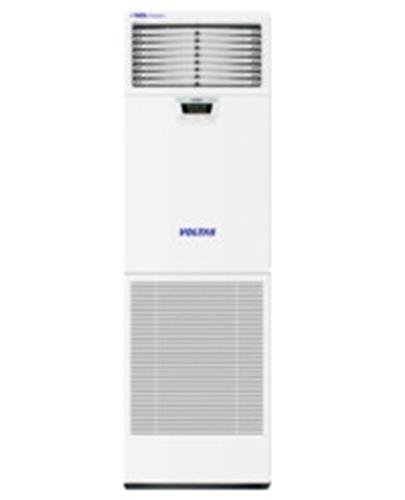
Image showing the sleek, white Voltas Venture Slimline Tower AC unit, highlighting its compact and modern design.
Official product video showcasing the key features and design of the Voltas Venture Slimline Tower AC.
2. Safety Information
Always adhere to the following safety precautions to prevent injury or damage to the appliance:
- Ensure the power supply matches the unit's requirements (230 V / 50 Hz / 1 Ph).
- Do not attempt to install or repair the unit yourself. Professional installation and servicing are required.
- Keep the unit away from water and moisture.
- Do not insert objects into the air vents.
- Supervise children to ensure they do not play with the appliance. The Child Lock Switch can be used to prevent unintended changes to settings.
- Ensure proper ventilation around the outdoor unit.
- In case of unusual smells, sounds, or smoke, immediately turn off the unit and disconnect power. Contact customer support.
3. Product Features
The Voltas Venture Slimline Tower AC is designed with advanced features for optimal performance and user convenience:
- Stylish Design: The compact size and modern aesthetics are designed to complement various interior styles.
- Noise Suppression Technology: Engineered with a specialized blower design, vibration attenuation for refrigerant piping, and insulation to ensure low operating sound levels.
- Dual Control: The unit can be operated using both the integrated panel controller and the LCD remote handset.
- Time and Temperature Display: An LED display panel indicates room temperature, on/off timer settings, fan speed, and other operational modes.
- Child Lock Switch: A dedicated switch allows for locking the settings, preventing accidental adjustments.
- High System Reliability: Features an internal overload protection device to safeguard the compressor from electrical and thermal overloads.
- High Efficiency Compressor: Equipped with a highly efficient rotary compressor (for 2 Ton models) for energy-saving performance.
4. Setup and Installation
Proper installation is crucial for the performance and longevity of your air conditioner. It is strongly recommended that installation be performed by a qualified technician.
Installation Process:
- Upon delivery, Amazon will contact you via email and SMS on your registered mobile number to provide the next steps for installation scheduling.
- Ensure the installation site meets the requirements for both the indoor (tower) and outdoor units, including adequate space and power access.
- The installation typically involves mounting the indoor and outdoor units, connecting refrigerant pipes (copper material recommended), and establishing electrical connections.
- A professional technician will perform vacuuming of the refrigerant lines and check for leaks to ensure optimal system performance.
For any assistance regarding installation, please contact customer support at 1800-3000-9027.
5. Operating Instructions
Your Voltas Venture Slimline Tower AC offers various modes and settings for personalized comfort. Use either the unit's panel controller or the remote handset for operation.
5.1. Basic Operation
- Power On/Off: Press the power button on the remote or unit panel to turn the AC on or off.
- Mode Selection: Use the "Mode" button to cycle through available modes: Cool, Fan, Dry, Auto.
- Temperature Adjustment: Use the Up/Down arrows to set your desired temperature. The LED display will show the current room temperature and set temperature.
- Fan Speed: Adjust the fan speed (High, Medium, Low) using the "Fan" button to control airflow.
5.2. Advanced Functions
- Timer Settings: Program the unit to turn on or off automatically at specific times using the "Timer" function. Refer to the remote control guide for detailed steps.
- Child Lock: Activate the Child Lock Switch to prevent accidental changes to settings, especially useful in households with children.
6. Maintenance
Regular maintenance ensures efficient operation and extends the lifespan of your AC unit.
6.1. Filter Cleaning
- Turn off the AC and disconnect power before cleaning.
- Open the front panel of the indoor unit and carefully remove the air filters.
- Clean the filters with a vacuum cleaner or wash them with lukewarm water and mild detergent.
- Allow filters to dry completely before reinstalling them.
- Clean filters every two weeks or more frequently depending on usage and air quality.
6.2. Professional Servicing
It is recommended to schedule professional servicing at least once a year, preferably before the peak cooling season. A qualified technician can perform comprehensive checks, clean coils, and ensure all components are functioning correctly.
7. Troubleshooting
Before contacting customer support, review the following common issues and their potential solutions:
| Problem | Possible Cause | Solution |
|---|---|---|
| Unit does not turn on | No power supply; Remote control batteries low; Circuit breaker tripped. | Check power connection; Replace remote batteries; Reset circuit breaker. |
| Insufficient cooling | Dirty air filters; Blocked outdoor unit; Temperature setting too high; Doors/windows open. | Clean air filters; Clear obstructions from outdoor unit; Lower temperature setting; Close doors/windows. |
| Unusual noise | Loose parts; Obstruction in fan; Unit not level. | Contact a qualified technician for inspection. |
| Water leakage | Blocked drain pipe; Improper installation. | Contact a qualified technician for inspection. |
If the problem persists after attempting these solutions, please contact customer support for further assistance.
8. Specifications
| Feature | Value |
|---|---|
| Brand | Voltas |
| Model Name | Venture |
| Model Number | 2.0 Ton Venture |
| Capacity | 2 Tons |
| Cooling Capacity | 6250 Watts |
| Power Supply | 230 V / 50 Hz / 1 Ph |
| Input Power | 2358 Watts |
| Rated Current | 10.4 Amps |
| Compressor Type | Rotary |
| Indoor Air Flow (Hi / Mi / Lo) | 900 CMH |
| Indoor Noise Level (Hi / Mi / Lo) | ≤43 dB(A) |
| Indoor Unit Dimension (W x H x D) | 480 x 1680 x 255 mm |
| Indoor Unit Net Weight | 38.5 Kg |
| Outdoor Air Flow | 2700 CMH |
| Outdoor Noise Level | 57 dB(A) |
| Outdoor Unit Dimension (W x H x D) | 850 x 585 x 370 mm |
| Outdoor Unit Net Weight | 46 Kg |
| Refrigerant Type | R22 |
| Core Material | Copper |
| Efficiency | 5 Star BEE Rating |
| Floor Area Coverage | 180 Square Feet |
| Control Method | Remote Control |
9. Warranty and Support
Your Voltas Venture Slimline Tower AC is covered by a comprehensive warranty:
- Product Warranty: 1 year from the date of purchase.
- Compressor Warranty: 5 years from the date of purchase.
For warranty claims, technical support, or any product-related queries, please contact Voltas customer service:
Toll-Free Number: 1800-3000-9027
Please have your product model number and purchase details ready when contacting support.