
1. Introduction
Thank you for choosing the Voltas 1.5 Ton 5 Star Window Air Conditioner, Model 1.5T 185 LY. This manual provides essential information for the safe and efficient operation, installation, and maintenance of your new air conditioner. Please read this manual thoroughly before using the appliance and keep it for future reference.
2. Important Safety Information
To prevent injury to the user or other people and property damage, the following instructions must be followed. Incorrect operation due to ignoring instructions may cause harm or damage.
- Always ensure the unit is properly grounded.
- Do not operate the AC with wet hands.
- Do not insert fingers or objects into the air inlet/outlet.
- Ensure the power cord is not damaged or modified.
- Keep flammable materials away from the unit.
- For installation and major repairs, always contact qualified service personnel.
- Unplug the unit before cleaning or performing any maintenance.
3. Package Contents
Upon unpacking, please verify that all the following items are included:
- Main Unit (Voltas 1.5 Ton 5 Star Window AC)
- User Manual
- Remote Control (if applicable, not explicitly listed but standard for ACs)
- Mounting Accessories (if applicable, not explicitly listed)
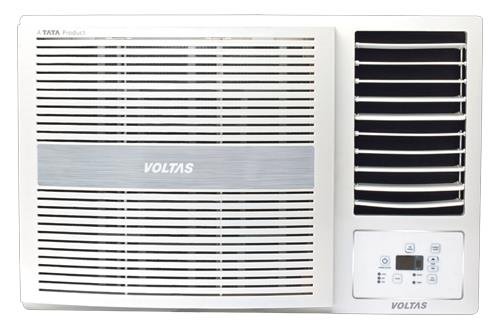
Figure 1: Voltas 1.5 Ton 5 Star Window AC Main Unit. This image displays the complete air conditioner unit, showing its front grille and control panel area.
4. Installation and Setup
Proper installation is crucial for the performance and longevity of your air conditioner. It is highly recommended to have the unit installed by a qualified technician.
4.1 Site Selection
- Choose a window opening that can securely support the weight of the unit (86 kg).
- Ensure there is no obstruction to the airflow both inside and outside the room.
- The location should allow for easy drainage of condensed water.
- Avoid direct sunlight exposure to the outdoor unit if possible, or provide shading.
4.2 Electrical Requirements
- The unit requires a dedicated power circuit with appropriate voltage and amperage. Consult a qualified electrician.
- Ensure the power outlet is properly grounded.
4.3 Installation Steps (Professional Installation Recommended)
- Prepare the window opening, ensuring it is clean and free of debris.
- Carefully lift and place the AC unit into the window frame.
- Secure the unit using the provided mounting brackets and screws.
- Install the side panels to seal the gap between the unit and the window frame.
- Ensure proper tilt for condensate drainage.
- Connect to the power supply.
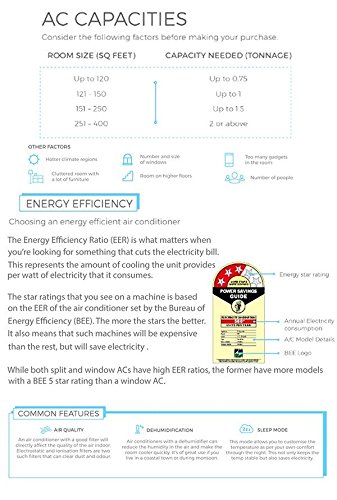
Figure 2: Front view of the Voltas Window AC. This image highlights the air intake grille and the overall design of the unit, important for understanding placement and airflow.
5. Operating Instructions
This section explains how to use your Voltas Window AC for optimal comfort and efficiency.
5.1 Control Panel Overview
The control panel on the front of the unit (or your remote control) allows you to adjust settings.

Figure 3: Voltas Window AC showcasing smart features. This image illustrates the unit's design and indicates areas related to its smart functionalities, such as smart savings, smart remote, and smart sense.
5.2 Basic Operation
- Power On/Off: Press the POWER button to turn the unit on or off.
- Mode Selection: Use the MODE button to cycle through modes: Cool, Fan, Dry (Dehumidifier).
- Temperature Adjustment: Use the TEMP UP and TEMP DOWN buttons to set your desired temperature.
- Fan Speed: Adjust fan speed (Low, Medium, High, Auto) using the FAN SPEED button.
5.3 Special Features
- Anti-Bacterial Filter: This feature helps to remove bacteria and allergens from the air, providing cleaner air quality.
- Dehumidifier: In Dry mode, the unit reduces humidity in the room, which is beneficial in humid climates.
- Sleep Mode: Optimizes cooling for comfortable sleep by gradually increasing the temperature and reducing fan speed.
6. Maintenance
Regular maintenance ensures efficient operation and extends the lifespan of your air conditioner. Always unplug the unit before performing any maintenance.
6.1 Air Filter Cleaning
- Open the front panel of the indoor unit.
- Remove the air filters.
- Clean the filters using a vacuum cleaner or wash them with lukewarm water and mild detergent.
- Rinse thoroughly and allow them to dry completely in a shaded area before re-installing.
- Re-install the filters and close the front panel.
Frequency: Clean air filters every two weeks or more often if the unit is used frequently or in dusty environments.
6.2 Coil Cleaning
The evaporator and condenser coils should be cleaned periodically by a qualified service technician to ensure optimal performance.
6.3 General Cleaning
- Wipe the exterior of the unit with a soft, damp cloth. Do not use harsh chemicals or abrasive cleaners.
- Ensure the drainage pan and hose are clear of blockages.
7. Troubleshooting
Before contacting customer service, please refer to the following table for common issues and their solutions.
| Problem | Possible Cause | Solution |
|---|---|---|
| Unit does not turn on. | No power supply; circuit breaker tripped; power cord unplugged. | Check power connection; reset circuit breaker; ensure plug is fully inserted. |
| Insufficient cooling. | Dirty air filter; blocked air intake/outlet; room too large; doors/windows open. | Clean air filter; remove obstructions; ensure room is sealed; check AC capacity for room size. |
| Water leakage. | Drain hose blocked or improperly installed; unit not level. | Clear drain hose; ensure unit is level for proper drainage. |
| Unusual noise. | Loose parts; foreign object in fan; unit not securely installed. | Check for loose parts; inspect for foreign objects; ensure secure installation. If noise persists, contact service. |
If the problem persists after attempting these solutions, please contact Voltas customer support.
8. Specifications
| Feature | Detail |
|---|---|
| Brand | Voltas |
| Model Number | 1.5T 185 LY |
| Capacity | 1.5 Tons |
| Cooling Power | 3200 Watts |
| Item Weight | 86 kg |
| Product Dimensions (LxWxH) | 79 x 66 x 43 Centimeters |
| Special Features | Anti Bacterial Filter, Dehumidifier |
| Color | White |
| Manufacturer | Voltas |
9. Warranty and Support
9.1 Warranty Information
Your Voltas Air Conditioner comes with a standard manufacturer's warranty. Please refer to the warranty card included with your purchase for specific terms, conditions, and duration. Keep your purchase receipt as proof of purchase for warranty claims.
9.2 Customer Support
For technical assistance, service requests, or any queries regarding your Voltas product, please contact Voltas customer support. Contact details can typically be found on the Voltas official website or on your warranty card.
You can also visit the official Voltas store page for more information: Voltas Store


